Dark Mode icon

Dark Mode Chrome Extension Analysis

Tab & Bookmark Productivity

Chrome extension ID: dmghijelimhndkbmpgbldicpogfkceaj

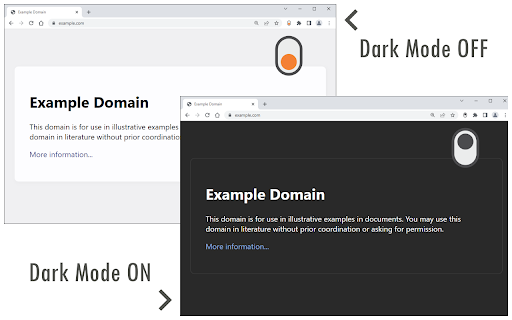
A browser extension that toggles dark mode on and off via a toolbar button. It allows users to customize their visual experience with various themes and manage website exceptions through settings or context menus.

Developer:Grephy
Version:0.5.6
Size:298KiB
Last updated:

Overview

Installs

2.0M+

Rating

3.6

2,240 reviews

Languages

1 locales

Includes English

Market analysis

Review-backed positioning, friction, and market signals for this Chrome extension.

Backed by review samples

Macro category

Tab & Bookmark Productivity

Pricing friction

Low review signal

Complaint intensity

High review signal

Listing & review signals
Observed signals from store listing text and review samples.

Listing positioning

The product positions itself as a quick and easy way to apply a global dark theme to the web for nighttime browsing. It offers over 50 theme options and a white-list feature to exclude specific domains from the dark mode effect.

Inferred product pattern

A high-volume utility extension facing significant technical reliability issues and user backlash regarding intrusive ads and privacy.

Review-backed pain points

Users report the extension fails on specific sites like Google Docs, Facebook, and YouTube Shorts. Other issues include dark text appearing on dark backgrounds, slow application speeds, and interference with Cloudflare verifications.

Observed feature gaps

Users noted the absence of an 'add to dark mode' button, noting only an exclusion feature is readily available.

Tags
Dark ModeNight ModeBrowser ThemeVisual Utility
Target users

- Nighttime browser users

- Users sensitive to light

- Web enthusiasts

Primary use cases

- Reducing eye strain in dark environments

- Applying dark themes to light-mode websites

- Customizing web page aesthetics

Positive themes

- Simplicity of use

Negative themes

- Unreliable functionality

- Incomplete page coverage

- Intrusive advertising and tracking

- Interference with site security/verifications

Observed friction

- Performance complaints detected

- Privacy complaints detected

- No direct pricing friction observed, though users report obtrusive ads.

Evidence boundary: Analysis based on store listing details and a sample of high and low-rated user reviews. The review sample is heavily weighted toward low ratings, which may not represent the experience of the entire 2 million user base.
Complaint summaries
Review-backed complaint signals grouped by operational area.

Support

No specific support interaction complaints found in the provided samples.

Reliability

Significant reliability issues reported, including inconsistent behavior across multiple tabs and failure to render pages correctly.

Privacy

Users have expressed concerns regarding the spawning of obtrusive tabs and potential tracking behaviors.

Access & pricing

- Ad-supported model observed

- No account requirement observed

- Free plan or free usage claimed

Store listing facts

Listing assets

- Screenshots: 2

- Videos: 1

- Languages: 1

Trust signals

- Developer contact

- Official website

Store metadata

- Version: 0.5.6

- Size: 298KiB

- Last updated:

Store description excerpt
Short excerpt from the public Chrome Web Store listing; full copy is available on the official store page.
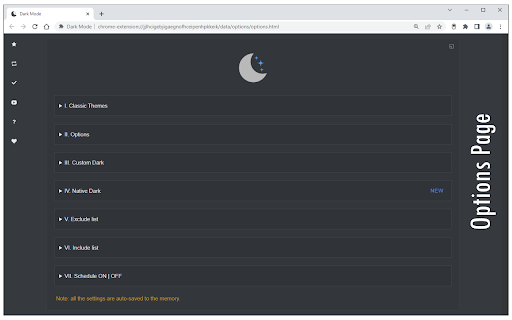
Dark Mode is an extension that helps you quickly turn the screen (browser) to dark at night time. Toolbar button serves as an ON|OFF switch which enables you to easily and quickly turn the extension ON or OFF. If you do not like the current dark theme, please visit the options page and choose a different theme from over 50 available options. There is also a white-list feature which enables you to exclude a desired domain from dark mode. Simply add a domain(s) to the designated area (comma separated) in the options page and the websites will be excluded from night mode. Alternatively, you can use the context-menu item in mouse right-click to exclude desired websites. To report bugs, please fill out the bug report form on the add-on's homepage (https://mybrowseraddon.com/dark-mode.html).

Listing SEO keywords

Search intent keywords
Keyword signals for evaluating how users may discover, compare, or search for this extension category.

Core discovery

Dark ModeNight ModeDark ThemeWeb Dark ModeBrowser Dark Mode

Comparison

Dark Reader

Problem

eye strainwhite backgroundCloudflare verification error

Alternative

Dark ReaderNight Mode

Similar extensions

Jump to related discovery paths:

FAQ

What is Dark Mode mainly used for?
A browser extension that toggles dark mode on and off via a toolbar button. It allows users to customize their visual experience with various themes and manage website exceptions through settings or context menus.
What market signals stand out?
Large installed base with substantial review base. Last known update: 04/14/2026.
What should builders compare before entering this space?
Compare install concentration, rating quality, update recency, screenshots, developer portfolio, listing claims, and review-backed friction signals.
Is this page review-backed?
Backed by review samples. This page combines store metadata with selected review signals, while raw store metrics remain visible for comparison.

Screenshots

Dark Mode screenshot

Links

Website: mybrowseraddon.com

Videos: Watch

Recommended Chrome extensions

Related listings from the same category, trending peers, and the same publisher portfolio.

Browse tools
Screen Recorder icon

Screen Recorder

Grephy

Record your computer's screen with just one click!

Installs

300K+

Rating

3.1

Planet Search icon

Planet Search

Free VPN Planet

Enchanced default search engine.

Installs

2.0M+

Rating

3.4

Lightshot (screenshot tool) icon

Lightshot (screenshot tool)

Skillbrains

Simple and convenient screenshot tool. Select an area, edit your screenshot and upload it to the server.

Installs

2.0M+

Rating

4.4

PrintFriendly: Print Clean Pages, Save as PDF & Screenshot, AI Tools icon

PrintFriendly: Print Clean Pages, Save as PDF & Screenshot, AI Tools

PrintFriendly

Print clean web pages, save as PDF, take screenshots, or use reader mode. AI summaries & ad removal. Works on ChatGPT & Gemini.

Installs

1.0M+

Rating

4.6

Mobile simulator - responsive testing tool icon

Mobile simulator - responsive testing tool

François Duprat

Smartphone and tablet simulator on computer with several models to test mobile responsive websites.

Installs

1.0M+

Rating

4.9

Chat with all AI models (Gemini, Claude, DeepSeek…) & AI Agents | AITOPIA icon

Chat with all AI models (Gemini, Claude, DeepSeek…) & AI Agents | AITOPIA

AITOPIA AI Sidebar

AI Agent Marketplace & AI Sidebar with all AI models (Gemini, Claude, DeepSeek & more) and hundreds of AI Agents

Installs

1.0M+

Rating

4.9

Codex icon

Codex

OpenAI

Control Chrome with Codex.

Installs

1.0M+

Rating

3.8

HID Credential Management Extension icon

HID Credential Management Extension

hid-global-chrome-web-store

Browser extension for HID credential management solution.

Installs

1.0M+

Rating

1.3

Keywords Everywhere - Keyword Tool icon

Keywords Everywhere - Keyword Tool

Axeman Technology Solutions LLP

Keyword search volume, cpc and competition for 15+ websites like Google™ Search Console, YouTube™, Amazon™ & more

Installs

1.0M+

Rating

4.5

WebChatGPT: Prompt library with web access icon

WebChatGPT: Prompt library with web access

WebChatGPT

Augment your ChatGPT prompts with relevant web search results through web browsing.

Installs

1.0M+

Rating

4.2