Privacy Extension for WhatsApp Privacy Chrome Extension Analysis
Privacy, Security & Ad BlockersChrome extension ID: cgipcgghboamefelooajpiabilddemlh
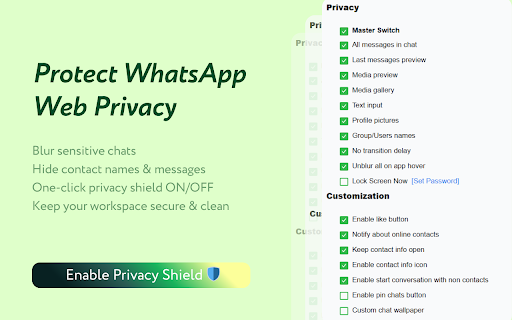
An utility extension for WhatsApp Web that provides customizable privacy blurring for sensitive screen elements alongside productivity add-ons. It allows users to hide messages, previews, names, and profile pictures until hovered over, while also including security features like an idle password lock.
Overview
Installs
300K+
Rating
★ 4.4
563 reviews
Languages
66 locales
Includes Deutsch, English, English (Australia), English (United Kingdom)...
Market analysis
Review-backed positioning, friction, and market signals for this Chrome extension.
Macro category
Privacy, Security & Ad Blockers
Pricing friction
Low review signal
Complaint intensity
Moderate review signal
Listing positioning
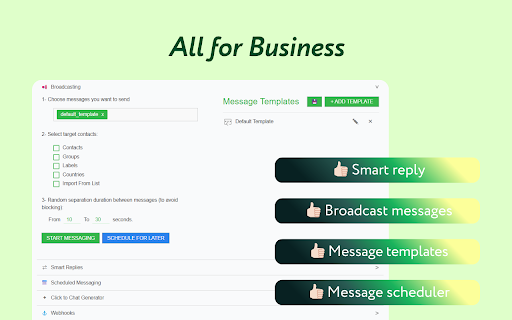
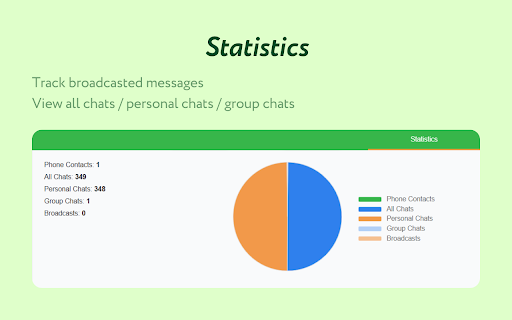
This extension positions itself as a comprehensive privacy and enhancement tool for WhatsApp Web. It focuses primarily on blurring sensitive chat elements like messages, media, and contact names to prevent over-the-shoulder snooping in shared spaces. Additionally, it offers advanced utility features like screen locking, custom wallpapers, and business-focused messaging tools.
Inferred product pattern
Privacy utility overlay that injects CSS/JS blur effects onto specific class elements of WhatsApp Web, rendering it highly sensitive to third-party front-end changes.
Review-backed pain points
Users frequently experience issues where specific element blur toggles (such as contact names, group names, or the text input field) stop working, exposing private information on screen.
Observed feature gaps
Reviewers note a lack of configuration syncing across multiple computer sessions, and report that the blurring elements frequently break when WhatsApp Web releases layout updates, indicating a need for more robust element selectors.
- Office professionals working in shared or open-plan workspaces
- Privacy-conscious individuals using WhatsApp Web in public areas
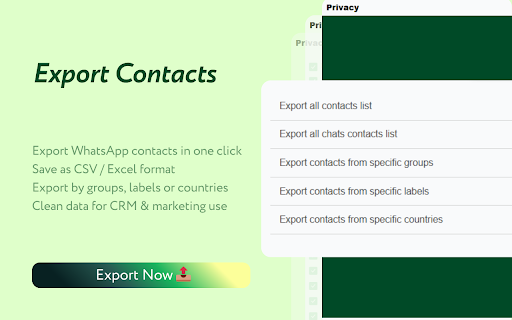
- Small business owners looking for lightweight contact export and broadcasting tools
- Blurring sensitive chat details to prevent shoulder-surfing in public or office environments
- Locking WhatsApp Web with a password to secure active chats during idle time
- Exporting WhatsApp contacts and utilizing smart template replies for business communication
- Highly effective chat and media blurring for general privacy
- Great overall concept and utility when working in shared office spaces
- Multi-lingual support and seamless integration when fully operational
- Failure of specific blur toggles like group and contact names after updates
- Text input box blur occasionally failing to function as expected
- Intermittent regressions on both Chrome and Firefox browsers
- No pricing complaints or monetization friction are mentioned in the public review samples.
Support
There are no direct complaints about customer support, though users frequently use the reviews section to request urgent bug fixes for broken blur toggles.
Reliability
Several users highlight reliability issues following updates, pointing out that toggles for blurring user names, group names, and the text input field regularly stop working.
Privacy
No major privacy or security complaints are reported; one user briefly expressed slight, non-specific uncertainty about general data privacy but noted no functional issues.
- Free usage observed
- No account requirement observed
- Free plan or free usage claimed
Store listing facts
- Screenshots: 4
- Videos: 0
- Languages: 66
- Privacy policy
- Developer contact
- Official website
- Version: 2.0.10
- Size: 6.62MiB
- Last updated:
Listing SEO keywords
Core discovery
Comparison
Problem
Alternative
Similar extensions
Jump to related discovery paths:
FAQ
Screenshots
Links
Website: web.whatsapp.com
Privacy policy: https://watools.ai/privacy-policy