Web Page Converter - Web to PDF - MyExtHub icon

Web Page Converter Chrome Extension Analysis

Automation & Workflow Efficiency

Store listing title: Web Page Converter - Web to PDF - MyExtHub

Chrome extension ID: cpojijpjgahpnagkfcglkiekdgjihpjo

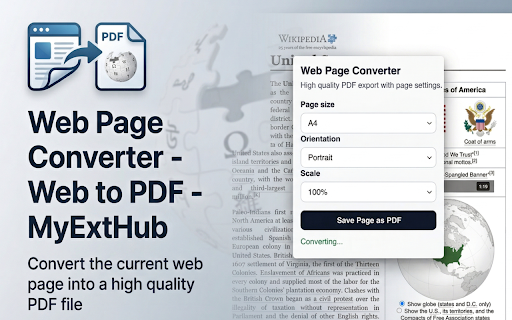
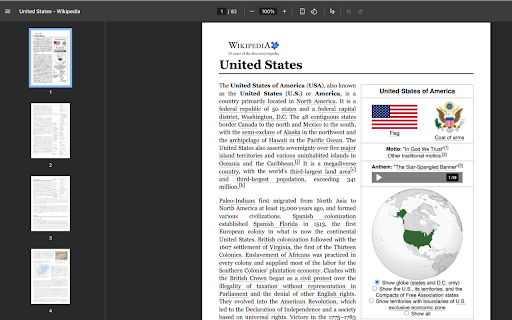
Web Page Converter is a Chrome extension designed to quickly convert the currently active web page into a PDF document. Users can customize page size, orientation, and print scale before saving the file directly to their device. It's suitable for saving articles, archiving research, or storing reference pages.

Developer:MyExtHub
Version:2.0.0
Size:412KiB
Last updated:

Overview

Installs

5

Rating

0 reviews

Languages

1 locales

Includes English (United States)

Market analysis

Review-backed positioning, friction, and market signals for this Chrome extension.

No review samples found

Macro category

Automation & Workflow Efficiency

Pricing friction

Low review signal

Complaint intensity

Low review signal

Listing & review signals
Observed signals from store listing text and review samples.

Listing positioning

This Chrome extension is positioned as a straightforward tool for converting web pages into high-quality PDF files. It emphasizes ease of use with a one-click export function, aiming to preserve the original page structure, images, and styling.

Inferred product pattern

A utility extension offering a core free functionality with a premium upgrade path for extended use or additional features.

Review-backed pain points

No reviews available to identify pain points.

Observed feature gaps

No reviews available to identify feature gaps.

Tags
Web To PdfPage ConverterSave Webpage
Target users

- Students

- Researchers

- Professionals

- Anyone needing to save web content

Primary use cases

- Offline reading

- Archiving web content

- Saving research and documentation

- Creating shareable PDF snapshots

Positive themes

No positive theme data.

Negative themes

No negative theme data.

Observed friction

- The extension offers a trial version with limited use (3x), after which users can upgrade to a Pro version for $2.99/month or a lifetime access of $29 for all MyExtHub extensions. A MyExtHub login is mentioned in relation to a premium flow.

Evidence boundary: Listing description data was used to infer product features, use cases, target users, monetization, and access models. No review data was available. No review data was available, so review-backed themes, pain points, feature gaps, and sentiment levels could not be determined.
Complaint summaries
Review-backed complaint signals grouped by operational area.

Support

No reviews available to assess support.

Reliability

No reviews available to assess reliability.

Privacy

No reviews available to assess privacy concerns.

Access & pricing

- Free entry with paid features

- Login needed for core features

- Limited free usage observed

Store listing facts

Listing assets

- Screenshots: 2

- Videos: 0

- Languages: 1

Trust signals

- Privacy policy

- Developer contact

Store metadata

- Version: 2.0.0

- Size: 412KiB

- Last updated:

Store description excerpt
Short excerpt from the public Chrome Web Store listing; full copy is available on the official store page.
Web Page Converter is a simple Chrome extension that lets users save the currently open web page as a high-quality PDF file. It is designed for fast one-click export while preserving page structure, images, and styling as accurately as possible using Chrome's built-in PDF rendering engine. Key features: - Convert the current tab to PDF instantly - Select page size (A4, Letter, Legal) - Select orientation (Portrait / Landscape) - Adjust print scale before export - Save the PDF directly to your device Typical use cases: - Save articles for offline reading - Archive research pages and documentation - Store receipts, confirmations, and reference pages - Share clean PDF snapshots of web content This extension focuses on one clear job: converting web pages into downloadable PDF files quickly and reliably. - The extension includes a MyExtHub login-based premium flow - Trial users can test the…

Listing SEO keywords

Search intent keywords
Keyword signals for evaluating how users may discover, compare, or search for this extension category.

Core discovery

web page to pdfconvert webpage to pdfsave web page as pdfchrome extension pdf converteronline page to pdf

Comparison

web page converter alternativepdf saver extension comparison

Problem

how to save web pagedownload web page as pdfpreserve web page format

Alternative

print to pdfsave as pdf tool

Similar extensions

Jump to related discovery paths:

FAQ

What is Web Page Converter mainly used for?
Web Page Converter is a Chrome extension designed to quickly convert the currently active web page into a PDF document. Users can customize page size, orientation, and print scale before saving the file directly to their device. It's suitable for saving articles, archiving research, or storing reference pages.
What market signals stand out?
Early or small audience with limited review base. Last known update: 05/07/2026.
What should builders compare before entering this space?
Compare install concentration, rating quality, update recency, screenshots, developer portfolio, listing claims, and review-backed friction signals.
Is this page review-backed?
No review samples found. This page combines store metadata with selected review signals, while raw store metrics remain visible for comparison.

Screenshots

Web Page Converter - Web to PDF - MyExtHub screenshot

Links

Recommended Chrome extensions

Related listings from the same category, trending peers, and the same publisher portfolio.

Browse tools
Google Sheets Dark Mode icon

Google Sheets Dark Mode

MyExtHub

Activate Google Sheets Dark Mode for improved viewing. Enjoy sheets darkmode and comfort with the spreadsheets dark mode feature.

Installs

1K+

Rating

3.7

Edit anything - Boost any page icon

Edit anything - Boost any page

MyExtHub

A powerful extension that allows you to edit text, take screenshots, and perform various actions on any webpage

Installs

1K+

Rating

3.5

Microsoft Bing Search with Rewards icon

Microsoft Bing Search with Rewards

Microsoft Corporation

Use the Microsoft Rewards extension to find new ways to earn every day, easily track your points and set your default search to Bing

Installs

3.0M+

Rating

4.4

Google Scholar Button icon

Google Scholar Button

scholar-chrome-extensions

Lookup scholarly articles as you browse the web.

Installs

3.0M+

Rating

4.6

ЮБуст - VPN для YouTube. Обход блокировки Ютуб без ВПН. VPN для браузера icon

ЮБуст - VPN для YouTube. Обход блокировки Ютуб без ВПН. VPN для браузера

Uboost

Ускоритель Ютуб без ВПН, VPN для браузера Яндекс, Chrome, Opera, Edge. Обход замедления Ютуба.

Installs

2.0M+

Rating

4.2

Pie Adblock - A Powerful Free Ad Blocker icon

Pie Adblock - A Powerful Free Ad Blocker

Pie Extensions

Pie Adblock blocks ads & pop-ups, plus YouTube & Twitch video ads. You can customize your ad experience with Pie!

Installs

2.0M+

Rating

4.9

Dark Mode icon

Dark Mode

Grephy

A global dark theme for the web.

Installs

2.0M+

Rating

3.6

Google Dictionary (by Google) icon

Google Dictionary (by Google)

dictionary-extension-dev

View definitions easily as you browse the web.

Installs

2.0M+

Rating

4.4

AI Chat for Search icon

AI Chat for Search

AI Chat for Search Team

Display AI Chat response alongside search engine results

Installs

2.0M+

Rating

4.6

WPS浏览器助手:文档在线阅读编辑 icon

WPS浏览器助手:文档在线阅读编辑

金山PDF

PDF、Excel、Word、PPT等文档无需下载即可在线预览,还能对文档进行编辑、打印、转换等处理。

Installs

2.0M+

Rating

3.0