Google Scholar Button icon

Google Scholar Button Chrome Extension Analysis

Automation & Workflow Efficiency

Chrome extension ID: ldipcbpaocekfooobnbcddclnhejkcpn

A productivity tool that integrates Google Scholar functionality into the browser. It allows users to search for scholarly papers, generate formatted citations, and manage research libraries directly from their web pages.

Version:3.6
Size:65.68KiB
Last updated:

Overview

Installs

3.0M+

Rating

4.6

1,426 reviews

Languages

41 locales

Includes Deutsch, English, Filipino, Indonesia...

Market analysis

Review-backed positioning, friction, and market signals for this Chrome extension.

Backed by review samples

Macro category

Automation & Workflow Efficiency

Pricing friction

Low review signal

Complaint intensity

Moderate review signal

Listing & review signals
Observed signals from store listing text and review samples.

Listing positioning

The extension is positioned as a seamless way to access Google Scholar while browsing the web. It emphasizes finding full-text articles, managing citations, and saving papers to a personal library.

Inferred product pattern

A browser-integrated research utility for academic workflow automation.

Review-backed pain points

Users report recurring server errors (403), the inability to retain specific search settings (like Case Law), and unwanted interference with typing in other Google services like Gmail.

Observed feature gaps

Missing an on/off switch, lack of Bibtex output within the extension panel (it opens a new tab), and a lack of direct integration with word processors like Google Docs or Microsoft Word.

Tags
Academic ResearchCitation ToolScholar SearchResearch Assistant
Target users

- Students

- Researchers

- Academics

- Librarians

Primary use cases

- Finding full-text scholarly articles

- Generating citations in various styles

- Saving articles to a Scholar library

- Searching US case law

Positive themes

- Convenient quick-access lookup

- Effective citation formatting

Negative themes

- Server connectivity and 403 errors

- Settings not persisting

- Interference with other web applications

Observed friction

- Performance complaints detected

- No pricing friction observed; the extension appears to be a free utility.

Evidence boundary: Data synthesized from the Chrome Web Store listing and a range of user reviews highlighting functionality and technical issues. The review sample includes some irrelevant entries and localized connectivity issues that may not represent global performance.
Complaint summaries
Review-backed complaint signals grouped by operational area.

Support

No specific complaints regarding customer support were identified.

Reliability

Reliability is impacted by server access errors, 403 forbidden errors, and settings failing to save.

Privacy

No privacy or security complaints were observed in the provided data.

Access & pricing

- Free usage observed

- Login needed for core features

- Free plan or free usage claimed

Store listing facts

Listing assets

- Screenshots: 4

- Videos: 0

- Languages: 41

Trust signals

- Privacy policy

- Developer contact

- Official website

Store metadata

- Version: 3.6

- Size: 65.68KiB

- Last updated:

Store description excerpt
Short excerpt from the public Chrome Web Store listing; full copy is available on the official store page.
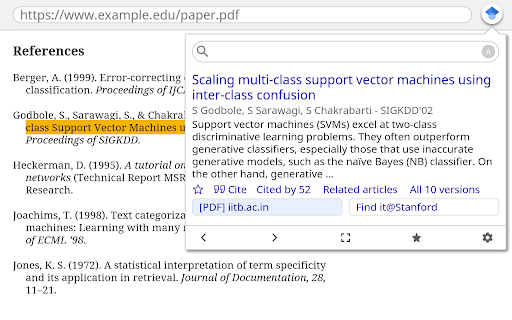
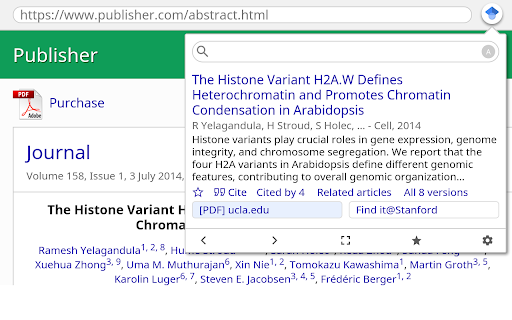
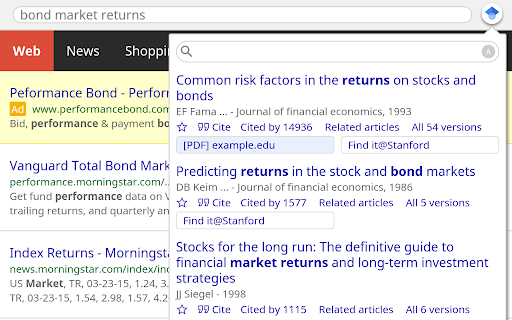
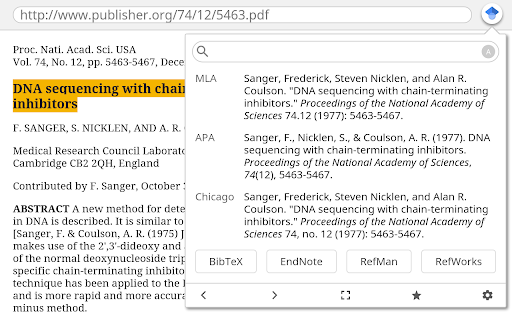
This extension adds a browser button for easy access to Google Scholar from any web page. Click the Scholar button to: - Find full text on the web or in your university library. Select the title of the paper on the page you're reading, and click the Scholar button to find it. - Transfer your query from web search to Scholar. Press the Scholar button to see top three results; click "full screen" at the bottom of the popup to see them all. - Format references in widely used citation styles. Press the quote button below the result to see a formatted reference and copy it into the paper you're writing. - Save the article to your Scholar library, so you can read it or cite it later. Press the blue star below the result to save it, or the gray star at the bottom to see all saved articles. Library links work best when you're on campus. To configure them for off-campus use, visit Google Scholar…

Listing SEO keywords

Search intent keywords
Keyword signals for evaluating how users may discover, compare, or search for this extension category.

Core discovery

Google Scholarscholarly articlescitation generatoracademic research

Comparison

ZoteroEndNote

Problem

unable to access serverGoogle Scholar 403 errorscholar settings not saving

Alternative

citation managerresearch tools

Similar extensions

Jump to related discovery paths:

FAQ

What is Google Scholar Button mainly used for?
A productivity tool that integrates Google Scholar functionality into the browser. It allows users to search for scholarly papers, generate formatted citations, and manage research libraries directly from their web pages.
What market signals stand out?
Large installed base with substantial review base. Last known update: 05/16/2024.
What should builders compare before entering this space?
Compare install concentration, rating quality, update recency, screenshots, developer portfolio, listing claims, and review-backed friction signals.
Is this page review-backed?
Backed by review samples. This page combines store metadata with selected review signals, while raw store metrics remain visible for comparison.

Screenshots

Google Scholar Button screenshot

Links

Recommended Chrome extensions

Related listings from the same category, trending peers, and the same publisher portfolio.

Browse tools