Screen Recorder icon

Screen Recorder Chrome Extension Analysis

Video & Image Downloaders

Chrome extension ID: dhopldobnfjeckokfjimfcdagmlhjdce

This is a browser-based screen recording tool that captures tab, window, or full-screen video content. It requires users to manually initiate recordings, provides basic audio selection settings, and defaults to saving files in the WebM format.

Developer:Grephy
Version:0.2.2
Size:62.9KiB
Last updated:

Overview

Installs

300K+

Rating

3.1

310 reviews

Languages

1 locales

Includes English

Market analysis

Review-backed positioning, friction, and market signals for this Chrome extension.

Backed by review samples

Macro category

Video & Image Downloaders

Pricing friction

Moderate review signal

Complaint intensity

High review signal

Listing & review signals
Observed signals from store listing text and review samples.

Listing positioning

The extension positions itself as a simple, one-click screen recording solution accessible directly from the browser toolbar. It emphasizes basic functionality such as selecting system audio, microphone, or specific window sources with automatic downloads in WebM format.

Inferred product pattern

A simple browser utility that suffers from critical stability issues, failing to guarantee data integrity for long-duration recordings.

Review-backed pain points

Users frequently report catastrophic failures where lengthy recordings disappear entirely or produce 0-byte/corrupted files, leading to significant loss of time and critical work data.

Observed feature gaps

The product lacks a robust file recovery system, fails to support flexible video formats beyond WebM, and provides no indication to the user when a recording process has silently crashed.

Tags
Screen RecorderVideo CaptureBrowser ExtensionWebM Recorder
Target users

- Casual browser users

- Remote meeting attendees

- Students recording lectures

Primary use cases

- Recording browser tabs

- Capturing screen activity for playback

- Basic system audio recording

Positive themes

- None prominent in the current sample set

Negative themes

- Severe data loss after long recordings

- Corrupted or unplayable output files

- Failure to record audio

- Performance lag during operation

- Unexpected trial paywalls

Observed friction

- Free-tier complaints detected

- Refund complaints detected

- Performance complaints detected

- Users report paying for features that fail to function, citing non-responsive support and perceived lack of value for the costs incurred.

Evidence boundary: Analysis is based on user reviews highlighting significant reliability failures, data loss, and functional gaps in recording stability. Evidence is limited to user feedback and store descriptions; technical performance metrics are not independently verified.
Complaint summaries
Review-backed complaint signals grouped by operational area.

Support

Support is described as non-responsive or ignoring requests, particularly regarding failed recordings or payment issues.

Reliability

High frequency of reports regarding complete recording failure, truncated files, black screens, and corrupted output formats.

Privacy

No specific privacy or security complaints found; users are primarily focused on functionality and reliability.

Access & pricing

- Free entry with paid features

- No account requirement observed

- Limited free usage observed

Store listing facts

Listing assets

- Screenshots: 4

- Videos: 1

- Languages: 1

Trust signals

- Developer contact

- Official website

Store metadata

- Version: 0.2.2

- Size: 62.9KiB

- Last updated:

Store description excerpt
Short excerpt from the public Chrome Web Store listing; full copy is available on the official store page.
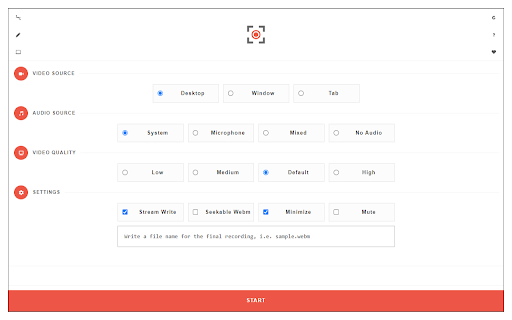
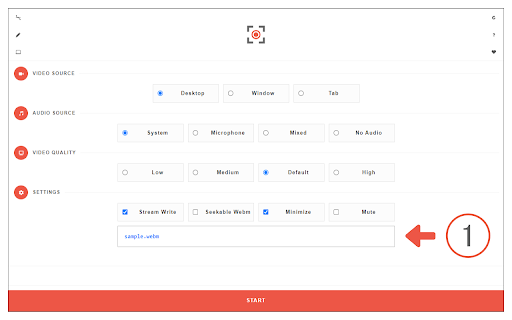
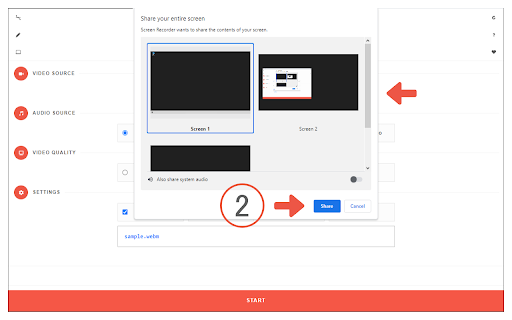
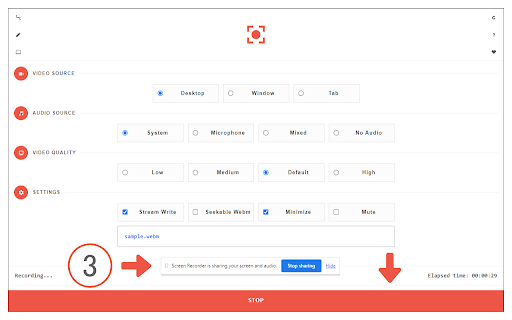
Screen Recorder extension helps you record video from the computer's screen. To work with this addon, please click on the toolbar button. Once the recorder interface appears, please adjust desired options, and then click the - Start - button. The video source could be your screen, window, or tab. The audio source can be the system's audio, microphone, mixed, or no audio at all. When you click the start button, a popup will appear within the interface. This popup window allows you to select the desired screen, tab, or window. To start recording please click on the - Share - button. When you are done recording the screen, please press the toolbar button (or the stop button on the app interface) to stop the recording process. The recorded video will be download to your computer automatically (on the default download location). By default, recorded media is in - webm - format. To get more i…

Listing SEO keywords

Search intent keywords
Keyword signals for evaluating how users may discover, compare, or search for this extension category.

Core discovery

chrome screen recorderrecord screen extensionbrowser screen capturesave tab video

Comparison

best screen recorder for chromescreen recorder alternative

Problem

recording not savingvideo corruptedextension audio not workingrecording black screen

Alternative

open source screen recorderreliable screen capture tool

Similar extensions

Jump to related discovery paths:

FAQ

What is Screen Recorder mainly used for?
This is a browser-based screen recording tool that captures tab, window, or full-screen video content. It requires users to manually initiate recordings, provides basic audio selection settings, and defaults to saving files in the WebM format.
What market signals stand out?
Established adoption with moderate review base. Last known update: 08/14/2025.
What should builders compare before entering this space?
Compare install concentration, rating quality, update recency, screenshots, developer portfolio, listing claims, and review-backed friction signals.
Is this page review-backed?
Backed by review samples. This page combines store metadata with selected review signals, while raw store metrics remain visible for comparison.

Screenshots

Screen Recorder screenshot

Links

Website: mybrowseraddon.com

Videos: Watch

Recommended Chrome extensions

Related listings from the same category, trending peers, and the same publisher portfolio.

Browse tools