YouTube Speed Control icon

YouTube Speed Control Chrome Extension Analysis

Niche Lifestyle & Gaming Hacks

Chrome extension ID: dmpbgbehgckaijcpmodinibhkdgbifif

A lightweight Chrome extension that allows users to adjust the speed of YouTube videos. The tool is open-source and designed to function seamlessly across various playback environments.

Developer:avi12
Version:2.1.6
Size:83.99KiB
Last updated:

Overview

Installs

2K+

Rating

4.7

9 reviews

Languages

1 locales

Includes English (United States)

Market analysis

Review-backed positioning, friction, and market signals for this Chrome extension.

Backed by review samples

Macro category

Niche Lifestyle & Gaming Hacks

Pricing friction

Low review signal

Complaint intensity

Low review signal

Listing & review signals
Observed signals from store listing text and review samples.

Listing positioning

Positions itself as a one-stop solution for controlling the playback speed of all YouTube videos. It emphasizes versatility by working on YouTube.com and on external sites where YouTube videos are embedded.

Inferred product pattern

Open-source quality-of-life utility for enhancing a specific third-party platform's media controls.

Review-backed pain points

Some users struggle to understand how to activate or operate the tool, indicating a need for a tutorial.

Observed feature gaps

Lack of an intuitive onboarding process or an integrated user guide.

Tags
YouTube ToolVideo PlaybackSpeed ControllerMedia Utility
Target users

- YouTube viewers

- Online learners

- Content researchers

Primary use cases

- Increasing playback speed for efficiency

- Slowing down videos for detailed analysis

- Controlling speed on embedded YouTube players

Positive themes

- Lightweight and bloat-free

- Compatibility with mobile browsers like Kiwi

- Fast loading and immediate functionality

Negative themes

- Lack of clear instructions

Observed friction

- No pricing friction observed.

Evidence boundary: Data extracted from the store listing and 7 user review samples. The review sample size is small, which may not capture all possible user edge cases.
Complaint summaries
Review-backed complaint signals grouped by operational area.

Support

One user reported difficulty using the tool and requested a tutorial.

Reliability

No reliability complaints; reviews generally describe the tool as working perfectly.

Privacy

No privacy complaints observed.

Access & pricing

- Free usage observed

- No account requirement observed

- Free plan or free usage claimed

Store listing facts

Listing assets

- Screenshots: 1

- Videos: 0

- Languages: 1

Trust signals

- Developer contact

- Official website

- Support link

Store metadata

- Version: 2.1.6

- Size: 83.99KiB

- Last updated:

Store description excerpt
Short excerpt from the public Chrome Web Store listing; full copy is available on the official store page.
The one-stop solution for changing the speed of every video you watch on YouTube, including outside of YouTube.com! Source code: https://github.com/avi12/youtube-speed-control

Listing SEO keywords

Search intent keywords
Keyword signals for evaluating how users may discover, compare, or search for this extension category.

Core discovery

youtube speed controlyoutube playback speedincrease youtube speed

Comparison

best youtube speed controlleryoutube speed control vs native

Problem

youtube video too slowincrease youtube speed beyond 2x

Alternative

youtube speed control alternativesvideo speed controller extension

Similar extensions

Jump to related discovery paths:

FAQ

What is YouTube Speed Control mainly used for?
A lightweight Chrome extension that allows users to adjust the speed of YouTube videos. The tool is open-source and designed to function seamlessly across various playback environments.
What market signals stand out?
Early or small audience with limited review base. Last known update: 04/10/2022.
What should builders compare before entering this space?
Compare install concentration, rating quality, update recency, screenshots, developer portfolio, listing claims, and review-backed friction signals.
Is this page review-backed?
Backed by review samples. This page combines store metadata with selected review signals, while raw store metrics remain visible for comparison.

Screenshots

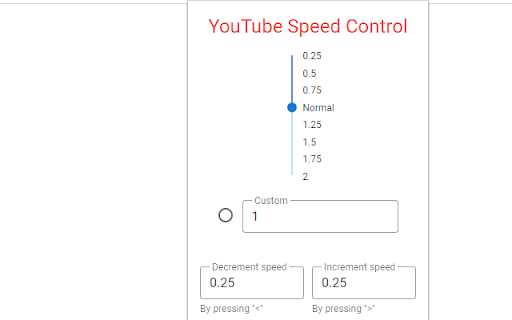
YouTube Speed Control screenshot

Links

Recommended Chrome extensions

Related listings from the same category, trending peers, and the same publisher portfolio.

Browse fun