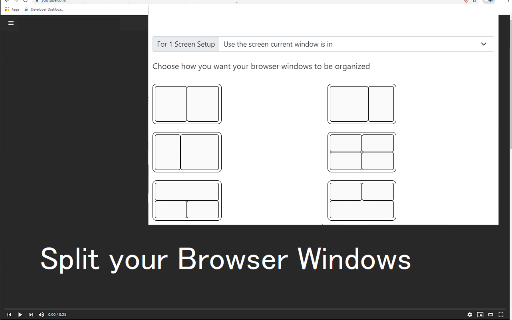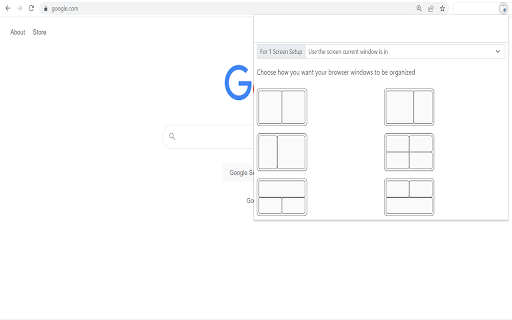
Split Screen for Google Chrome icon

Split Screen for Google Chrome Chrome Extension Analysis

Tab & Bookmark Productivity

Chrome extension ID: dnollkdkikklpdganoecjcmmlddbennb

A browser extension that automates the resizing and positioning of Chrome windows into split-screen layouts. It allows users to quickly arrange their browser views into columns and rows to improve multitasking.

Version:3.0.0
Size:471KiB
Last updated:

Overview

Installs

300K+

Rating

3.7

397 reviews

Languages

40 locales

Includes Deutsch, English, Filipino, Indonesia...

Market analysis

Review-backed positioning, friction, and market signals for this Chrome extension.

Backed by review samples

Macro category

Tab & Bookmark Productivity

Pricing friction

Low review signal

Complaint intensity

High review signal

Listing & review signals
Observed signals from store listing text and review samples.

Listing positioning

The product is positioned as a tool to mimic a dual-monitor setup by splitting browser windows into customizable ratios. It specifically targets online teachers and presenters who need to see both their presentation and video call attendees (e.g., Google Meet, Zoom) simultaneously.

Inferred product pattern

Window layout automation for Chromium-based browsers.

Review-backed pain points

Users are highly frustrated that the extension does not provide a 'true' split-screen within one window, instead simply automating the creation of multiple windows, which they perceive as a native OS feature.

Observed feature gaps

Lack of a single-window split-view (internal tab splitting) and reported failures in correctly targeting non-primary monitors.

Tags
Split ScreenWindow ManagementProductivity ToolDual Monitor Setup
Target users

- Online Teachers

- Virtual Presenters

- Remote Workers

- Single-monitor users

Primary use cases

- Monitoring students via Google Meet grid mode while presenting materials

- Managing multiple browser views on a single screen

- Quickly adjusting window ratios for multitasking

Positive themes

- Review-backed positive data is not available in the provided samples.

Negative themes

- Misleading functionality (opens new windows instead of splitting a single window)

- Redundancy with native OS window management features

- Lack of true internal tab splitting

- Issues with multi-monitor screen placement

Observed friction

- No pricing friction observed in provided data.

Evidence boundary: Analysis based on the official store listing and a sample of 10 high-helpfulness, low-rating reviews. Provided review samples are exclusively 1-star, which does not represent the full sentiment distribution of the 398 total reviews.
Complaint summaries
Review-backed complaint signals grouped by operational area.

Support

No specific support interaction complaints; users primarily expressed dissatisfaction with product utility.

Reliability

Reports of the extension jumping to the primary screen even when a different screen is selected.

Privacy

No privacy complaints observed.

Access & pricing

- No clear monetization signal

- No account requirement observed

- Free plan or free usage claimed

Store listing facts

Listing assets

- Screenshots: 3

- Videos: 0

- Languages: 40

Trust signals

- Developer contact

- Official website

Store metadata

- Version: 3.0.0

- Size: 471KiB

- Last updated:

Store description excerpt
Short excerpt from the public Chrome Web Store listing; full copy is available on the official store page.
This extension splits your browser windows into two with just 2 clicks. The ratio of the windows can be adjusted according to your needs. This extension is great for presenters who need to use Google Meet/Zoom and need to split their screen so that they can see their presentation & also see the faces of their students/attendees of the Google Meet call. Most of our users are on hangouts meet and want to see the faces of the attendees while they are doing screen sharing. This extension/feature is great for teachers who are teaching online classes at the moment. You can monitor your students via "Grid Mode in Google Meet" on one tab and do "screen sharing" in another Chrome tab which contains your teaching materials. Split the current browser window into a pair so it acts like a dual monitor setup. Try dualless mode today using this extension. Our software works well with google hangouts m…

Listing SEO keywords

Search intent keywords
Keyword signals for evaluating how users may discover, compare, or search for this extension category.

Core discovery

Chrome split screendual monitor extensionsplit browser windowsGoogle Meet screen split

Comparison

Chrome vs Edge split screenSplit screen extension vs Windows Snap

Problem

how to split chrome screenview two tabs at once chromechrome dual window layout

Alternative

split screen alternativeswindow manager chrome extension

Similar extensions

Jump to related discovery paths:

FAQ

What is Split Screen for Google Chrome mainly used for?
A browser extension that automates the resizing and positioning of Chrome windows into split-screen layouts. It allows users to quickly arrange their browser views into columns and rows to improve multitasking.
What market signals stand out?
Established adoption with moderate review base. Last known update: 10/17/2023.
What should builders compare before entering this space?
Compare install concentration, rating quality, update recency, screenshots, developer portfolio, listing claims, and review-backed friction signals.
Is this page review-backed?
Backed by review samples. This page combines store metadata with selected review signals, while raw store metrics remain visible for comparison.

Screenshots

Split Screen for Google Chrome screenshot

Links

Recommended Chrome extensions

Related listings from the same category, trending peers, and the same publisher portfolio.

Browse tools
Auto Admit for Google Meet icon

Auto Admit for Google Meet

Free Software Extensions

Automatically admit join requests from external guests to Google Meet

Installs

100K+

Rating

4.2

IE Tab icon

IE Tab

Blackfish Software

Display web pages using IE within Chrome. Use Java, Silverlight, ActiveX, Sharepoint, and more.

Installs

4.0M+

Rating

4.3

Microsoft Bing Homepage & Search for Chrome icon

Microsoft Bing Homepage & Search for Chrome

Microsoft Corporation

Set Microsoft Bing as your default homepage and default search engine

Installs

4.0M+

Rating

3.8

Monica: All-In-One AI Assist & Smartest  AI Agent icon

Monica: All-In-One AI Assist & Smartest AI Agent

Monica Team

One stop AI Assistant with GPT, Claude, Gemini: Chat, Write, Translate, Search, Summarize, image generator, video generation

Installs

3.0M+

Rating

4.9

Immersive Translate: AI Web, PDF & Video Translator icon

Immersive Translate: AI Web, PDF & Video Translator

Immersive Translate

Free Translate Website, Translate PDF & Epub eBook, Translate Video Subtitles in Bilingual

Installs

3.0M+

Rating

4.0

BetterTTV icon

BetterTTV

NightDev, LLC

BetterTTV enhances Twitch and YouTube with new features, emotes, and more.

Installs

3.0M+

Rating

4.6

Ad Blocker: Stands AdBlocker icon

Ad Blocker: Stands AdBlocker

Stands

Stands AdBlocker – it's a free ad blocker for YouTube, Twitch, Pop-Ups, Video Ads, and websites. Block ads everywhere with Stands!

Installs

3.0M+

Rating

4.8

Google Input Tools icon

Google Input Tools

cloud-input-team

Input Tools lets you type in the language of your choice.

Installs

3.0M+

Rating

4.0

Microsoft Bing Search with Rewards icon

Microsoft Bing Search with Rewards

Microsoft Corporation

Use the Microsoft Rewards extension to find new ways to earn every day, easily track your points and set your default search to Bing

Installs

3.0M+

Rating

4.4

Google Scholar Button icon

Google Scholar Button

scholar-chrome-extensions

Lookup scholarly articles as you browse the web.

Installs

3.0M+

Rating

4.6