Google Input Tools icon

Google Input Tools Chrome Extension Analysis

Automation & Workflow Efficiency

Chrome extension ID: mclkkofklkfljcocdinagocijmpgbhab

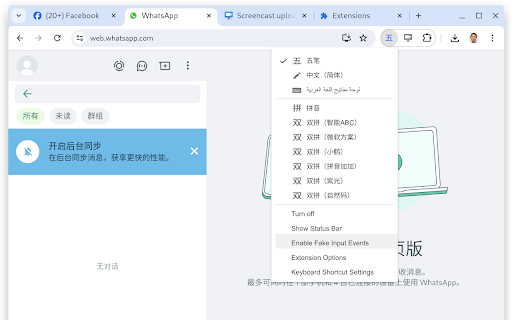
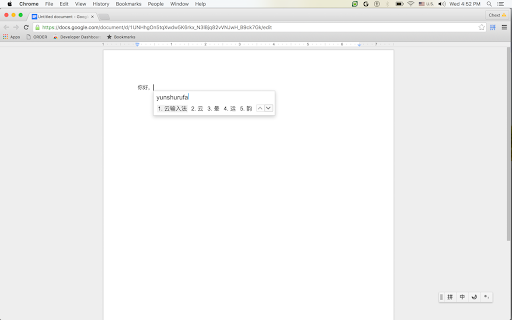
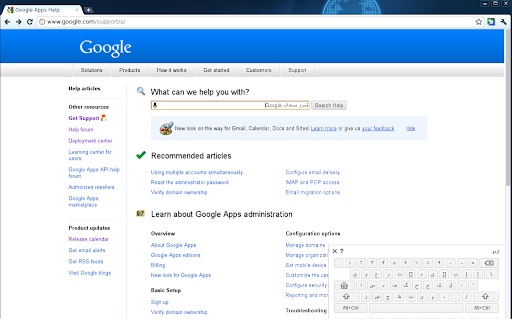
This extension provides a browser-based input method editor (IME) that enables users to type in various languages, scripts, and phonetic transliterations. It includes features for spell correction and diacritic support, functioning as a bridge between a standard US keyboard and non-Latin or complex scripts.

Version:11.4.0.0
Size:795KiB
Last updated:

Overview

Installs

3.0M+

Rating

4.0

5,545 reviews

Languages

53 locales

Includes Deutsch, English, English (United Kingdom), Filipino...

Market analysis

Review-backed positioning, friction, and market signals for this Chrome extension.

Backed by review samples

Macro category

Automation & Workflow Efficiency

Pricing friction

Low review signal

Complaint intensity

Moderate review signal

Listing & review signals
Observed signals from store listing text and review samples.

Listing positioning

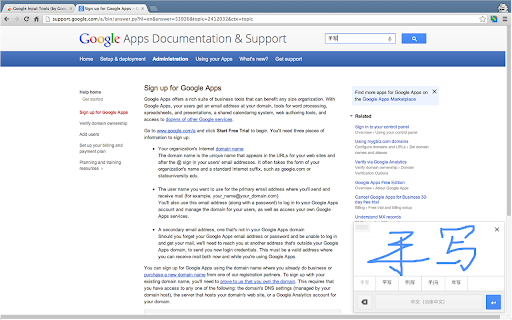
Google Input Tools positions itself as a comprehensive multilingual typing solution offering virtual keyboards, IMEs, and handwriting input for over 90 languages. It emphasizes ease of use, allowing users to switch between different languages and input methods directly within their browser.

Inferred product pattern

Free utility tool maintained by a major platform provider, currently suffering from maintenance neglect and technical debt.

Review-backed pain points

Users frequently report that the extension stops functioning entirely on certain websites, causes text to duplicate during editing, and experiences inconsistent toggling behavior with keyboard shortcuts.

Observed feature gaps

Absence of a standalone text composition editor, inability to paste text for transliteration, and forced auto-spacing around punctuation that cannot be disabled.

Tags
Language ToolsInput MethodVirtual KeyboardTransliterationMultilingual
Target users

- Multilingual speakers

- International students

- Global communication professionals

- Translation hobbyists

Primary use cases

- Typing in non-native languages

- Phonetic transliteration of text

- Handwriting input for complex scripts

- Switching input methods during web browsing

Positive themes

- Effective core functionality for language conversion

- Wide variety of supported languages

- Useful keyboard shortcuts for toggling input

Negative themes

- Unresponsive or broken input in specific web environments

- Persistent bugs causing text duplication

- Frustrating UI/shortcut design

- Lack of recent updates

Observed friction

- Performance complaints detected

- None; the product is free.

Evidence boundary: Data gathered from Chrome Web Store description and user reviews highlighting feature utility vs. reliability issues. Reviews represent a subjective snapshot and may not reflect the experience of the entire 4 million user base.
Complaint summaries
Review-backed complaint signals grouped by operational area.

Support

Users express frustration over the perceived lack of maintenance and updates for the extension.

Reliability

High; users report frequent performance issues including text duplication and failure to initialize on specific websites.

Privacy

No privacy-related complaints observed in the sample data.

Access & pricing

- Free usage observed

- No account requirement observed

- Free plan or free usage claimed

Store listing facts

Listing assets

- Screenshots: 5

- Videos: 1

- Languages: 53

Trust signals

- Privacy policy

- Developer contact

- Official website

Store metadata

- Version: 11.4.0.0

- Size: 795KiB

- Last updated:

Store description excerpt
Short excerpt from the public Chrome Web Store listing; full copy is available on the official store page.
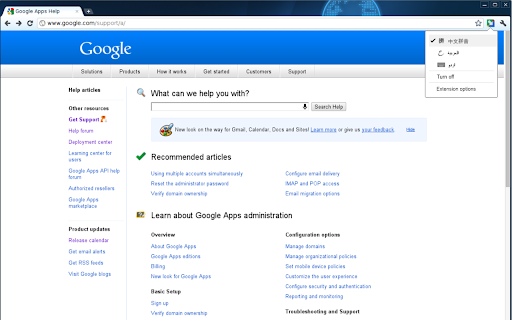
By installing this extension, you agree to the Terms of Service at http://www.google.com/intl/en/policies/terms/. Switch to typing in a different language with the click of the mouse, and switch back just as easily. The Google Input Tools extension provides virtual keyboards for over 90 languages, full IMEs or direct transliteration for over 30 different scripts, and handwriting input for over 40 languages. What's New? ✓ Malayalam now prioritize Arabic numerals as the default output when typing numbers. This change makes it easier to input numbers, as Malayalam numerals are not commonly used. Usage Instructions: When you first install the extension, click on the extension icon, then select "Extension Options" in the pop-up menu. A new tab will appear where you can select your preferred languages or input methods. The keyboards, IMEs or handwriting input you add to 'Selected input tools'…

Listing SEO keywords

Search intent keywords
Keyword signals for evaluating how users may discover, compare, or search for this extension category.

Core discovery

multilingual keyboard extensionGoogle language input toolsbrowser transliteration pluginvirtual keyboard chrome

Comparison

Google Input Tools vs alternative IMEsbest language input extension

Problem

extension not workingtext duplication buginput tool stops working

Alternative

language input pluginkeyboard layout switcher

Similar extensions

Jump to related discovery paths:

FAQ

What is Google Input Tools mainly used for?
This extension provides a browser-based input method editor (IME) that enables users to type in various languages, scripts, and phonetic transliterations. It includes features for spell correction and diacritic support, functioning as a bridge between a standard US keyboard and non-Latin or complex scripts.
What market signals stand out?
Large installed base with substantial review base. Last known update: 04/17/2026.
What should builders compare before entering this space?
Compare install concentration, rating quality, update recency, screenshots, developer portfolio, listing claims, and review-backed friction signals.
Is this page review-backed?
Backed by review samples. This page combines store metadata with selected review signals, while raw store metrics remain visible for comparison.

Screenshots

Google Input Tools screenshot

Links

Recommended Chrome extensions

Related listings from the same category, trending peers, and the same publisher portfolio.

Browse tools
Chrome Remote Desktop icon

Chrome Remote Desktop

Chrome Remote Desktop Release Managers

Chrome Remote Desktop extension

Installs

34.0M+

Rating

3.2

Google Translate icon

Google Translate

google-translate-chrome-extension-owners

View translations easily as you browse the web. By the Google Translate team.

Installs

32.0M+

Rating

4.2

CSFloat Market Checker icon

CSFloat Market Checker

CSFloat Inc.

Shows the float value, paint seed, and more of Counter-Strike (CS:GO & CS2) items on the Steam Market or Inventories

Installs

1.0M+

Rating

3.9

Video Downloader Plus icon

Video Downloader Plus

Video Downloader Plus

Download and save videos from any website instantly. A fast, simple video downloader that just works.

Installs

1.0M+

Rating

4.5

Wordtune: AI Paraphrasing and Grammar Tool icon

Wordtune: AI Paraphrasing and Grammar Tool

Wordtune

Unlock your potential with Wordtune's free AI writer – paraphrase, rewrite, translate, fix grammar, and more.

Installs

1.0M+

Rating

4.6

AIPRM for ChatGPT icon

AIPRM for ChatGPT

AIPRM

AIPRM is your cheat code for ChatGPT. Adds a list of curated prompt templates and advanced features. Try today.

Installs

1.0M+

Rating

3.9

Enhancer for YouTube™ icon

Enhancer for YouTube™

Max RF

Take control of YouTube and boost your user experience!

Installs

1.0M+

Rating

4.7

Поиск Яндексa icon

Поиск Яндексa

Yandex

Вводите запросы в адресную строку и получайте ответы от Яндекса

Installs

1.0M+

Rating

3.3

Bing Search and Homepage icon

Bing Search and Homepage

Microsoft Corporation

Set Microsoft Bing as your default homepage and default search engine

Installs

1.0M+

Rating

1.8

uberAgent icon

uberAgent

Cloud Software Group, Inc.

Enables uberAgent to collect web app usage and performance data (e.g., foreground tab, page load duration) from Chrome.

Installs

1.0M+

Rating

5.0