ZIP Manager (zip, rar, 7z) icon

ZIP Manager (zip, rar, 7z) Chrome Extension Analysis

Automation & Workflow Efficiency

Chrome extension ID: eahldalhgbpahhllfcgaobhjnmcfmlbd

A browser-based utility for viewing and extracting files from various archive formats. It supports both local drag-and-drop files and remote URLs, integrating directly into the browser's context menu for ease of access.

Developer:lunu.bounir
Version:0.2.8
Size:765KiB
Last updated:

Overview

Installs

20K+

Rating

3.7

21 reviews

Languages

12 locales

Includes Deutsch, English, Nederlands, dansk...

Market analysis

Review-backed positioning, friction, and market signals for this Chrome extension.

Backed by review samples

Macro category

Automation & Workflow Efficiency

Pricing friction

Low review signal

Complaint intensity

Moderate review signal

Listing & review signals
Observed signals from store listing text and review samples.

Listing positioning

The product positions itself as a versatile archive viewer and extractor supporting multiple formats like ZIP, RAR, and 7z. It highlights the ability to extract specific files from remote links without needing to download the entire archive first.

Inferred product pattern

Browser-based archive utility focusing on partial extraction of remote files to save bandwidth.

Review-backed pain points

Some users report the extension freezes or fails to perform basic extraction functions, rendering it unusable for certain files.

Observed feature gaps

The tool currently lacks the ability to create compressed archives; it is limited to viewing and extracting.

Tags
Archive ExtractorZip ViewerFile UtilityRar Unzipper
Target users

- Web users downloading compressed files

- Developers handling archive assets

- General productivity users

Primary use cases

- Extracting a single file from a large remote ZIP archive

- Viewing archive contents before downloading

- Quickly unzipping local files via the browser

Positive themes

- Effective single-file extraction

- Reliability and speed

- Ease of use

Negative themes

- Complete failure to extract files

- Application freezing

- General lack of functionality

Observed friction

- Performance complaints detected

- No pricing friction observed.

Evidence boundary: Analysis based on the store listing and a provided sample of 10 reviews. The review sample is small, which may not fully capture the diverse experience of the 20,000 users.
Complaint summaries
Review-backed complaint signals grouped by operational area.

Support

No specific support or account complaints observed.

Reliability

Multiple reports of the tool freezing or failing to extract files entirely.

Privacy

No privacy complaints observed.

Access & pricing

- Free usage observed

- No account requirement observed

- Free plan or free usage claimed

Store listing facts

Listing assets

- Screenshots: 2

- Videos: 0

- Languages: 12

Trust signals

- Privacy policy

- Developer contact

- Official website

Store metadata

- Version: 0.2.8

- Size: 765KiB

- Last updated:

Store description excerpt
Short excerpt from the public Chrome Web Store listing; full copy is available on the official store page.
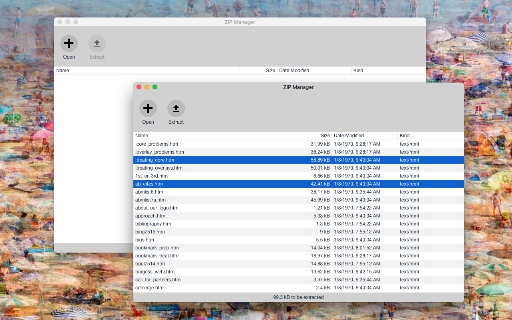
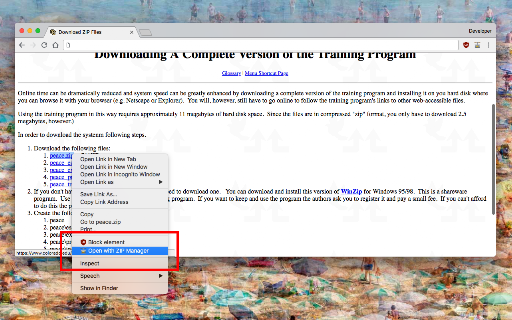
This extension is a ZIP format viewer and extractor. You can feed this application with one or multiple local files or a single remote link. The extension displays the content of the ZIP archive for you without any dependencies. You can then extract selected files or all files into the default download directory or a directory of your choice without even downloading the actual ZIP archive. Note that this extension keeps the file structure only if your browser supports downloading into subdirectories. The extension adds a context menu item to the ZIP links. To open local files, first, open the manager window and then drag and drop the files into the view. Supported archive formats: 7z, Zip, Tar, GZip, Rar, and many more! Version Logs: 0.1.2: 1. It is now possible to drag a file from the ZIP manager window and drop it into a folder like your Desktop directory. This feature is used to drop…

Listing SEO keywords

Search intent keywords
Keyword signals for evaluating how users may discover, compare, or search for this extension category.

Core discovery

chrome zip extractoronline rar viewer7z browser extensionextract zip without downloading

Comparison

zip manager vs winrarbest chrome zip extractoronline zip viewer alternative

Problem

how to extract one file from zip onlineopen rar file in chromeextract 7z without software

Alternative

online unzip toolbrowser archive extractorrar file opener extension

Similar extensions

Jump to related discovery paths:

FAQ

What is ZIP Manager (zip, rar, 7z) mainly used for?
A browser-based utility for viewing and extracting files from various archive formats. It supports both local drag-and-drop files and remote URLs, integrating directly into the browser's context menu for ease of access.
What market signals stand out?
Visible niche traction with limited review base. Last known update: 08/10/2025.
What should builders compare before entering this space?
Compare install concentration, rating quality, update recency, screenshots, developer portfolio, listing claims, and review-backed friction signals.
Is this page review-backed?
Backed by review samples. This page combines store metadata with selected review signals, while raw store metrics remain visible for comparison.

Screenshots

ZIP Manager (zip, rar, 7z) screenshot

Links

Recommended Chrome extensions

Related listings from the same category, trending peers, and the same publisher portfolio.

Browse tools
Allow Right-Click icon

Allow Right-Click

lunu.bounir

Re-enable the possibility to use the context menu, copy, paste, and text selection on sites that prevent them.

Installs

400K+

Rating

4.3

Picture in Picture - PiP View icon

Picture in Picture - PiP View

lunu.bounir

Watch videos in a floating PiP window (always on top of other windows) even when tab is switched.

Installs

60K+

Rating

3.9

Smallpdf—Edit, Convert, Compress, & AI Summarize PDF icon

Smallpdf—Edit, Convert, Compress, & AI Summarize PDF

Smallpdf AG

Easy-to-use PDF tools to compress, convert, merge, chat to, split, e-sign, and edit PDF files in your browser.

Installs

2.0M+

Rating

4.6

Google Dictionary (by Google) icon

Google Dictionary (by Google)

dictionary-extension-dev

View definitions easily as you browse the web.

Installs

2.0M+

Rating

4.4

AI Chat for Search icon

AI Chat for Search

AI Chat for Search Team

Display AI Chat response alongside search engine results

Installs

2.0M+

Rating

4.6

WPS浏览器助手:文档在线阅读编辑 icon

WPS浏览器助手:文档在线阅读编辑

金山PDF

PDF、Excel、Word、PPT等文档无需下载即可在线预览,还能对文档进行编辑、打印、转换等处理。

Installs

2.0M+

Rating

3.0

Planet Search icon

Planet Search

Free VPN Planet

Enchanced default search engine.

Installs

2.0M+

Rating

3.4

Lightshot (screenshot tool) icon

Lightshot (screenshot tool)

Skillbrains

Simple and convenient screenshot tool. Select an area, edit your screenshot and upload it to the server.

Installs

2.0M+

Rating

4.4

PrintFriendly: Print Clean Pages, Save as PDF & Screenshot, AI Tools icon

PrintFriendly: Print Clean Pages, Save as PDF & Screenshot, AI Tools

PrintFriendly

Print clean web pages, save as PDF, take screenshots, or use reader mode. AI summaries & ad removal. Works on ChatGPT & Gemini.

Installs

1.0M+

Rating

4.6

Mobile simulator - responsive testing tool icon

Mobile simulator - responsive testing tool

François Duprat

Smartphone and tablet simulator on computer with several models to test mobile responsive websites.

Installs

1.0M+

Rating

4.9