Picture in Picture - PiP View icon

Picture in Picture Chrome Extension Analysis

Tab & Bookmark Productivity

Store listing title: Picture in Picture - PiP View

Chrome extension ID: eaeedemddlledlghhjebjgdmhjekgegd

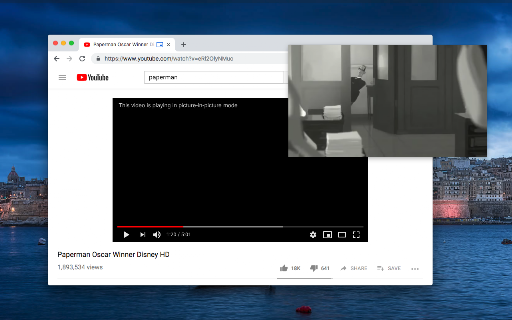
A productivity extension that creates a floating, always-on-top video window for web-based players. It allows users to continue watching content while switching tabs or interacting with other windows.

Developer:lunu.bounir
Version:0.3.9
Size:53.39KiB
Last updated:

Overview

Installs

60K+

Rating

3.9

54 reviews

Languages

11 locales

Includes Deutsch, English, Nederlands, español...

Market analysis

Review-backed positioning, friction, and market signals for this Chrome extension.

Backed by review samples

Macro category

Tab & Bookmark Productivity

Pricing friction

Low review signal

Complaint intensity

Moderate review signal

Listing & review signals
Observed signals from store listing text and review samples.

Listing positioning

The extension positions itself as a universal tool to enable Picture-in-Picture mode for any website containing an HTML video element. It highlights its ability to bypass 'disablepictureinpicture' attributes and provides a specialized in-player button for YouTube users to facilitate seamless multitasking.

Inferred product pattern

A lightweight utility extension focused on improving video multitasking through a floating UI and platform-specific optimizations.

Review-backed pain points

Users reported issues with broken 10-second rewind functions, persistent progress bars appearing on the original page, and limited window mobility/sizing on specific hardware.

Observed feature gaps

Missing playback controls such as a seek slider, fast-forward/rewind buttons, and double-click to fullscreen functionality.

Tags
Picture In PictureVideo PlayerMultitasking ToolFloating Video
Target users

- Multitaskers

- YouTube viewers

- Remote workers

- Students

Primary use cases

- Watching videos while browsing other websites

- Multitasking during work sessions

- Using YouTube in a floating window

Positive themes

- Seamless YouTube integration with an in-player button

- High privacy standards with no data collection observed

- Enhanced controls like volume adjustment within the PiP window

Negative themes

- Broken playback seek/rewind functionality

- Visual glitches on the original video page after pausing

- Difficulties with window positioning and sizing on certain devices like Chromebooks

Observed friction

- Performance complaints detected

- No pricing information or friction observed in the provided data.

Evidence boundary: Analysis based on the Chrome Web Store listing and a sample of user reviews covering various ratings. The review sample size is relatively small, which may not represent the full user experience.
Complaint summaries
Review-backed complaint signals grouped by operational area.

Support

No support or account-related complaints observed.

Reliability

Users reported reliability issues regarding the 'always on top' behavior during tab switching and broken playback controls on certain platforms.

Privacy

No privacy complaints; one user explicitly noted the absence of data collection.

Access & pricing

- No clear monetization signal

- No account requirement observed

- No clear pricing signal

Store listing facts

Listing assets

- Screenshots: 1

- Videos: 0

- Languages: 11

Trust signals

- Privacy policy

- Developer contact

- Official website

Store metadata

- Version: 0.3.9

- Size: 53.39KiB

- Last updated:

Store description excerpt
Short excerpt from the public Chrome Web Store listing; full copy is available on the official store page.
This extension brings a PiP view to all websites with an HTML video element. The extension adds a page action button to your browser. When a page has a video element, the color of this button changes. Press the button to open the active player in the Picture-in-Picture mode (PiP Mode). This extension automatically tries to use the active player. For YouTube, the extension also offers an in-player button next to the settings button to open the YouTube video in the picture-in-picture mode. You can use this extension to watch YouTube videos in a floating window that is on top of all other windows so tabs can be switched and still the player is visible. The floating window has play and pause buttons, and you can exit from the picture-in-picture mode anytime. What is the Picture-in-Picture (PiP) mode: This mode lets you play any video in Picture-in-Picture (PiP) mode, and it works on all pla…

Listing SEO keywords

Search intent keywords
Keyword signals for evaluating how users may discover, compare, or search for this extension category.

Core discovery

Picture in Picture extensionPiP video playerfloating video windowYouTube PiP mode

Comparison

Firefox PiPGoogle PiPother PiP extensions

Problem

disable picture in picturewatch video while switching tabsalways on top video

Alternative

video floating windowmulti-tasking video player

Similar extensions

Jump to related discovery paths:

FAQ

What is Picture in Picture mainly used for?
A productivity extension that creates a floating, always-on-top video window for web-based players. It allows users to continue watching content while switching tabs or interacting with other windows.
What market signals stand out?
Visible niche traction with limited review base. Last known update: 03/01/2026.
What should builders compare before entering this space?
Compare install concentration, rating quality, update recency, screenshots, developer portfolio, listing claims, and review-backed friction signals.
Is this page review-backed?
Backed by review samples. This page combines store metadata with selected review signals, while raw store metrics remain visible for comparison.

Screenshots

Picture in Picture - PiP View screenshot

Links

Recommended Chrome extensions

Related listings from the same category, trending peers, and the same publisher portfolio.

Browse workflow