Cursorful - Screen Recorder with Auto Zoom icon

Cursorful Chrome Extension Analysis

Automation & Workflow Efficiency

Store listing title: Cursorful - Screen Recorder with Auto Zoom

Chrome extension ID: eihpmapodnppeemkhkbhikmggfojdkjd

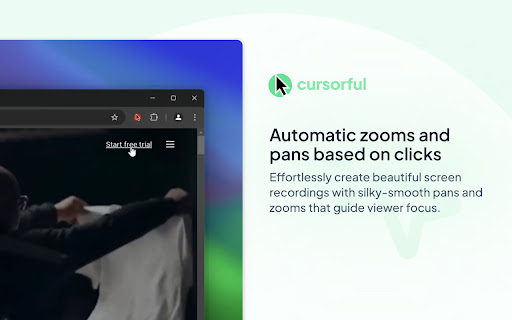
Cursorful is a Chrome extension that enables users to create screen recordings featuring automatic zoom and pan effects based on cursor movements and clicks. It includes an editor to adjust zoom details, allows custom backgrounds, and offers options to hide browser toolbars. Videos can be exported in multiple aspect ratios, with local offline rendering as a core feature.

Developer:Cursorful
Version:2.4.6
Size:8.07MiB
Last updated:

Overview

Installs

60K+

Rating

4.9

1,021 reviews

Languages

1 locales

Includes English

Market analysis

Review-backed positioning, friction, and market signals for this Chrome extension.

Backed by review samples

Macro category

Automation & Workflow Efficiency

Pricing friction

High review signal

Complaint intensity

High review signal

Listing & review signals
Observed signals from store listing text and review samples.

Listing positioning

Cursorful is positioned as a tool for creating beautiful screen recordings with automatic zooms and pans to enhance viewer engagement. It emphasizes guiding viewer focus, offering editing capabilities for zoom positions, and providing options to customize backgrounds and hide browser toolbars for a cleaner look. The extension also highlights local offline rendering and multi-platform availability for async video communication within teams.

Inferred product pattern

A browser-based screen recorder with advanced visual enhancements like automatic zoom and pan, aimed at creating polished video content for professional use (e.g., demos, tutorials). It operates on a freemium model with a one-time purchase option for full features, but users report critical functionality and export paywall issues.

Review-backed pain points

Users experience critical issues with core functionality, including excessively long rendering times, corrupted video files, and fundamental features like auto-zoom and trimming failing to work or producing inaccurate results compared to previews. There are also notable complaints about the basic ability to export or save recorded videos being restricted behind a paywall.

Observed feature gaps

The product listing indicates that Cursorful Cloud (for uploading), offline audio transcription, project saving, and shareable links are features currently on the roadmap and not yet available. Reviews primarily highlight existing feature breakage rather than specific missing capabilities.

Tags
Screen RecorderAuto ZoomVideo EditorProduct DemosCommunication Tool
Target users

- SaaS startups creating product walkthroughs

- Solo and indie founders creating instructional content

- Teams engaged in asynchronous video communication

- Users creating tutorials or presentations requiring polished screen recordings

Primary use cases

- Creating engaging product demonstrations and walkthroughs

- Producing professional-looking tutorials and how-to guides

- Enhancing async video communication with polished screen recordings

- Recording presentations with automatic visual emphasis

Positive themes

- Ease of use for creating high-production screen shares and walkthroughs

- Effectiveness of auto-zoom and editing features for a premium look

- Generous free tier and availability of a one-time payment option

- Simple screen recording with useful features like background customization and editing

Negative themes

- Significant issues with video rendering, including long processing times and corrupted/0MB file downloads

- Inaccuracies where previewed zooms and animations do not match the final downloaded video, making it unusable

- Core features like zoom-on-click and trimming not working as expected or at all

- Complaints about basic video export/saving being paywalled, despite claims of free use/export

Observed friction

- Payment required for meaningful usage

- Free-tier complaints detected

- Performance complaints detected

- There is significant pricing friction observed, with multiple low-rating reviews complaining that basic video saving/export is paywalled. This directly contradicts positive reviews stating the product is 'free to use/export' or has a 'generous' free tier, indicating potential changes in policy or unclear communication regarding free usage limitations.

Evidence boundary: This analysis is based on the Chrome Web Store listing's title, short and long descriptions, and a sample of 12 reviews, including helpful, high-rating, and low-rating submissions. The reviews span a period from April 2025 to May 2026. While the review samples provide strong signals regarding core feature reliability and pricing friction, they do not represent the full sentiment distribution across all 1009 comments. There is conflicting information regarding the availability of free export functionality, which may indicate policy changes or nuanced usage terms not fully captured.
Complaint summaries
Review-backed complaint signals grouped by operational area.

Support

Review-backed data on support, account blocking, or refund complaints is not available.

Reliability

Severe reliability complaints include excessively long video rendering times, corrupted or zero-byte file downloads, and critical functionality failures where recorded zooms and animations do not accurately appear in the final output, rendering videos unusable. Users also report issues with the trim option and the main zoom-on-click feature not functioning.

Privacy

Review-backed data on privacy or security complaints is not available. The listing highlights local offline rendering as a privacy-positive feature.

Access & pricing

- Free entry with paid features

- No account requirement observed

- Limited free usage observed

Store listing facts

Listing assets

- Screenshots: 5

- Videos: 0

- Languages: 1

Trust signals

- Privacy policy

- Developer contact

- Official website

Store metadata

- Version: 2.4.6

- Size: 8.07MiB

- Last updated:

Store description excerpt
Short excerpt from the public Chrome Web Store listing; full copy is available on the official store page.
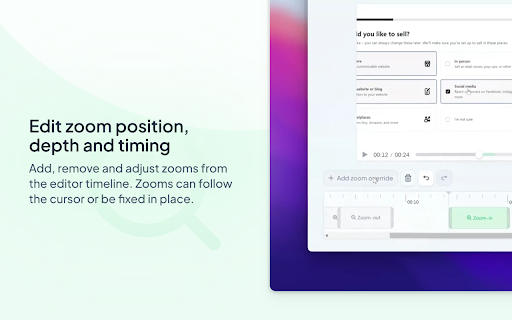
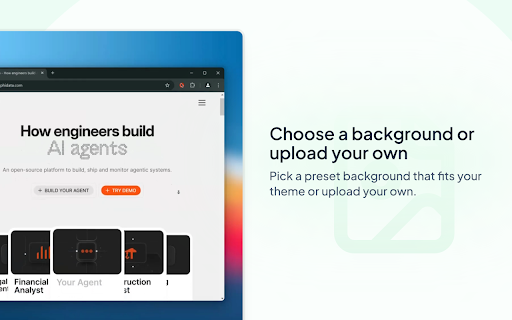
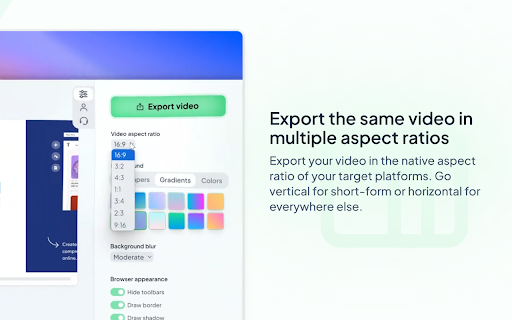
FEATURES 🖱️ Automatic zooms and pans based on clicks Effortlessly create beautiful browser recordings with silky-smooth pans and zooms that guide viewer focus. 🎯 Edit zoom position, depth and timing Add, remove and adjust zooms from the editor timeline. Zooms can follow the cursor or be fixed in place. 🖼️ Choose a background or upload your own Pick a preset background that fits your theme or upload your own. 🧼 Hide browser toolbars for a cleaner look Suffer from tab hoarding or a messy bookmarks bar? Hide all toolbars, including developer tools, with a single click. 🎥 Export the same video in multiple aspect ratios Export your video in the native aspect ratio of your target platforms. Go vertical for short-form or horizontal for everywhere else. 🎞️ Local offline rendering Your videos never leave your machine unless you explicitly choose to upload to Cursorful Cloud (coming soon).…

Listing SEO keywords

Search intent keywords
Keyword signals for evaluating how users may discover, compare, or search for this extension category.

Core discovery

screen recorder with auto zoombrowser recording toolproduct demo creatortutorial video makerengaging screen captureasync video communication tool

Comparison

Cursorful vs LoomCursorful vs ScreencastifyCursorful vs Zightscreen recording software comparison

Problem

how to make product walkthrough videoseasy screen recording with zoom effectsvideo editing for software demosrecord screen with highlightunreliable screen recorder

Alternative

screen recording alternativesauto zoom video recorder alternativebrowser video editor alternativedemo creation tool alternatives

Similar extensions

Jump to related discovery paths:

FAQ

What is Cursorful mainly used for?
Cursorful is a Chrome extension that enables users to create screen recordings featuring automatic zoom and pan effects based on cursor movements and clicks. It includes an editor to adjust zoom details, allows custom backgrounds, and offers options to hide browser toolbars. Videos can be exported in multiple aspect ratios, with local offline rendering as a core feature.
What market signals stand out?
Visible niche traction with substantial review base. Last known update: 05/22/2026.
What should builders compare before entering this space?
Compare install concentration, rating quality, update recency, screenshots, developer portfolio, listing claims, and review-backed friction signals.
Is this page review-backed?
Backed by review samples. This page combines store metadata with selected review signals, while raw store metrics remain visible for comparison.

Screenshots

Cursorful - Screen Recorder with Auto Zoom screenshot

Links

Recommended Chrome extensions

Related listings from the same category, trending peers, and the same publisher portfolio.

Browse communication
Fathom AI Note Taker for Google Meet icon

Fathom AI Note Taker for Google Meet

Fathom

Records, transcribes & summarizes meetings FREE

Installs

500K+

Rating

4.9

GMass: Powerful mail merge for Gmail icon

GMass: Powerful mail merge for Gmail

GMass, Inc.

A powerful mass email and mail merge system for Gmail.

Installs

400K+

Rating

4.8

Magical: Text Expander & Autofill icon

Magical: Text Expander & Autofill

Magical

Magical is a text expander and autofill automation app used by over 100K companies. Expand text like magic and auto-fill forms.

Installs

300K+

Rating

4.4

Compose AI: AI-powered Writing Tool icon

Compose AI: AI-powered Writing Tool

Compose.ai

Accelerate your writing with AI

Installs

300K+

Rating

4.1

L.O.C icon

L.O.C

Loc Mai

L.O.C is a collection of automation tools.

Installs

300K+

Rating

4.3

RingCentral for Google icon

RingCentral for Google

RingCentral

For organizations powered by Google Chrome, Workspace and ChromeOS, the browser is the primary engine of productivity. However,…

Installs

200K+

Rating

3.0

Mailvelope - Secure your email with PGP icon

Mailvelope - Secure your email with PGP

Mailvelope GmbH

Protect your email conversations and attachments on Gmail, Nextcloud, Outlook & more with PGP and end-to-end encryption.

Installs

200K+

Rating

4.4

Linguist - web page translator icon

Linguist - web page translator

Vitonsky

Web page translation, text translation, dictionary, history, custom translators, all you need to break language barriers

Installs

200K+

Rating

4.5

Notifier for Gmail™ icon

Notifier for Gmail™

InBasic

Multiple label and account notifier for Google Mail (Gmail™)

Installs

200K+

Rating

4.4

ViiTor Translate - AI Translation & Real-Time Bilingual Subtitles & Free icon

ViiTor Translate - AI Translation & Real-Time Bilingual Subtitles & Free

ViiTor

The ViiTor translation provides translation for live audio & video, realizing bilingual subtitle functions.

Installs

100K+

Rating

3.9