XML Formatter icon

XML Formatter Chrome Extension Analysis

Developer & Designer Tools

Chrome extension ID: ejmpbcebpllmffkidemmlecpgboklcme

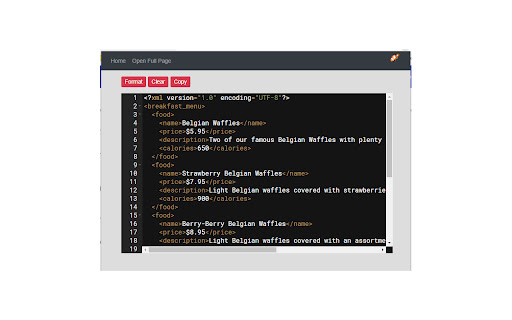
An XML formatting utility that allows users to paste or upload XML files to beautify the structure. It includes error highlighting and the ability to download the formatted output.

Developer:LinangData
Version:1.0.5
Size:1.64MiB
Last updated:

Overview

Installs

10K+

Rating

3.3

7 reviews

Languages

1 locales

Includes English (United States)

Market analysis

Review-backed positioning, friction, and market signals for this Chrome extension.

Backed by review samples

Macro category

Developer & Designer Tools

Pricing friction

Low review signal

Complaint intensity

Moderate review signal

Listing & review signals
Observed signals from store listing text and review samples.

Listing positioning

The extension is positioned as a tool to pretty-print XML for easier readability. It highlights features like context menu integration, local file support, and error detection for well-formedness.

Inferred product pattern

A lightweight, free XML beautification tool that struggles with scalability and core feature reliability.

Review-backed pain points

Users report that the extension fails to handle large XML files and that the right-click 'Format XML' feature is non-functional.

Observed feature gaps

Lack of support for large-scale data processing.

Tags
XML FormatterCode PrettifierDeveloper Utility
Target users

- Developers

- Data Analysts

- Web Engineers

Primary use cases

- XML data beautification

- XML syntax error detection

- Formatting web-based XML content

Positive themes

- Speed

- Functional for basic requirements

Negative themes

- Failure to process large datasets

- Broken context menu functionality

- General unreliability

Observed friction

- Performance complaints detected

- No pricing friction observed; the product is marketed as free.

Evidence boundary: Analysis based on store listing features and user reviews highlighting performance issues with large data and broken context menu integration. The sample size of reviews is very small, which may not fully represent the entire user population.
Complaint summaries
Review-backed complaint signals grouped by operational area.

Support

No specific support complaints observed.

Reliability

Users reported the tool is unreliable, specifically citing broken core features and inability to handle large files.

Privacy

No privacy complaints observed.

Access & pricing

- Free usage observed

- No account requirement observed

- Free plan or free usage claimed

Store listing facts

Listing assets

- Screenshots: 1

- Videos: 0

- Languages: 1

Trust signals

- Privacy policy

- Developer contact

- Official website

Store metadata

- Version: 1.0.5

- Size: 1.64MiB

- Last updated:

Store description excerpt
Short excerpt from the public Chrome Web Store listing; full copy is available on the official store page.
This formatter lets you pretty print your XML. Just paste your XML and then click the Format button. You can also open a local XML file to format. The formatter checks that your XML is well-formed. If errors are found they are highlighted. Hover over the error icons to see a description of the error. Features: - select XML in a browser tab, right-click on the selected XML, and then choose "Format XML" from the menu. This will open a new tab and format the XML you selected. - download the result to an XML file - open local XML files for formatting - the current state is saved for your next session. - provides links to other tools from LinangData from the More tools menu - It's free! Release Notes: - 1.0.4 - update to manifest v3

Listing SEO keywords

Search intent keywords
Keyword signals for evaluating how users may discover, compare, or search for this extension category.

Core discovery

XML FormatterPretty Print XMLXML ValidatorFormat XML

Comparison

XML beautifierXML tree viewer

Problem

malformed XMLunformatted XMLXML syntax error

Alternative

Online XML formatterXML prettifier

Similar extensions

Jump to related discovery paths:

FAQ

What is XML Formatter mainly used for?
An XML formatting utility that allows users to paste or upload XML files to beautify the structure. It includes error highlighting and the ability to download the formatted output.
What market signals stand out?
Visible niche traction with limited review base. Last known update: 10/19/2022.
What should builders compare before entering this space?
Compare install concentration, rating quality, update recency, screenshots, developer portfolio, listing claims, and review-backed friction signals.
Is this page review-backed?
Backed by review samples. This page combines store metadata with selected review signals, while raw store metrics remain visible for comparison.

Screenshots

XML Formatter screenshot

Links

Recommended Chrome extensions

Related listings from the same category, trending peers, and the same publisher portfolio.

Browse workflow