Google Keep Chrome Extension icon

Google Keep Chrome Extension Chrome Extension Analysis

Tab & Bookmark Productivity

Chrome extension ID: lpcaedmchfhocbbapmcbpinfpgnhiddi

An official Chrome extension that allows users to capture URLs, text, and images from the browser into Google Keep. It enables the organization of saved content through labels and notes.

Developer:google.com
Version:4.26251.540.1
Size:6.47MiB
Last updated:

Overview

Installs

6.0M+

Rating

4.0

7,981 reviews

Languages

55 locales

Includes Deutsch, English, English (United Kingdom), Filipino...

Market analysis

Review-backed positioning, friction, and market signals for this Chrome extension.

Backed by review samples

Macro category

Tab & Bookmark Productivity

Pricing friction

Low review signal

Complaint intensity

High review signal

Listing & review signals
Observed signals from store listing text and review samples.

Listing positioning

The extension is positioned as a seamless, one-click tool to save web content directly to Google Keep. It emphasizes cross-platform synchronization across web, mobile, and wearable devices.

Inferred product pattern

Official ecosystem utility for capturing and syncing data to a proprietary cloud note service.

Review-backed pain points

Users report critical 'Error 400: invalid_request' and 'Custom scheme URI not allowed' messages during login, rendering the extension unusable for some.

Observed feature gaps

Lack of a native sidebar to add multiple items to a single note; users find the current implementation to be little more than a basic bookmark shortcut.

Tags
Web ClipperNote TakingGoogle EcosystemProductivity ToolQuick Save
Target users

- Google Keep users

- Web researchers

- Students

- Content curators

Primary use cases

- Saving webpages for later reading

- Capturing quotes and images from the web

- Syncing web findings to mobile devices

- Categorizing web clips with labels

Positive themes

No positive theme data.

Negative themes

- Authentication and authorization failures

- Total loss of functionality

- Lack of advanced features

- Browser compatibility issues

Observed friction

- Account blocking complaints detected

- Performance complaints detected

- No pricing friction observed as the service is free.

Evidence boundary: Analyzed official store listing and a sample of low-rating reviews highlighting critical auth errors. Provided review samples are exclusively negative, while the overall store score suggests a higher general satisfaction level.
Complaint summaries
Review-backed complaint signals grouped by operational area.

Support

Significant complaints regarding authorization errors that prevent users from signing in and using the tool.

Reliability

Reports of the extension disappearing from the browser or suddenly stopping work after previous successful use.

Privacy

No privacy complaints observed in the provided samples.

Access & pricing

- Free usage observed

- Account required for core usage

- Free plan or free usage claimed

Store listing facts

Listing assets

- Screenshots: 4

- Videos: 0

- Languages: 55

Trust signals

- Privacy policy

- Developer contact

- Official website

Store metadata

- Version: 4.26251.540.1

- Size: 6.47MiB

- Last updated:

Store description excerpt
Short excerpt from the public Chrome Web Store listing; full copy is available on the official store page.
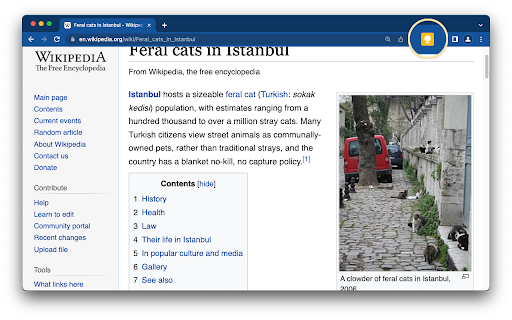
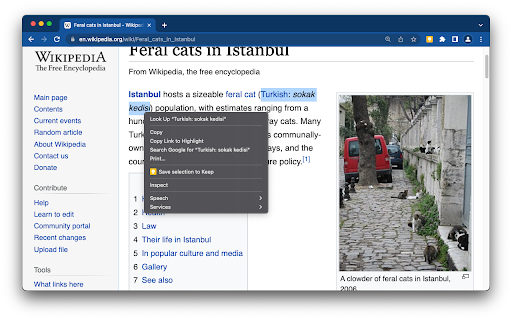
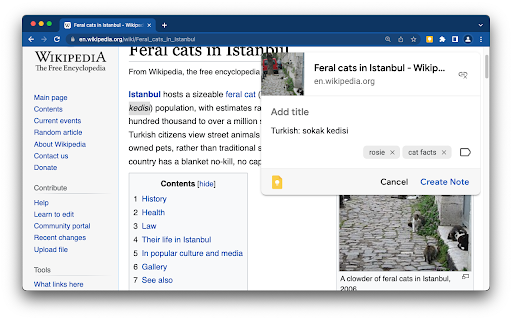
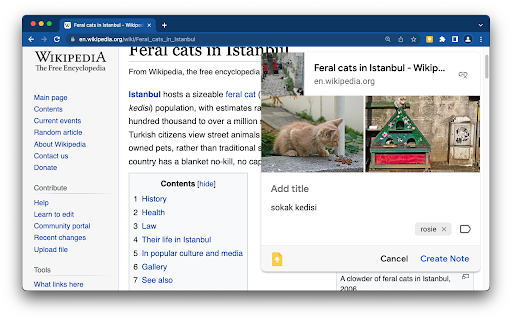
Found a webpage, image, or quote that you want to save for later? With the Google Keep Chrome Extension, easily save the things you care about to Keep and have them synced across all of the platforms that you use — including web, Android, iOS, and Wear. Take notes for additional detail and add labels to quickly categorize your note for later retrieval. Features: • Save URLs, text, and images • Take notes on saved content • Add labels to your notes • Automatically saves to Google Keep Try Google Keep on the web at https://keep.google.com, on your Android device at https://g.co/keep, and on your iOS device at https://itunes.apple.com/us/app/google-keep-your-thoughts/id1029207872.

Listing SEO keywords

Search intent keywords
Keyword signals for evaluating how users may discover, compare, or search for this extension category.

Core discovery

Google Keep extensionsave to Google Keepweb clipper for Keep

Comparison

Google Keep vs EvernoteGoogle Keep vs Notion

Problem

how to save web pages to Google Keepquick web clipping toolsync notes across devices

Alternative

Google Keep alternativesbest Chrome web clippers

Similar extensions

Jump to related discovery paths:

FAQ

What is Google Keep Chrome Extension mainly used for?
An official Chrome extension that allows users to capture URLs, text, and images from the browser into Google Keep. It enables the organization of saved content through labels and notes.
What market signals stand out?
Large installed base with substantial review base. Last known update: 06/25/2026.
What should builders compare before entering this space?
Compare install concentration, rating quality, update recency, screenshots, developer portfolio, listing claims, and review-backed friction signals.
Is this page review-backed?
Backed by review samples. This page combines store metadata with selected review signals, while raw store metrics remain visible for comparison.

Screenshots

Google Keep Chrome Extension screenshot

Links

Recommended Chrome extensions

Related listings from the same category, trending peers, and the same publisher portfolio.

Browse workflow
Chrome Remote Desktop icon

Chrome Remote Desktop

Chrome Remote Desktop Release Managers

Chrome Remote Desktop extension

Installs

34.0M+

Rating

3.2

Google Translate icon

Google Translate

google-translate-chrome-extension-owners

View translations easily as you browse the web. By the Google Translate team.

Installs

32.0M+

Rating

4.2

Enable local file links icon

Enable local file links

Takashi Sugimoto (tksugimoto)

Make it possible to open by click a link to a local file that is disabled by Chrome.

Installs

3.0M+

Rating

3.9

Pop up blocker for Chrome™ - Poper Blocker icon

Pop up blocker for Chrome™ - Poper Blocker

dingosolutions

Block popups, ads, cookie requests, trackers, notifications, ads on social media & more. A clean browsing experience starts today.

Installs

2.0M+

Rating

4.8

Momentum icon

Momentum

Momentum

Transform your browser into a beautifully designed tab that helps you feel calm, keep focus, and stay energized.

Installs

2.0M+

Rating

4.5

Google Scholar PDF Reader icon

Google Scholar PDF Reader

scholar-chrome-extensions

Supercharge your paper reading: follow references, skim outline, jump to figures, cite and save.

Installs

2.0M+

Rating

4.1

Keeper® Password Manager & Digital Vault icon

Keeper® Password Manager & Digital Vault

Keeper Security

Generate strong passwords, autofill and protect your confidential info with zero-knowledge encryption.

Installs

2.0M+

Rating

4.8

AI Grammar Checker & Paraphraser – LanguageTool icon

AI Grammar Checker & Paraphraser – LanguageTool

lt-extension-publisher

Instantly Enhance Your Texts with LanguageTool’s Grammar Checker and Paraphrasing Tool

Installs

2.0M+

Rating

4.7

Snow Web Application Metering icon

Snow Web Application Metering

snow_chrome_extensions

This extension tracks web application use for the purpose of license compliance and cost optimization. www.snowsoftware.com/browser

Installs

2.0M+

Rating

1.3

Sound Booster - increase volume up icon

Sound Booster - increase volume up

Sound-ultimate.com

Volume Booster helps boost sound video or music on any tab! Increase volume and bass booster, equalizer. Volume control.

Installs

2.0M+

Rating

4.5