Visual HTML icon

Visual HTML Chrome Extension Analysis

Developer & Designer Tools

Chrome extension ID: elfoppmphbdpopcbegabiakcgjmmpobo

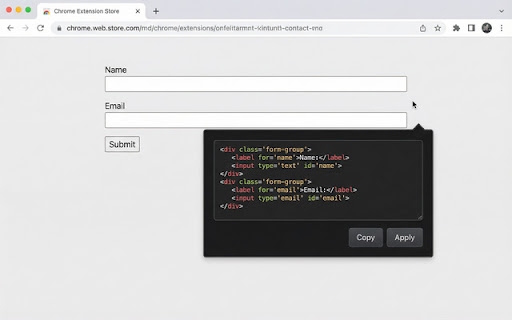
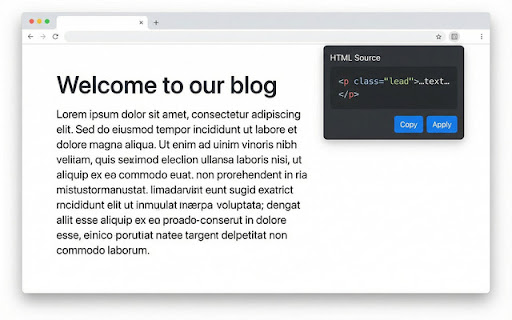
Visual HTML is a browser extension that displays the HTML source of elements upon hovering the cursor. It enables users to view, copy, and live-edit HTML directly within a popup to update the webpage instantly.

Developer:r01930828
Version:1.2.0
Size:13.46MiB
Last updated:

Overview

Installs

15

Rating

5.0

2 reviews

Languages

55 locales

Includes Deutsch, English, English (United Kingdom), English (United States)...

Market analysis

Review-backed positioning, friction, and market signals for this Chrome extension.

Backed by review samples

Macro category

Developer & Designer Tools

Pricing friction

Low review signal

Complaint intensity

Low review signal

Listing & review signals
Observed signals from store listing text and review samples.

Listing positioning

The product positions itself as a streamlined, faster alternative to standard browser DevTools. It emphasizes ease of use by allowing users to inspect, copy, and edit HTML markup via hover actions without opening a separate console.

Inferred product pattern

A lightweight developer utility focused on reducing friction in the HTML inspection and rapid prototyping workflow.

Review-backed pain points

No review-backed pain points identified.

Observed feature gaps

No specific feature gaps identified from the provided data.

Tags
HTML InspectorCode EditorWeb DevelopmentUI Tweaker
Target users

- Web Developers

- UI/UX Designers

- Frontend Engineers

Primary use cases

- Quickly inspecting element markup

- Testing layout and copy changes live

- Copying HTML snippets for development

Positive themes

- Time-saving compared to standard Inspect Element

- Clean and responsive user interface

- High utility for layout tweaking

Negative themes

No negative theme data.

Observed friction

- Pricing information is not provided in the store listing or reviews.

Evidence boundary: Extracted from the Chrome Web Store listing and two highly positive user reviews. The review sample size is extremely small (2 reviews), which may not represent the full user sentiment.
Complaint summaries
Review-backed complaint signals grouped by operational area.

Support

No support complaints were found in the provided reviews.

Reliability

No reliability or performance complaints were found in the provided reviews.

Privacy

No privacy complaints were found in the provided reviews.

Access & pricing

- No clear monetization signal

- No account requirement observed

- No clear pricing signal

Store listing facts

Listing assets

- Screenshots: 2

- Videos: 0

- Languages: 55

Trust signals

- Privacy policy

- Developer contact

Store metadata

- Version: 1.2.0

- Size: 13.46MiB

- Last updated:

Store description excerpt
Short excerpt from the public Chrome Web Store listing; full copy is available on the official store page.
Visual HTML — Inspect, copy, and edit HTML in place Visual HTML shows the HTML source of any element when you hover over it on a webpage. No right‑click or DevTools needed: just point at a button, link, div, or any node and get an instant popup with its markup. What you can do • View — See the full HTML of the element in a readable, word‑wrapped code block. • Copy — One click copies the code (including your edits) to the clipboard. • Edit — Change the HTML in the popup and click Apply to update the page live. Great for quick tweaks, testing copy, or fixing broken markup. • Works everywhere — Runs on any site. The popup stays in place so you can easily reach the Copy and Apply buttons. Details • No permissions required beyond normal page access. • Interface follows your browser language (50+ locales). • Safe apply: invalid HTML shows an error instead of breaking the page. Table cells and…

Listing SEO keywords

Search intent keywords
Keyword signals for evaluating how users may discover, compare, or search for this extension category.

Core discovery

HTML InspectorEdit HTML LiveVisual HTML EditorInspect Element Alternative

Comparison

Chrome DevToolsInspect Element

Problem

slow HTML inspectiondifficult markup editing

Alternative

HTML inspector extensionweb developer tools

Similar extensions

Jump to related discovery paths:

FAQ

What is Visual HTML mainly used for?
Visual HTML is a browser extension that displays the HTML source of elements upon hovering the cursor. It enables users to view, copy, and live-edit HTML directly within a popup to update the webpage instantly.
What market signals stand out?
Early or small audience with limited review base. Last known update: 05/17/2026.
What should builders compare before entering this space?
Compare install concentration, rating quality, update recency, screenshots, developer portfolio, listing claims, and review-backed friction signals.
Is this page review-backed?
Backed by review samples. This page combines store metadata with selected review signals, while raw store metrics remain visible for comparison.

Screenshots

Visual HTML screenshot

Links

Recommended Chrome extensions

Related listings from the same category, trending peers, and the same publisher portfolio.

Browse developer