Open With Download Manager icon

Open With Download Manager Chrome Extension Analysis

Automation & Workflow Efficiency

Chrome extension ID: epgilldoipfbdlneomlmegekaoonchcj

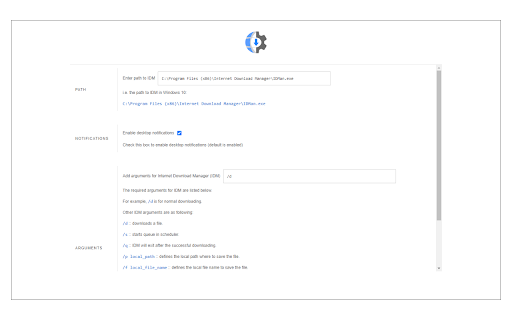
An unofficial browser extension designed to integrate with the Internet Download Manager desktop software. It enables users to right-click links to trigger IDM downloads and supports custom command-line arguments for download automation.

Developer:Muyor
Version:0.1.7
Size:25.28KiB
Last updated:

Overview

Installs

90K+

Rating

3.6

324 reviews

Languages

1 locales

Includes English

Market analysis

Review-backed positioning, friction, and market signals for this Chrome extension.

Backed by review samples

Macro category

Automation & Workflow Efficiency

Pricing friction

Low review signal

Complaint intensity

Moderate review signal

Listing & review signals
Observed signals from store listing text and review samples.

Listing positioning

The product is positioned as an unofficial bridge that allows users to send download links from the browser to the Internet Download Manager (IDM) desktop application. It explicitly states it is not affiliated with IDM and requires a separate native-client patch and manual path configuration to function.

Inferred product pattern

Third-party native-client bridge connecting a browser context menu to a specific piece of desktop software.

Review-backed pain points

Users frequently report that the extension does not work even after following setup instructions. Specific complaints include the inability to detect the native client, particularly when using portable browser versions.

Observed feature gaps

Lack of seamless, one-click installation; requires a third-party GitHub patch and manual directory pathing to operate.

Tags
IDM IntegrationDownload ManagerContext MenuWindows Utility
Target users

- Internet Download Manager users

- Power users managing large downloads

- Windows OS users

Primary use cases

- Sending web links to a desktop download manager

- Automating IDM downloads using specific arguments

Positive themes

No positive theme data.

Negative themes

- Failure to function

- Difficulty with native client detection

- Confusion over official vs. unofficial status

Observed friction

- Performance complaints detected

- No pricing friction observed as the product appears to be free.

Evidence boundary: Analysis based on the official store listing and 12 review samples. The provided review sample is exclusively composed of low-rating feedback, meaning positive user themes are not represented.
Complaint summaries
Review-backed complaint signals grouped by operational area.

Support

Users report total functional failure, though the developer provides a bug report form on their website.

Reliability

High incidence of reports claiming the extension is 'fake' or simply 'not working,' suggesting significant reliability issues across different browser versions.

Privacy

No privacy-related complaints found in the provided samples.

Access & pricing

- Free usage observed

- No account requirement observed

- Free plan or free usage claimed

Store listing facts

Listing assets

- Screenshots: 1

- Videos: 0

- Languages: 1

Trust signals

- Developer contact

- Official website

Store metadata

- Version: 0.1.7

- Size: 25.28KiB

- Last updated:

Store description excerpt
Short excerpt from the public Chrome Web Store listing; full copy is available on the official store page.
Open With Download Manager is a browser extension that enables you to open and download a desired item with the Internet Download Manager application. Important note: Open With Download Manager extension does NOT belong or relate to IDM and has NO affiliations with Internet Download Manager or IDM at all. It is an unofficial extension that is developed and maintained independently by its author. To operate with this addon you need a native-client patch to connect your browser with the native IDM application in your OS. Please read the following to get more info on how to install native-client and operate with this add-on. 1) after installing the add-on, you need to connect it with native applications (i.e. IDM) on your machine. If you do not have IDM, please head to (internetdownloadmanager.com/download.html) and install IDM on your machine. Once you have IDM, you need to make the conne…

Listing SEO keywords

Search intent keywords
Keyword signals for evaluating how users may discover, compare, or search for this extension category.

Core discovery

Open with IDMIDM browser integrationInternet Download Manager extension

Comparison

IDM official extension alternativeunofficial IDM extension

Problem

IDM not catching linksIDM extension not working Chrome

Alternative

IDM native client bridgedownload manager context menu

Similar extensions

Jump to related discovery paths:

FAQ

What is Open With Download Manager mainly used for?
An unofficial browser extension designed to integrate with the Internet Download Manager desktop software. It enables users to right-click links to trigger IDM downloads and supports custom command-line arguments for download automation.
What market signals stand out?
Visible niche traction with moderate review base. Last known update: 04/23/2026.
What should builders compare before entering this space?
Compare install concentration, rating quality, update recency, screenshots, developer portfolio, listing claims, and review-backed friction signals.
Is this page review-backed?
Backed by review samples. This page combines store metadata with selected review signals, while raw store metrics remain visible for comparison.

Screenshots

Open With Download Manager screenshot

Links

Recommended Chrome extensions

Related listings from the same category, trending peers, and the same publisher portfolio.

Browse tools
Allow CORS: Access-Control-Allow-Origin icon

Allow CORS: Access-Control-Allow-Origin

Muyor

Easily add (Access-Control-Allow-Origin: *) rule to the response header.

Installs

800K+

Rating

3.4

Lightshot (screenshot tool) icon

Lightshot (screenshot tool)

Skillbrains

Simple and convenient screenshot tool. Select an area, edit your screenshot and upload it to the server.

Installs

2.0M+

Rating

4.4

PrintFriendly: Print Clean Pages, Save as PDF & Screenshot, AI Tools icon

PrintFriendly: Print Clean Pages, Save as PDF & Screenshot, AI Tools

PrintFriendly

Print clean web pages, save as PDF, take screenshots, or use reader mode. AI summaries & ad removal. Works on ChatGPT & Gemini.

Installs

1.0M+

Rating

4.6

Mobile simulator - responsive testing tool icon

Mobile simulator - responsive testing tool

François Duprat

Smartphone and tablet simulator on computer with several models to test mobile responsive websites.

Installs

1.0M+

Rating

4.9

Chat with all AI models (Gemini, Claude, DeepSeek…) & AI Agents | AITOPIA icon

Chat with all AI models (Gemini, Claude, DeepSeek…) & AI Agents | AITOPIA

AITOPIA AI Sidebar

AI Agent Marketplace & AI Sidebar with all AI models (Gemini, Claude, DeepSeek & more) and hundreds of AI Agents

Installs

1.0M+

Rating

4.9

Codex icon

Codex

OpenAI

Control Chrome with Codex.

Installs

1.0M+

Rating

3.8

HID Credential Management Extension icon

HID Credential Management Extension

hid-global-chrome-web-store

Browser extension for HID credential management solution.

Installs

1.0M+

Rating

1.3

Keywords Everywhere - Keyword Tool icon

Keywords Everywhere - Keyword Tool

Axeman Technology Solutions LLP

Keyword search volume, cpc and competition for 15+ websites like Google™ Search Console, YouTube™, Amazon™ & more

Installs

1.0M+

Rating

4.5

WebChatGPT: Prompt library with web access icon

WebChatGPT: Prompt library with web access

WebChatGPT

Augment your ChatGPT prompts with relevant web search results through web browsing.

Installs

1.0M+

Rating

4.2

Ecosia - The search engine that plants trees icon

Ecosia - The search engine that plants trees

Ecosia GmbH

This extension sets your search engine to Ecosia and customizes your new tab page so you can plant trees with every search.

Installs

1.0M+

Rating

4.7