Allow CORS: Access-Control-Allow-Origin icon

Allow CORS Chrome Extension Analysis

Developer & Designer Tools

Store listing title: Allow CORS: Access-Control-Allow-Origin

Chrome extension ID: lhobafahddgcelffkeicbaginigeejlf

A Chrome extension designed to bypass browser-enforced Cross-Origin Resource Sharing (CORS) restrictions. It allows developers to modify response headers to facilitate testing and debugging of web applications.

Developer:Muyor
Version:0.2.2
Size:86.41KiB
Last updated:

Overview

Installs

800K+

Rating

3.4

291 reviews

Languages

1 locales

Includes English

Market analysis

Review-backed positioning, friction, and market signals for this Chrome extension.

Backed by review samples

Macro category

Developer & Designer Tools

Pricing friction

Low review signal

Complaint intensity

High review signal

Listing & review signals
Observed signals from store listing text and review samples.

Listing positioning

The product is positioned as a simple utility to enable cross-domain Ajax requests by adding the Access-Control-Allow-Origin: * rule to response headers. It emphasizes easy activation via a toggle button in the toolbar popup.

Inferred product pattern

Header-modification utility for development debugging.

Review-backed pain points

Users report the extension frequently fails to resolve CORS errors on localhost, breaks PATCH requests in professional environments like MS DevOps, and can disable core functionality on sites like YouTube.

Observed feature gaps

Lack of reliable support for localhost and file:// URLs, instability across different HTTP methods (specifically PATCH), and poor user experience regarding browser startup behavior.

Tags
CORS BypassWeb DevelopmentHTTP HeadersAjax Debugging
Target users

- Web Developers

- Frontend Engineers

- API Testers

Primary use cases

- Debugging cross-domain Ajax requests

- Bypassing CORS restrictions during local development

- Testing APIs without server-side header access

Positive themes

- Appreciation for whitelist functionality

Negative themes

- Failure to work on localhost or file protocols

- Broken PATCH requests

- Severe performance degradation/RAM usage

- Intrusive update tabs

- Interference with unrelated site functionality

Observed friction

- Performance complaints detected

- Privacy complaints detected

- No pricing friction observed as the tool appears to be free.

Evidence boundary: Analysis based on store listing data and a sample of 10 high-impact, low-rating reviews. Review sample is heavily weighted toward negative experiences; minimal positive review data provided.
Complaint summaries
Review-backed complaint signals grouped by operational area.

Support

Users express frustration over unfixed bugs and a lack of resolution for critical technical failures.

Reliability

Significant reports of the tool not working for its primary purpose on specific environments and causing collateral damage to other browser functions.

Privacy

One user raised a severe concern regarding potential illegal crypto-mining due to observed RAM usage of 6GB.

Access & pricing

- Free usage observed

- No account requirement observed

- Free plan or free usage claimed

Store listing facts

Listing assets

- Screenshots: 3

- Videos: 1

- Languages: 1

Trust signals

- Developer contact

- Official website

Store metadata

- Version: 0.2.2

- Size: 86.41KiB

- Last updated:

Store description excerpt
Short excerpt from the public Chrome Web Store listing; full copy is available on the official store page.
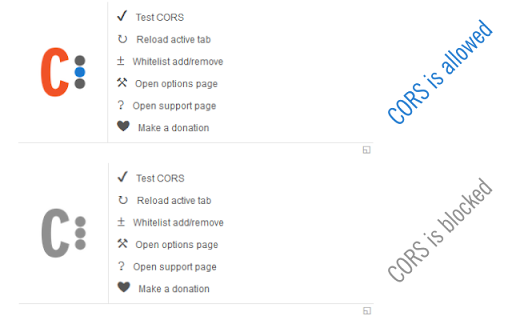
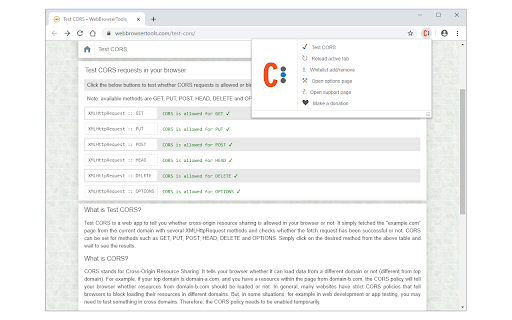
Allow CORS: Access-Control-Allow-Origin lets you easily perform cross-domain Ajax requests in web applications. Simply activate the add-on and perform the request. CORS or Cross-Origin Resource Sharing is blocked in modern browsers by default (in JavaScript APIs). Installing this add-on will allow you to unblock this feature. Please note that, when the add-on is added to your browser, it is inactive by default (toolbar icon is grey C letter). If you want to activate the add-on, please open the toolbar popup and press the toggle button on the left side. The icon will turn to an orange C letter. If you have a feature request or found a bug to report, please fill out the bug report form on the add-on's homepage (https://mybrowseraddon.com/access-control-allow-origin.html).

Listing SEO keywords

Search intent keywords
Keyword signals for evaluating how users may discover, compare, or search for this extension category.

Core discovery

allow cors extensionbypass cors chromeaccess-control-allow-origin header

Comparison

best cors extensionallow cors alternatives

Problem

cors error localhostcross-origin request blockedpatch request cors failure

Alternative

cors bypass chromeunblock cors extension

Similar extensions

Jump to related discovery paths:

FAQ

What is Allow CORS mainly used for?
A Chrome extension designed to bypass browser-enforced Cross-Origin Resource Sharing (CORS) restrictions. It allows developers to modify response headers to facilitate testing and debugging of web applications.
What market signals stand out?
Established adoption with moderate review base. Last known update: 04/01/2026.
What should builders compare before entering this space?
Compare install concentration, rating quality, update recency, screenshots, developer portfolio, listing claims, and review-backed friction signals.
Is this page review-backed?
Backed by review samples. This page combines store metadata with selected review signals, while raw store metrics remain visible for comparison.

Screenshots

Allow CORS: Access-Control-Allow-Origin screenshot

Links

Website: mybrowseraddon.com

Videos: Watch

Recommended Chrome extensions

Related listings from the same category, trending peers, and the same publisher portfolio.

Browse tools
Open With Download Manager icon

Open With Download Manager

Muyor

Open and download desired links with internet download manager.

Installs

90K+

Rating

3.6

Immersive Translate: AI Web, PDF & Video Translator icon

Immersive Translate: AI Web, PDF & Video Translator

Immersive Translate

Free Translate Website, Translate PDF & Epub eBook, Translate Video Subtitles in Bilingual

Installs

3.0M+

Rating

4.0

BetterTTV icon

BetterTTV

NightDev, LLC

BetterTTV enhances Twitch and YouTube with new features, emotes, and more.

Installs

3.0M+

Rating

4.6

Monica: All-In-One AI Assist & Smartest  AI Agent icon

Monica: All-In-One AI Assist & Smartest AI Agent

Monica Team

One stop AI Assistant with GPT, Claude, Gemini: Chat, Write, Translate, Search, Summarize, image generator, video generation

Installs

3.0M+

Rating

4.9

Ad Blocker: Stands AdBlocker icon

Ad Blocker: Stands AdBlocker

Stands

Stands AdBlocker – it's a free ad blocker for YouTube, Twitch, Pop-Ups, Video Ads, and websites. Block ads everywhere with Stands!

Installs

3.0M+

Rating

4.8

Google Input Tools icon

Google Input Tools

cloud-input-team

Input Tools lets you type in the language of your choice.

Installs

3.0M+

Rating

4.0

Smallpdf—Edit, Convert, Compress, & AI Summarize PDF icon

Smallpdf—Edit, Convert, Compress, & AI Summarize PDF

Smallpdf AG

Easy-to-use PDF tools to compress, convert, merge, chat to, split, e-sign, and edit PDF files in your browser.

Installs

3.0M+

Rating

4.6

Microsoft Bing Search with Rewards icon

Microsoft Bing Search with Rewards

Microsoft Corporation

Use the Microsoft Rewards extension to find new ways to earn every day, easily track your points and set your default search to Bing

Installs

3.0M+

Rating

4.4

Google Scholar Button icon

Google Scholar Button

scholar-chrome-extensions

Lookup scholarly articles as you browse the web.

Installs

3.0M+

Rating

4.6

ЮБуст - VPN для YouTube. Обход блокировки Ютуб без ВПН. VPN для браузера icon

ЮБуст - VPN для YouTube. Обход блокировки Ютуб без ВПН. VPN для браузера

Uboost

Ускоритель Ютуб без ВПН, VPN для браузера Яндекс, Chrome, Opera, Edge. Обход замедления Ютуба.

Installs

2.0M+

Rating

4.2