GoFullPage - Full Page Screen Capture icon

GoFullPage Chrome Extension Analysis

Tab & Bookmark Productivity

Store listing title: GoFullPage - Full Page Screen Capture

Chrome extension ID: fdpohaocaechififmbbbbbknoalclacl

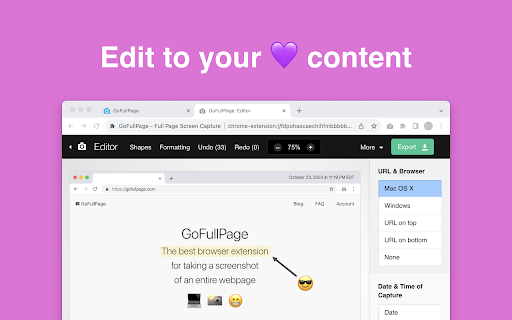
A Chrome extension that captures full web pages as images or PDFs. It includes a premium editor that allows users to crop, annotate, and add emojis to their screenshots.

Developer:GoFullPage
Version:8.6
Size:1.7MiB
Last updated:

Overview

Installs

11.0M+

Rating

4.9

83,993 reviews

Languages

5 locales

Includes English, español, français, 日本語...

Market analysis

Review-backed positioning, friction, and market signals for this Chrome extension.

Backed by review samples

Macro category

Tab & Bookmark Productivity

Pricing friction

Moderate review signal

Complaint intensity

High review signal

Listing & review signals
Observed signals from store listing text and review samples.

Listing positioning

The product positions itself as a simple, bloat-free, and reliable tool for capturing entire web pages. It emphasizes its ability to handle complex layouts, including iframes and scrollable elements, without requiring unnecessary permissions.

Inferred product pattern

A high-utility productivity tool transitioning from a simple free utility to a feature-gated freemium model.

Review-backed pain points

Users are highly frustrated by the requirement to create an account to save edited screenshots and a perceived shift away from perpetual licensing toward a subscription model.

Observed feature gaps

Users reported a lack of a direct print option and difficulties capturing content on specific platforms like Gemini, Claude, or local HTML files.

Tags
Full Page ScreenshotWeb CapturePDF ExportImage Editor
Target users

- Web developers

- Content creators

- Researchers

- Designers

Primary use cases

- Capturing long web pages

- Documenting website layouts

- Converting web pages to PDF

Positive themes

- Reliability in capturing complex pages

- Effective handling of scrollable elements

Negative themes

- Requirement of account creation to save edits

- Transition from perpetual to subscription pricing

- Paywalls on previously free features

Observed friction

- Free-tier complaints detected

- Account blocking complaints detected

- Significant friction exists regarding the subscription model and the requirement of an account to access saving/editing features.

Evidence boundary: Data extracted from the Chrome Web Store listing and a sample of high-information user reviews. Review samples may not reflect the sentiment of the entire 11 million user base.
Complaint summaries
Review-backed complaint signals grouped by operational area.

Support

No specific support complaints observed, though users expressed frustration with the business model.

Reliability

Occasional reports of failure when capturing local files or specific AI-driven web interfaces.

Privacy

No privacy complaints observed.

Access & pricing

- Free entry with paid features

- Login needed for core features

- Limited free usage observed

Store listing facts

Listing assets

- Screenshots: 3

- Videos: 0

- Languages: 5

Trust signals

- Privacy policy

- Developer contact

- Official website

Store metadata

- Version: 8.6

- Size: 1.7MiB

- Last updated:

Store description excerpt
Short excerpt from the public Chrome Web Store listing; full copy is available on the official store page.
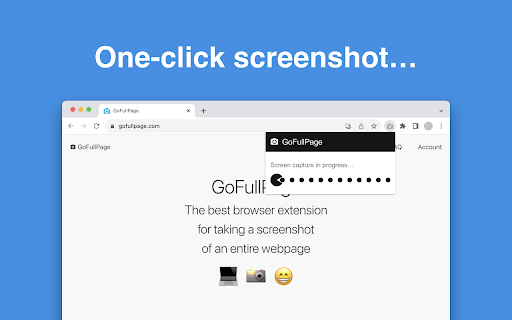
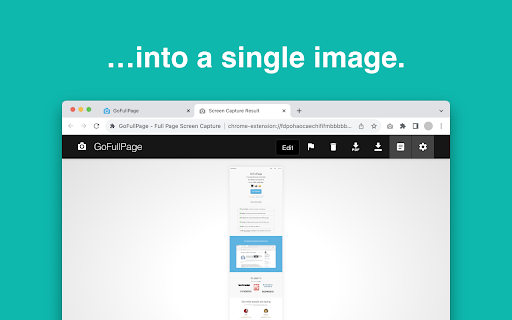
The simplest way to take a full page screenshot of your current browser window. Click on the extension icon (or press Alt+Shift+P), watch the extension capture each part of the page, and be transported to a new tab of your screenshot where you can download it as an image or PDF or even just drag it to your desktop. *No bloat, no ads, no unnecessary permissions, just a simple way to turn a full web page into an image.* The advanced screen capture technology handles complex pages—including inner scrollable elements as well as embedded iframes—unlike any other extension. If you encounter an issue, please report it via the customer support flag icon on the capture page, so we can improve the extension for you and everyone else who uses it. In order to screenshot the entire page it must scroll to each visible part, so please be patient as it quickly assembles all the pieces. For the rare sce…

Listing SEO keywords

Search intent keywords
Keyword signals for evaluating how users may discover, compare, or search for this extension category.

Core discovery

full page screenshotweb page capturescreenshot to pdfchrome screen capture

Comparison

SnapifyChrome DevTools

Problem

screenshot local filescapture geminicapture claude

Alternative

full page screen capturewebpage to image

Similar extensions

Jump to related discovery paths:

FAQ

What is GoFullPage mainly used for?
A Chrome extension that captures full web pages as images or PDFs. It includes a premium editor that allows users to crop, annotate, and add emojis to their screenshots.
What market signals stand out?
Large installed base with very deep review base. Last known update: 01/21/2026.
What should builders compare before entering this space?
Compare install concentration, rating quality, update recency, screenshots, developer portfolio, listing claims, and review-backed friction signals.
Is this page review-backed?
Backed by review samples. This page combines store metadata with selected review signals, while raw store metrics remain visible for comparison.

Screenshots

GoFullPage - Full Page Screen Capture screenshot

Links

Recommended Chrome extensions

Related listings from the same category, trending peers, and the same publisher portfolio.

Browse developer