Color Picker for Chrome™ Chrome Extension Analysis
Developer & Designer ToolsChrome extension ID: clldacgmdnnanihiibdgemajcfkmfhia
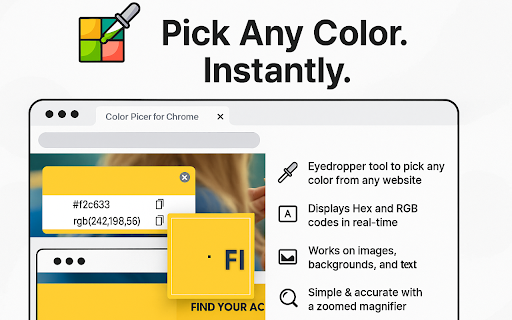
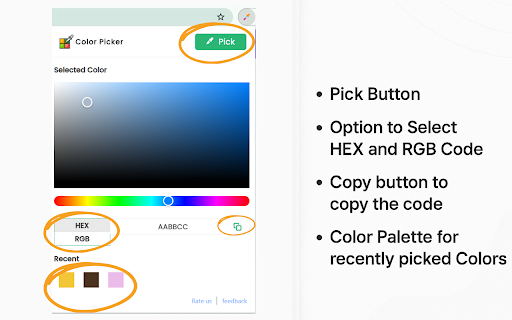
Color Picker for Chrome is a browser extension that allows users to extract color data from websites. It provides real-time color values in HEX and RGB formats and maintains a history of recently selected colors.
Overview
Installs
700K+
Rating
★ 4.0
264 reviews
Languages
1 locales
Includes English
Market analysis
Review-backed positioning, friction, and market signals for this Chrome extension.
Macro category
Developer & Designer Tools
Pricing friction
Low review signal
Complaint intensity
High review signal
Listing positioning
The extension positions itself as a robust, user-friendly utility for capturing colors from any webpage. It emphasizes its core functionality of providing HEX and RGB codes through an advanced eyedropper and a built-in color history feature.
Inferred product pattern
A formerly utility-focused extension that appears to have introduced performance regressions and potentially invasive background behaviors through feature creep.
Review-backed pain points
The primary pain point is that the core eyedropper tool frequently freezes or closes without capturing any data. Users also report significant frustration with unwanted background persistent processes and perceived 'bloat' that has degraded the user experience.
Observed feature gaps
The extension lacks basic stability in modern browser versions (e.g., macOS Sonoma). Users desire a return to a lightweight, functional tool without the recently added extraneous features or invasive background behaviors.
- Web Designers
- Frontend Developers
- UI/UX Professionals
- Digital Content Creators
- Grabbing HEX/RGB color codes from live webpages
- Saving color palettes for design projects
- Identifying color values for design consistency
- Formerly a reliable and highly useful tool for daily design workflows
- Simple and clean user interface
- Total loss of core functionality (eyedropper not picking colors)
- Unexpected background process/startup behavior
- Presence of unwanted bloatware or AI features
- Frequent 'undefined' results
- Performance complaints detected
- Privacy complaints detected
- No direct pricing friction reported; the primary friction is the non-functional state of the core tool.
Support
Users express frustration that the tool is 'broken' and feel ignored or gaslit when technical issues persist.
Reliability
High frequency of reports citing the eyedropper failing to activate, crashing, or returning 'undefined' values across different platforms.
Privacy
Users are concerned about the extension requesting permission to run on PC boot and persistent background activity.
- No clear monetization signal
- No account requirement observed
- Free plan or free usage claimed
Store listing facts
- Screenshots: 2
- Videos: 0
- Languages: 1
- Privacy policy
- Developer contact
- Official website
- Version: 3.0.1
- Size: 280KiB
- Last updated:
Listing SEO keywords
Core discovery
Comparison
Problem
Alternative
Similar extensions
Jump to related discovery paths:
FAQ
Screenshots
Links
Website: autocolorpicker.com
Privacy policy: https://autocolorpicker.com/privacy-policy