What the font? - Web Font Inspector icon

What the font? Chrome Extension Analysis

Developer & Designer Tools

Store listing title: What the font? - Web Font Inspector

Chrome extension ID: fheplimpgnnehdjjjhjhkhjdohaeoaba

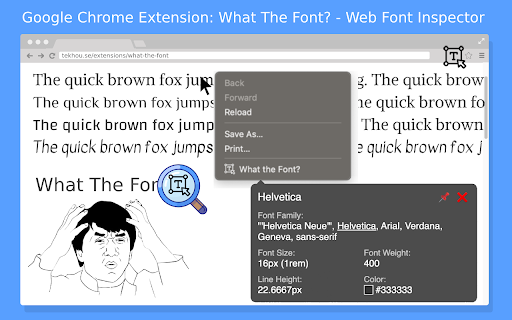
This tool allows users to identify font families and various CSS styles by using a mouse cursor or right-click menu. It provides immediate data on line height, weight, and color for any text on a webpage.

Developer:Extension Rocks
Version:1.3
Size:37.96KiB
Last updated:

Overview

Installs

3K+

Rating

5.0

5 reviews

Languages

52 locales

Includes Deutsch, English, Filipino, Indonesia...

Market analysis

Review-backed positioning, friction, and market signals for this Chrome extension.

Backed by review samples

Macro category

Developer & Designer Tools

Pricing friction

Low review signal

Complaint intensity

Low review signal

Listing & review signals
Observed signals from store listing text and review samples.

Listing positioning

The extension is positioned as a privacy-focused utility for identifying web fonts and CSS properties like size, weight, and color. It emphasizes security by highlighting Manifest V3 compliance and the absence of tracking or third-party scripts.

Inferred product pattern

A specialized utility tool that likely utilizes open-source font-detection logic with minor UX differentiators like a pin feature.

Review-backed pain points

Users have noted that the extension icon is difficult to see when using a white browser theme due to the logo color.

Observed feature gaps

A dark-themed logo is requested to improve visibility on light-colored browser interfaces.

Tags
Font InspectorWeb Design ToolCSS Inspector
Target users

- Web Designers

- Frontend Developers

- Graphic Designers

Primary use cases

- Identifying web fonts

- Inspecting CSS typography settings

Positive themes

- Effective font identification

- Unique pin feature in the pop-up modal

- Developer reliability

Negative themes

- UI visibility issues

Observed friction

- No pricing friction observed in the available reviews.

Evidence boundary: Extracted from store listing details and high-rating user reviews. The analysis is limited by a small total number of reviews.
Complaint summaries
Review-backed complaint signals grouped by operational area.

Support

No support complaints observed.

Reliability

No reliability or performance complaints observed.

Privacy

No privacy complaints observed; the listing explicitly claims no permission abuse or tracking.

Access & pricing

- No clear monetization signal

- No account requirement observed

- No clear pricing signal

Store listing facts

Listing assets

- Screenshots: 1

- Videos: 0

- Languages: 52

Trust signals

- Privacy policy

- Developer contact

- Official website

Store metadata

- Version: 1.3

- Size: 37.96KiB

- Last updated:

Store description excerpt
Short excerpt from the public Chrome Web Store listing; full copy is available on the official store page.
What the font is this? This extension will help you identify current font pointing by mouse cursor, alone with other font CSS styles. How to use: Right click on the web pages and choose "What The Font?". Or click the extension icon. ✅ Manifest V3 enabled. 🚫 No permission abuse. 🚫 No sneaky tracking code. 🚫 No 3rd-party script. Have fun.

Listing SEO keywords

Search intent keywords
Keyword signals for evaluating how users may discover, compare, or search for this extension category.

Core discovery

web font inspectoridentify fonts on websitesfont detector extensionCSS typography toolfind font family

Comparison

WhatFont

Problem

identify web fontsfind font size and color

Alternative

font identification toolCSS font inspector

Similar extensions

Jump to related discovery paths:

FAQ

What is What the font? mainly used for?
This tool allows users to identify font families and various CSS styles by using a mouse cursor or right-click menu. It provides immediate data on line height, weight, and color for any text on a webpage.
What market signals stand out?
Early or small audience with limited review base. Last known update: 02/09/2026.
What should builders compare before entering this space?
Compare install concentration, rating quality, update recency, screenshots, developer portfolio, listing claims, and review-backed friction signals.
Is this page review-backed?
Backed by review samples. This page combines store metadata with selected review signals, while raw store metrics remain visible for comparison.

Screenshots

What the font? - Web Font Inspector screenshot

Links

Recommended Chrome extensions

Related listings from the same category, trending peers, and the same publisher portfolio.

Browse tools
Pesticide - Advanced CSS Debugger icon

Pesticide - Advanced CSS Debugger

Extension Rocks

Not only inserts outlines (without background color) on all elements, but also inspects size and layout. CSS is awesome!

Installs

20K+

Rating

4.9

Swoosh Cookie and Local Storage Specialist icon

Swoosh Cookie and Local Storage Specialist

Extension Rocks

Manage Cookies, Local Storage & Session Storage in one place. Powerful, intuitive, and real-time web dev toolkit.

Installs

10K+

Rating

3.9

Shazam: Find song names from your browser icon

Shazam: Find song names from your browser

Shazam

Identify music, search lyrics & more

Installs

5.0M+

Rating

4.7

IE Tab icon

IE Tab

Blackfish Software

Display web pages using IE within Chrome. Use Java, Silverlight, ActiveX, Sharepoint, and more.

Installs

4.0M+

Rating

4.3

Microsoft Bing Homepage & Search for Chrome icon

Microsoft Bing Homepage & Search for Chrome

Microsoft Corporation

Set Microsoft Bing as your default homepage and default search engine

Installs

4.0M+

Rating

3.8

Immersive Translate: AI Web, PDF & Video Translator icon

Immersive Translate: AI Web, PDF & Video Translator

Immersive Translate

Free Translate Website, Translate PDF & Epub eBook, Translate Video Subtitles in Bilingual

Installs

3.0M+

Rating

4.0

BetterTTV icon

BetterTTV

NightDev, LLC

BetterTTV enhances Twitch and YouTube with new features, emotes, and more.

Installs

3.0M+

Rating

4.6

Monica: All-In-One AI Assist & Smartest  AI Agent icon

Monica: All-In-One AI Assist & Smartest AI Agent

Monica Team

One stop AI Assistant with GPT, Claude, Gemini: Chat, Write, Translate, Search, Summarize, image generator, video generation

Installs

3.0M+

Rating

4.9

Ad Blocker: Stands AdBlocker icon

Ad Blocker: Stands AdBlocker

Stands

Stands AdBlocker – it's a free ad blocker for YouTube, Twitch, Pop-Ups, Video Ads, and websites. Block ads everywhere with Stands!

Installs

3.0M+

Rating

4.8

Google Input Tools icon

Google Input Tools

cloud-input-team

Input Tools lets you type in the language of your choice.

Installs

3.0M+

Rating

4.0