Pesticide - Advanced CSS Debugger icon

Pesticide Chrome Extension Analysis

Developer & Designer Tools

Store listing title: Pesticide - Advanced CSS Debugger

Chrome extension ID: jeebpgmphhagpecfiophljpkhncoajcg

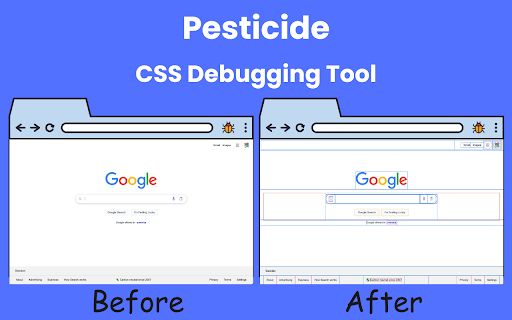
This tool provides a visual overlay for web pages that highlights layout structures, element dimensions, and CSS properties. It allows developers and designers to quickly inspect page elements, copy CSS formatting, and visualize spacing without navigating standard browser developer tools.

Developer:Extension Rocks
Version:3.2.0
Size:169KiB
Last updated:

Overview

Installs

20K+

Rating

4.9

94 reviews

Languages

51 locales

Includes Deutsch, English, Filipino, Indonesia...

Market analysis

Review-backed positioning, friction, and market signals for this Chrome extension.

Backed by review samples

Macro category

Developer & Designer Tools

Pricing friction

Low review signal

Complaint intensity

Low review signal

Listing & review signals
Observed signals from store listing text and review samples.

Listing positioning

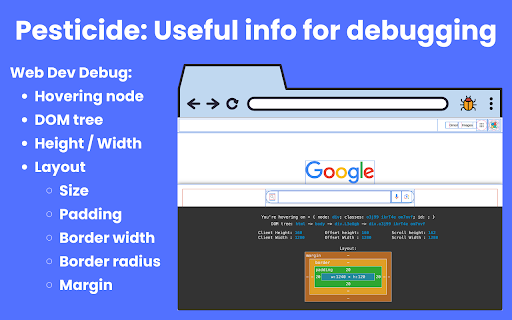
Pesticide positions itself as a lightweight, advanced CSS debugging alternative to heavy built-in browser consoles. It emphasizes non-intrusive layout inspection through outlines and a floating inspector panel for real-time box model, typography, and CSS data.

Inferred product pattern

Free productivity-focused utility that enhances existing browser developer capabilities.

Review-backed pain points

Users have identified UI obstruction as a primary pain point, specifically where the inspector overlay covers content at the bottom of the viewport.

Observed feature gaps

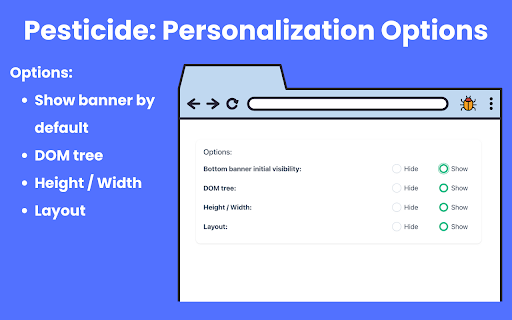
Users have requested more granular controls to hide or toggle off specific segments of the inspector panel and better resizing capabilities to prevent UI blockage.

Tags
CSS DebuggerWeb DevelopmentUI InspectionFrontend Tool
Target users

- Front-end Developers

- UI/UX Designers

- Web Design Students

Primary use cases

- Layout debugging

- CSS property inspection

- Copying styles to clipboard

- Analyzing website structures

Positive themes

- Simplifies CSS debugging compared to built-in console tabs

- Helpful for reverse-engineering other websites

- Fast workflow for checking dimensions and classes

Negative themes

- Floating inspector panel can obscure the bottom of the page

- Inability to easily hide or resize specific UI sections

- UX confusion regarding how to move or minimize the overlay

Observed friction

- No pricing friction identified; the tool appears to be offered as a free utility.

Evidence boundary: The analysis is based on 10 user reviews and the product's official description. The tool is highly regarded for its utility but noted for minor UI placement issues. The sample size of reviews is limited, though consistent in expressing positive sentiment towards core functionality and feedback on UI design.
Complaint summaries
Review-backed complaint signals grouped by operational area.

Support

No support or refund complaints identified.

Reliability

Minor usability complaints regarding UI overlay behavior on specific screen layouts.

Privacy

No privacy or security complaints identified.

Access & pricing

- Free usage observed

- No account requirement observed

- Free plan or free usage claimed

Store listing facts

Listing assets

- Screenshots: 4

- Videos: 1

- Languages: 51

Trust signals

- Privacy policy

- Developer contact

- Official website

Store metadata

- Version: 3.2.0

- Size: 169KiB

- Last updated:

Store description excerpt
Short excerpt from the public Chrome Web Store listing; full copy is available on the official store page.
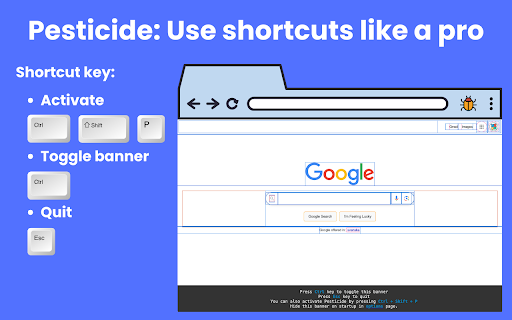
Pesticide 3.2 is an advanced CSS debugger for Chrome that helps you inspect layout, spacing, typography, and computed styles directly on the page. Turn it on and hover any element to open a floating inspector with the details you actually need: - Element tag, id, and classes - DOM path - Client / offset / scroll dimensions - Full box model: margin, border, padding, radius, and content size - Font inspection - Computed CSS properties - Copy CSS output in Tailwind, inline, or block format What makes Pesticide useful: - Outline-based debugging without shifting layout - Click to pin the current element while comparing spacing and styles - Resizable, draggable inspector overlay - Per-site saved panel position and size - Options page to show or hide inspector sections - Quick keyboard control with Ctrl + Shift + P Pesticide is built for front-end developers, designers, and anyone debugging tr…

Listing SEO keywords

Search intent keywords
Keyword signals for evaluating how users may discover, compare, or search for this extension category.

Core discovery

CSS debugging toolvisual layout inspectorChrome extension for web developers

Comparison

Pesticide vs Chrome DevToolsCSS inspector alternative

Problem

how to debug CSS layoutslow CSS inspection

Alternative

CSS outline toolweb design inspector

Similar extensions

Jump to related discovery paths:

FAQ

What is Pesticide mainly used for?
This tool provides a visual overlay for web pages that highlights layout structures, element dimensions, and CSS properties. It allows developers and designers to quickly inspect page elements, copy CSS formatting, and visualize spacing without navigating standard browser developer tools.
What market signals stand out?
Visible niche traction with limited review base. Last known update: 03/26/2026.
What should builders compare before entering this space?
Compare install concentration, rating quality, update recency, screenshots, developer portfolio, listing claims, and review-backed friction signals.
Is this page review-backed?
Backed by review samples. This page combines store metadata with selected review signals, while raw store metrics remain visible for comparison.

Screenshots

Pesticide - Advanced CSS Debugger screenshot

Links

Recommended Chrome extensions

Related listings from the same category, trending peers, and the same publisher portfolio.

Browse developer