Diccionario RAE en un clic 2022 icon

Diccionario RAE en un clic 2022 Chrome Extension Analysis

Automation & Workflow Efficiency

Chrome extension ID: gejdeepcjkfbepfkcfdgiodgoglakiii

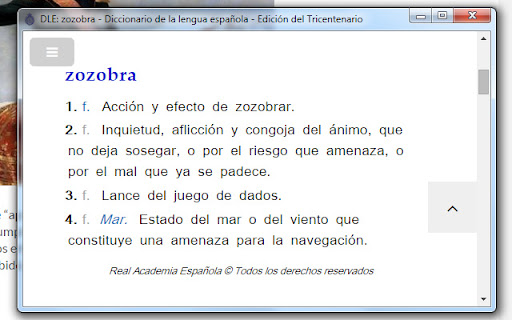
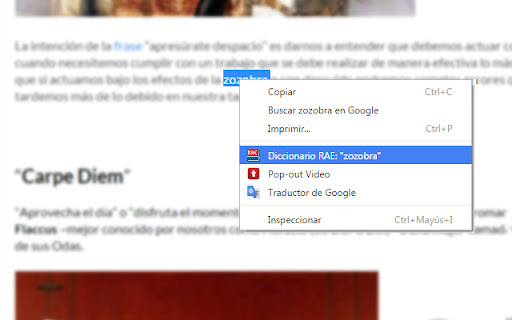
This Chrome extension allows users to select any text on a webpage and perform a right-click to search for its definition in the official RAE dictionary. It aims to streamline language lookup workflows for native Spanish speakers or learners by providing a one-click gateway to the site's database.

Developer:copete
Version:2.1.1
Size:8.82KiB
Last updated:

Overview

Installs

300K+

Rating

4.0

404 reviews

Languages

1 locales

Includes español

Market analysis

Review-backed positioning, friction, and market signals for this Chrome extension.

Backed by review samples

Macro category

Automation & Workflow Efficiency

Pricing friction

Low review signal

Complaint intensity

Moderate review signal

Listing & review signals
Observed signals from store listing text and review samples.

Listing positioning

The product is positioned as a productivity utility designed to provide quick access to the Real Academia Española (RAE) dictionary. It enables users to look up word definitions directly from a browser context menu, eliminating the need to manually navigate to the dictionary website.

Inferred product pattern

Single-purpose browser shortcut utility that wraps a third-party website.

Review-backed pain points

Users frequently report that the extension stops working periodically due to dead links or browser compatibility issues. A common frustration is the lack of a lightweight 'in-app' definition pop-up, as the extension simply redirects the user to the full RAE website.

Observed feature gaps

Users desire a native pop-up window displaying the definition directly within the browser tab rather than full page redirection, as well as improved case-sensitivity support for word searches.

Tags
DictionaryRAELanguage ToolsSpanish LanguageUtility
Target users

- Students

- Language learners

- Writers

- Frequent RAE dictionary users

Primary use cases

- Defining words while browsing

- Quick lookup of Spanish vocabulary

Positive themes

- Efficiency in lookup workflows

- Utility of the right-click integration

- Convenience for quick navigation to the official RAE site

Negative themes

- Intermittent technical breakage

- Outdated website links

- Lack of an in-extension pop-up definition (user is redirected to the full website)

- Lack of case-sensitivity handling

Observed friction

- Performance complaints detected

- None; the product is free.

Evidence boundary: The evidence is based on 404 user reviews and the developer's provided version history. Reviews detail long-standing maintenance issues and feature requests regarding the lookup UI. The reviews span a long period (2013-2025), meaning some feedback may refer to older versions of the extension that have since been patched.
Complaint summaries
Review-backed complaint signals grouped by operational area.

Support

Users express frustration with the lack of updates and maintenance regarding broken links and outdated RAE URL structures.

Reliability

Frequent reports of the extension failing to load, showing white screens, or failing to register clicks after RAE website updates.

Privacy

No privacy-related complaints observed.

Access & pricing

- Free usage observed

- No account requirement observed

- Free plan or free usage claimed

Store listing facts

Listing assets

- Screenshots: 2

- Videos: 0

- Languages: 1

Trust signals

- Developer contact

Store metadata

- Version: 2.1.1

- Size: 8.82KiB

- Last updated:

Store description excerpt
Short excerpt from the public Chrome Web Store listing; full copy is available on the official store page.
VER. 2.0 (08.2022) Actualización a manifest v3 (razón por la cual no funcionaba) - - - - - - - - - - - - - - - - - - - - - - - - - - - - - - VER. 1.8 (03.2021) Corrección de errores. - - - - - - - - - - - - - - - - - - - - - - - - - - - - - - VER. 1.5.1 2016 ACTUALIZADA A LA NUEVA VERSION DE LA RAE. Busca el significado de palabras en el Diccionario de la Real Academia Española de forma ágil y sin usar el teclado. Modo de uso: 1. Seleccionar la palabra y hacer click derecho. 2. Presionar "Diccionario RAE:" del menú contextual.

Listing SEO keywords

Search intent keywords
Keyword signals for evaluating how users may discover, compare, or search for this extension category.

Core discovery

Diccionario RAE extensionRAE chromebuscar significado RAERAE en un clic

Comparison

Simple Translate alternativeextensiones diccionario español

Problem

RAE no funcionaerror RAE extensióndiccionario bloqueado

Alternative

rae.esdiccionario rae app

Similar extensions

Jump to related discovery paths:

FAQ

What is Diccionario RAE en un clic 2022 mainly used for?
This Chrome extension allows users to select any text on a webpage and perform a right-click to search for its definition in the official RAE dictionary. It aims to streamline language lookup workflows for native Spanish speakers or learners by providing a one-click gateway to the site's database.
What market signals stand out?
Established adoption with moderate review base. Last known update: 08/16/2022.
What should builders compare before entering this space?
Compare install concentration, rating quality, update recency, screenshots, developer portfolio, listing claims, and review-backed friction signals.
Is this page review-backed?
Backed by review samples. This page combines store metadata with selected review signals, while raw store metrics remain visible for comparison.

Screenshots

Diccionario RAE en un clic 2022 screenshot

Recommended Chrome extensions

Related listings from the same category, trending peers, and the same publisher portfolio.

Browse tools
BlockSite Block Websites & Stay Focused icon

BlockSite Block Websites & Stay Focused

BlockSite

Stay focused and boost productivity: Custom blocklist, Scheduled site blocking, and Password protection.

Installs

1.0M+

Rating

4.5

YouTube Summary with ChatGPT & Claude icon

YouTube Summary with ChatGPT & Claude

Glasp

Summarize YouTube videos, web articles, and PDFs to save time, powered by ChatGPT, Claude, Mistral AI, and Gemini.

Installs

1.0M+

Rating

4.3

Screen Recorder & Screenshot App for Chrome | Scrnli icon

Screen Recorder & Screenshot App for Chrome | Scrnli

scrnli

Screen recorder for Chrome: capture, edit, share screenshots and videos instantly

Installs

1.0M+

Rating

4.7

Transpose ▲▼ pitch ▹ speed ▹ loop icon

Transpose ▲▼ pitch ▹ speed ▹ loop

Tune73

Change the pitch and speed of music and loop sections directly on YouTube, Spotify and many other streaming platforms.

Installs

1.0M+

Rating

4.5

CSFloat Market Checker icon

CSFloat Market Checker

CSFloat Inc.

Shows the float value, paint seed, and more of Counter-Strike (CS:GO & CS2) items on the Steam Market or Inventories

Installs

1.0M+

Rating

3.9

Video Downloader Plus icon

Video Downloader Plus

Video Downloader Plus

Download and save videos from any website instantly. A fast, simple video downloader that just works.

Installs

1.0M+

Rating

4.5

Wordtune: AI Paraphrasing and Grammar Tool icon

Wordtune: AI Paraphrasing and Grammar Tool

Wordtune

Unlock your potential with Wordtune's free AI writer – paraphrase, rewrite, translate, fix grammar, and more.

Installs

1.0M+

Rating

4.6

Dark Mode icon

Dark Mode

Grephy

A global dark theme for the web.

Installs

1.0M+

Rating

3.6

AIPRM for ChatGPT icon

AIPRM for ChatGPT

AIPRM

AIPRM is your cheat code for ChatGPT. Adds a list of curated prompt templates and advanced features. Try today.

Installs

1.0M+

Rating

3.9

Enhancer for YouTube™ icon

Enhancer for YouTube™

Max RF

Take control of YouTube and boost your user experience!

Installs

1.0M+

Rating

4.7