Docs Viewer icon

Docs Viewer Chrome Extension Analysis

Automation & Workflow Efficiency

Chrome extension ID: hdjhnhajlgeijccgeepomnhpobohcloh

This extension provides a context-menu interface to render web-hosted documents in a new tab. It acts as a wrapper for the Google GView service to allow users to preview files without downloading them first.

Developer:Muyor
Version:0.1.4
Size:20.34KiB
Last updated:

Overview

Installs

10K+

Rating

3.4

16 reviews

Languages

1 locales

Includes English

Market analysis

Review-backed positioning, friction, and market signals for this Chrome extension.

Backed by review samples

Macro category

Automation & Workflow Efficiency

Pricing friction

Low review signal

Complaint intensity

Moderate review signal

Listing & review signals
Observed signals from store listing text and review samples.

Listing positioning

Docs Viewer positions itself as a lightweight utility for opening various document formats like PDF, DOC, and PPT directly in the browser. It functions by routing document links through the Google GView engine upon a right-click user action.

Inferred product pattern

Simple context-menu wrapper for an existing public cloud-based rendering service.

Review-backed pain points

Users report that the extension often fails to render files, returning 'No preview available' messages, and lacks support for internal or local network URLs.

Observed feature gaps

Users desire automatic document detection rather than requiring a right-click selection, and improved stability for complex documents.

Tags
Document ViewerPDF ReaderBrowser ProductivityFile Converter
Target users

- Casual web users

- Researchers

- Office professionals

Primary use cases

- Viewing PDF documents

- Opening MS Office files

- Printing web-hosted documents

Positive themes

- Ease of use

- Functional simplicity

- Works as expected for basic documents

Negative themes

- Fails to render internal network documents

- Broken rendering or 'Preview Unavailable' errors

- Redundancy in functionality

- Lack of automation

Observed friction

- Performance complaints detected

- None observed; the product is free.

Evidence boundary: Extracted from Chrome Web Store listing data and a sample of 10 user reviews highlighting both successful basic usage and common rendering failures. Review sample size is small relative to the total user base, potentially biasing the sentiment toward power users or those encountering specific edge-case bugs.
Complaint summaries
Review-backed complaint signals grouped by operational area.

Support

No specific support channel complaints, though technical bugs (rendering failures) are noted.

Reliability

Frequent reports of the 'No preview available' error and inability to handle internal network document links.

Privacy

None observed.

Access & pricing

- Free usage observed

- No account requirement observed

- Free plan or free usage claimed

Store listing facts

Listing assets

- Screenshots: 1

- Videos: 0

- Languages: 1

Trust signals

- Developer contact

- Official website

Store metadata

- Version: 0.1.4

- Size: 20.34KiB

- Last updated:

Store description excerpt
Short excerpt from the public Chrome Web Store listing; full copy is available on the official store page.
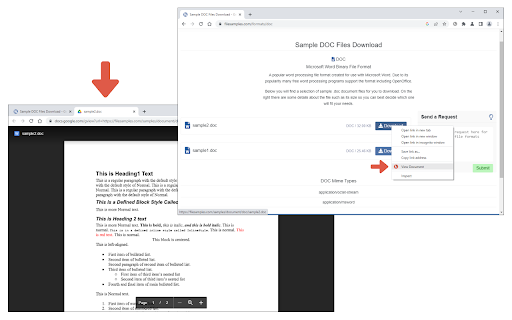
Docs Viewer is an extension that let you open and view a wide range of online documents right in your browser (new tab). Simply add the add-on to your browser and start surfing. Once you see a document link (i.e. .doc, .docx, .ppt, .pdf), please right-click on the link and then select - View Document - from context menu. The document will be rendered and opened in a new tab. You can also, print the document to PDF or send it to a printer right away (via the print button within the page). Please note that this add-on uses the google gview engine to render the document. Moreover, it supports a wide range of documents, including pdf, doc, docx, ppt, and more. If you have a feature request or found a bug to report, please fill out the bug report form on the add-on's homepage (https://mybrowseraddon.com/docs-viewer.html).

Listing SEO keywords

Search intent keywords
Keyword signals for evaluating how users may discover, compare, or search for this extension category.

Core discovery

open pdf in browserview docx onlinebrowser document viewerppt online viewer

Comparison

Google Docs Viewer alternativeextension for document preview

Problem

preview unavailable errorcannot open documentbrowser extension not working

Alternative

pdf viewer extensionoffice file opener

Similar extensions

Jump to related discovery paths:

FAQ

What is Docs Viewer mainly used for?
This extension provides a context-menu interface to render web-hosted documents in a new tab. It acts as a wrapper for the Google GView service to allow users to preview files without downloading them first.
What market signals stand out?
Visible niche traction with limited review base. Last known update: 01/28/2026.
What should builders compare before entering this space?
Compare install concentration, rating quality, update recency, screenshots, developer portfolio, listing claims, and review-backed friction signals.
Is this page review-backed?
Backed by review samples. This page combines store metadata with selected review signals, while raw store metrics remain visible for comparison.

Screenshots

Docs Viewer screenshot

Links

Recommended Chrome extensions

Related listings from the same category, trending peers, and the same publisher portfolio.

Browse tools
Allow CORS: Access-Control-Allow-Origin icon

Allow CORS: Access-Control-Allow-Origin

Muyor

Easily add (Access-Control-Allow-Origin: *) rule to the response header.

Installs

800K+

Rating

3.4

Open With Download Manager icon

Open With Download Manager

Muyor

Open and download desired links with internet download manager.

Installs

90K+

Rating

3.6

HID Credential Management Extension icon

HID Credential Management Extension

hid-global-chrome-web-store

Browser extension for HID credential management solution.

Installs

1.0M+

Rating

1.3

Keywords Everywhere - Keyword Tool icon

Keywords Everywhere - Keyword Tool

Axeman Technology Solutions LLP

Keyword search volume, cpc and competition for 15+ websites like Google™ Search Console, YouTube™, Amazon™ & more

Installs

1.0M+

Rating

4.5

WebChatGPT: Prompt library with web access icon

WebChatGPT: Prompt library with web access

WebChatGPT

Augment your ChatGPT prompts with relevant web search results through web browsing.

Installs

1.0M+

Rating

4.2

Ecosia - The search engine that plants trees icon

Ecosia - The search engine that plants trees

Ecosia GmbH

This extension sets your search engine to Ecosia and customizes your new tab page so you can plant trees with every search.

Installs

1.0M+

Rating

4.7

BlockSite Block Websites & Stay Focused icon

BlockSite Block Websites & Stay Focused

BlockSite

Stay focused and boost productivity: Custom blocklist, Scheduled site blocking, and Password protection.

Installs

1.0M+

Rating

4.5

YouTube Summary with ChatGPT & Claude icon

YouTube Summary with ChatGPT & Claude

Glasp

Summarize YouTube videos, web articles, and PDFs to save time, powered by ChatGPT, Claude, Mistral AI, and Gemini.

Installs

1.0M+

Rating

4.3

Screen Recorder & Screenshot App for Chrome | Scrnli icon

Screen Recorder & Screenshot App for Chrome | Scrnli

scrnli

Screen recorder for Chrome: capture, edit, share screenshots and videos instantly

Installs

1.0M+

Rating

4.7

Transpose ▲▼ pitch ▹ speed ▹ loop icon

Transpose ▲▼ pitch ▹ speed ▹ loop

Tune73

Change the pitch and speed of music and loop sections directly on YouTube, Spotify and many other streaming platforms.

Installs

1.0M+

Rating

4.5