Equatio - Math made digital icon

Equatio Chrome Extension Analysis

AI & Writing Assistants

Store listing title: Equatio - Math made digital

Chrome extension ID: hjngolefdpdnooamgdldlkjgmdcmcjnc

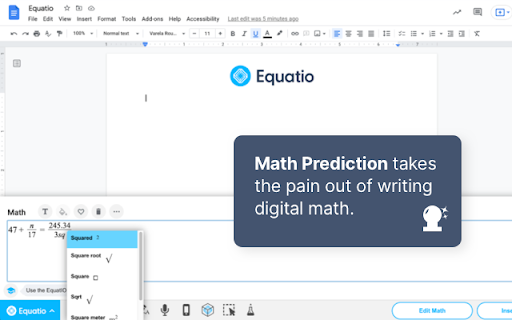
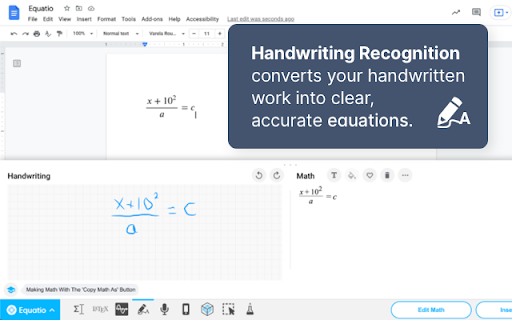
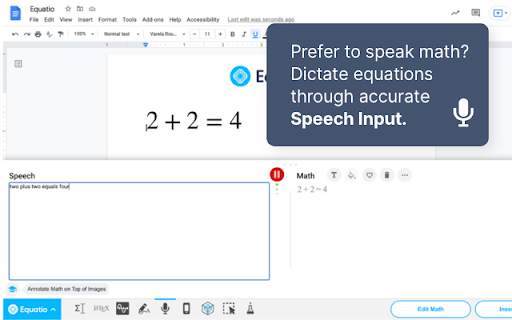
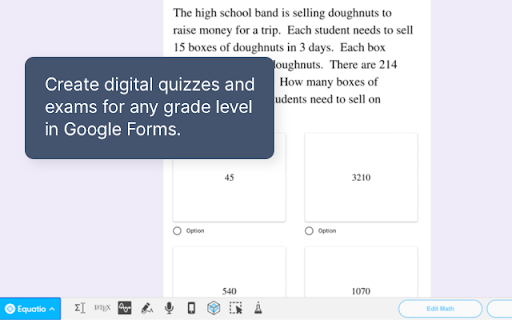
Equatio is a Chrome extension designed to simplify the creation of mathematical expressions in digital formats. It supports various input methods, including keyboard, handwriting, and voice dictation, and integrates with Google Docs, Forms, Slides, Sheets, and Drawings. The tool offers features like predictive text for math and LaTeX compatibility, aiming to make STEM subjects more engaging.

Developer:Texthelp
Version:67.0.2
Size:16.0MiB
Last updated:

Overview

Installs

2.0M+

Rating

3.9

639 reviews

Languages

8 locales

Includes English (United Kingdom), English (United States), dansk, español...

Market analysis

Review-backed positioning, friction, and market signals for this Chrome extension.

Backed by review samples

Macro category

AI & Writing Assistants

Pricing friction

High review signal

Complaint intensity

High review signal

Listing & review signals
Observed signals from store listing text and review samples.

Listing positioning

Equatio positions itself as a solution for easily creating mathematical equations, formulas, and quizzes, eliminating the need for complex math code. It emphasizes intuitive input methods like typing, handwriting recognition, and voice dictation, making math digital for both teachers and students.

Inferred product pattern

A trial-based subscription model for an educational math content creation tool, targeting teachers and students with advanced features for digital equation and quiz creation, accessible via Google Workspace integration.

Review-backed pain points

Users express significant pain points related to the shift of previously free features behind a paywall, particularly the inability for educators to afford the subscription, leading to accusations of 'bait and switch.' Technical issues such as the extension not opening, failing to integrate correctly with Google Forms, and a glitchy UI that obstructs work are also frequently reported.

Observed feature gaps

The product listing indicates a 30-day free trial, after which premium features require a license. Reviewers note a gap where core functionalities previously available for free are now inaccessible without payment, especially for Google Forms integration. Graphing functionality was expected but not observed by reviewers, and handwriting recognition is described as inaccurate.

Tags
Math EditorSTEM EducationQuiz CreatorDigital EquationsHandwriting Recognition
Target users

- Teachers

- Students

- Educators

- Users of Google Workspace (Docs, Forms, Slides, Sheets, Drawings)

Primary use cases

- Creating mathematical equations and formulas

- Developing digital math quizzes

- Inputting student responses into digital quizzes

- Working with STEM subjects

Positive themes

- No positive review themes are available from the provided samples.

Negative themes

- Features previously free are now paywalled

- High subscription cost deemed unaffordable by educators

- Inconsistent or failed integration with Google Forms and Docs

- Extension not opening or functioning reliably

- Inaccurate handwriting recognition

- UI elements obstructing user work

Observed friction

- Payment required for meaningful usage

- Free-tier complaints detected

- Account blocking complaints detected

- Performance complaints detected

- Significant pricing friction is evident, primarily due to features previously available for free being moved behind a premium subscription. Educators, in particular, find the $100 annual subscription cost prohibitive, leading to accusations of 'bait and switch' and 'greed.'

Evidence boundary: Analysis based on the Chrome Web Store listing, including the short and long descriptions, developer information, and a sample of 10 helpful and low-rating user reviews. The provided review samples are predominantly negative, offering limited insight into user satisfaction with premium features or successful use cases.
Complaint summaries
Review-backed complaint signals grouped by operational area.

Support

Complaints include the extension not recognizing user accounts even after signing in, leading to an inability to use the product effectively. There are no direct support response complaints, but the account recognition issue itself is a support-related problem.

Reliability

Users frequently report reliability issues, including the extension failing to open, not working with Google Docs/Forms despite being listed as compatible, and overall being 'very glitchy.' One review notes the extension's UI elements obstructing work and appearing in random places.

Privacy

No privacy or security complaints are available in the provided review samples.

Access & pricing

- Subscription model observed

- Account required for core usage

- Trial or limited free usage before paid plan

Store listing facts

Listing assets

- Screenshots: 4

- Videos: 1

- Languages: 8

Trust signals

- Privacy policy

- Developer contact

- Official website

- Support link

Store metadata

- Version: 67.0.2

- Size: 16.0MiB

- Last updated:

Store description excerpt
Short excerpt from the public Chrome Web Store listing; full copy is available on the official store page.
Until now, writing equations and math expressions on your computer has been slow and laborious. Equatio makes math digital, helping teachers and students at all levels create math expressions quickly and easily. Type or handwrite virtually any mathematical expression directly on your keyboard or touchscreen. There’s no need for any complicated code or programming languages. Equatio instantly turns your thoughts into clear, accurate on-screen formulas. When you type ‘sq’, it knows that you mean ‘square root’. And it listens, too. When you dictate a formula aloud, Equatio is smart enough to ignore ‘umms’, ‘errs’ and other unwanted non-math words. More than a replacement for pen and paper, Equatio makes math and other STEM subjects engaging and rewarding for every student. Features: - Easily create math expressions including equations and formulas - Compatible with Google Docs, Forms*, Sli…

Listing SEO keywords

Search intent keywords
Keyword signals for evaluating how users may discover, compare, or search for this extension category.

Core discovery

math equation editorgoogle docs math extensioncreate math quizzeshandwriting to mathstem education toolsdigital math formulas

Comparison

equatio vs g(math)equatio vs desmosequatio alternativesbest math editor chrome

Problem

equatio not working google formsequatio pricing issuesequatio handwriting inaccurateequatio glitchesmath editor expensive

Alternative

free math equation editorgoogle forms math quiz alternativeequation writer chrome extensionmath assistant for teachers

Similar extensions

Jump to related discovery paths:

FAQ

What is Equatio mainly used for?
Equatio is a Chrome extension designed to simplify the creation of mathematical expressions in digital formats. It supports various input methods, including keyboard, handwriting, and voice dictation, and integrates with Google Docs, Forms, Slides, Sheets, and Drawings. The tool offers features like predictive text for math and LaTeX compatibility, aiming to make STEM subjects more engaging.
What market signals stand out?
Large installed base with moderate review base. Last known update: 04/09/2026.
What should builders compare before entering this space?
Compare install concentration, rating quality, update recency, screenshots, developer portfolio, listing claims, and review-backed friction signals.
Is this page review-backed?
Backed by review samples. This page combines store metadata with selected review signals, while raw store metrics remain visible for comparison.

Screenshots

Equatio - Math made digital screenshot

Links

Recommended Chrome extensions

Related listings from the same category, trending peers, and the same publisher portfolio.

Browse education
Polaris icon

Polaris

Texthelp

Polaris' IEP Copilot Experience brings the power of Polaris directly into the IEP tools your district already uses. Instead of…

Installs

174

Rating

Language Learning with Netflix & YouTube-AFL icon

Language Learning with Netflix & YouTube-AFL

App For Language

Language learning with Netflix: dual subtitles, YouTube support, AI mind maps & speaking coach for fast, fun progress.

Installs

100K+

Rating

3.9

AnswerAI - Homework AI Tutor & Study Helper icon

AnswerAI - Homework AI Tutor & Study Helper

AnswerAI Team

Your AI assistant ChatGPT Plugin.Answer questions and get AI answers quickly,write emails,articles,chatbot,learning assistant.

Installs

100K+

Rating

4.9

Rememberry - Translate and Memorize with Flashcards icon

Rememberry - Translate and Memorize with Flashcards

rememberry

Translate words while browsing and turn them into spaced repetition flashcards to build foreign language vocabulary.

Installs

100K+

Rating

4.6

Transcript - AI Homework Helper icon

Transcript - AI Homework Helper

Transcript

Streamline your study experience with AI: Instant answers, deep insights, and personalized learning across subjects.

Installs

100K+

Rating

3.4

Revision History: Writing Process Visibility for Google Docs & Slides icon

Revision History: Writing Process Visibility for Google Docs & Slides

Revision History

Built for teachers: See how students write, not just what they wrote. View the writing process in Google Docs & Slides.

Installs

100K+

Rating

3.7

Passei Direto – Ferramentas de Estudo icon

Passei Direto – Ferramentas de Estudo

pd.services

A extensão que te ajuda a achar as respostas para suas perguntas, utilizando a maior rede de estudantes do Brasil.

Installs

100K+

Rating

3.7

SolvelyAI - AI Homework Tutor &  Study Helper icon

SolvelyAI - AI Homework Tutor & Study Helper

cws-test-group-1

SolvelyAI is your AI Homework Helper—instant screenshot solving, step-by-step AI Answers, AI Summary, and Study Helper tools.

Installs

100K+

Rating

4.6

Readlang Web Reader icon

Readlang Web Reader

readlang

Read websites in the language you're learning, translate words you don't know, and we'll create flashcards to help you remember.

Installs

100K+

Rating

4.3

Talk & Comment - Voice notes anywhere icon

Talk & Comment - Voice notes anywhere

TalkandComment.com

Voice notes for classrooms and teams. Give feedback students actually hear.

Installs

100K+

Rating

4.1