Convert Gmail™ to PDF (locally) icon

Convert Gmail™ to PDF (locally) Chrome Extension Analysis

Automation & Workflow Efficiency

Chrome extension ID: kkdondhaomeongofcikoplakobapphcj

This browser extension adds buttons directly to the Gmail interface to facilitate the conversion of single or bulk email threads into PDF documents. It emphasizes local processing to maintain user privacy and supports various Gmail display layouts.

Developer:rynu.smith
Version:0.3.8
Size:4.03MiB
Last updated:

Overview

Installs

10K+

Rating

3.4

38 reviews

Languages

12 locales

Includes Deutsch, English, Nederlands, español...

Market analysis

Review-backed positioning, friction, and market signals for this Chrome extension.

Backed by review samples

Macro category

Automation & Workflow Efficiency

Pricing friction

Low review signal

Complaint intensity

Moderate review signal

Listing & review signals
Observed signals from store listing text and review samples.

Listing positioning

The extension positions itself as a privacy-focused tool that enables local conversion of Gmail emails to PDF without server-side processing. It highlights two distinct operation modes: a 'simple' mode for distraction-free reading and a 'normal' mode utilizing standard print functions.

Inferred product pattern

Utility extension that relies on DOM manipulation within a third-party platform (Gmail), susceptible to breakage during UI updates.

Review-backed pain points

Users report that core functional buttons frequently fail to trigger downloads, resulting in either unresponsive UI or empty files. There is also specific user frustration regarding the necessity of creating an account despite the developer's claim that no server-side data processing occurs.

Observed feature gaps

The extension lacks consistent compatibility with Gmail's frequently changing interface, often breaking functionality. Users also note a lack of transparency regarding account requirements versus privacy claims.

Tags
GmailPDF ConverterEmail ArchivingDocument Export
Target users

- Gmail users

- Email archivists

- Office professionals

Primary use cases

- Backing up email threads as PDFs

- Creating simplified, distraction-free versions of emails for reading

- Bulk exporting Gmail conversations

Positive themes

- Ease of installation

- Previously reliable performance

- Useful conceptual utility for workflow efficiency

Negative themes

- Buttons becoming greyed out or unresponsive

- Generation of empty PDF files

- Inconsistency following Gmail interface updates

- Privacy concerns regarding required account sign-ups

Observed friction

- Account blocking complaints detected

- Performance complaints detected

- Privacy complaints detected

- No direct payment friction mentioned, but users express friction regarding mandatory account creation.

Evidence boundary: Analysis based on 38 user reviews highlighting recurring functional failures and concerns regarding account requirements versus local privacy claims. Review sample captures a mix of historical and recent feedback, potentially reflecting different versions of the extension and varying Gmail compatibility.
Complaint summaries
Review-backed complaint signals grouped by operational area.

Support

Reviewers express frustration with the lack of reliable functionality and bugs that render the extension unusable for long periods.

Reliability

High frequency of reports citing broken buttons, empty PDF files, and failure to trigger any action in the browser.

Privacy

Users question why an account is required for a tool that claims to perform all processing locally on the client machine.

Access & pricing

- Free usage observed

- Login needed for core features

- Free plan or free usage claimed

Store listing facts

Listing assets

- Screenshots: 1

- Videos: 0

- Languages: 12

Trust signals

- Privacy policy

- Developer contact

- Official website

Store metadata

- Version: 0.3.8

- Size: 4.03MiB

- Last updated:

Store description excerpt
Short excerpt from the public Chrome Web Store listing; full copy is available on the official store page.
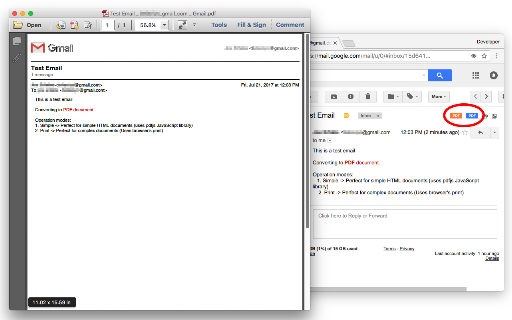
This extension adds two new buttons to your Gmail interface. One orange PDF button and one blue PDF button. The orange button can be used to generate distraction-free PDF documents and the blue one generates a normal PDF document. It is also possible to press the toolbar button (action button) to convert multiple emails to PDF at once. For bulk conversion, you need to select a few threads first. Features: 1. Supports all Gmail view modes (no split, right of inbox, below inbox) 2. Supports bulk conversion by selecting multiple threads at once 3. Support simple and advance printing with and without images 4. Extracts email date and use it in the archived name Notes: 1. The orange button is called the "simple" mode of operation. In this mode, your emails are reformated and all the images, lines, and any other distracting elements are removed from the document before the PDF file is generat…

Listing SEO keywords

Search intent keywords
Keyword signals for evaluating how users may discover, compare, or search for this extension category.

Core discovery

save gmail as pdfbulk gmail to pdfconvert email to pdf extension

Comparison

gmail pdf converter alternatives

Problem

extension not workinggmail pdf button greyed outempty pdf download

Alternative

print gmail to pdfbest gmail archiving tools

Similar extensions

Jump to related discovery paths:

FAQ

What is Convert Gmail™ to PDF (locally) mainly used for?
This browser extension adds buttons directly to the Gmail interface to facilitate the conversion of single or bulk email threads into PDF documents. It emphasizes local processing to maintain user privacy and supports various Gmail display layouts.
What market signals stand out?
Visible niche traction with limited review base. Last known update: 11/16/2025.
What should builders compare before entering this space?
Compare install concentration, rating quality, update recency, screenshots, developer portfolio, listing claims, and review-backed friction signals.
Is this page review-backed?
Backed by review samples. This page combines store metadata with selected review signals, while raw store metrics remain visible for comparison.

Screenshots

Convert Gmail™ to PDF (locally) screenshot

Links

Recommended Chrome extensions

Related listings from the same category, trending peers, and the same publisher portfolio.

Browse education
User-Agent Switcher and Manager icon

User-Agent Switcher and Manager

rynu.smith

Spoof websites trying to gather information about your web navigation to deliver distinct content you may not want

Installs

300K+

Rating

4.3

Open in PDF Reader icon

Open in PDF Reader

rynu.smith

Send PDF links directly to your favorite PDF viewer like Adobe Acrobat Reader

Installs

90K+

Rating

3.5

Knowt: Quizlet Import, AI Notes & Flashcards icon

Knowt: Quizlet Import, AI Notes & Flashcards

Knowt

Automatically import flashcards and notes from any video, PDF, article, or flashcard site. Knowt is the fastest way to study.

Installs

100K+

Rating

4.9

ExCITATION – Journal Ranking & Impact Factor for Google Scholar™ icon

ExCITATION – Journal Ranking & Impact Factor for Google Scholar™

Excitation Journal

Show SJR, ABS & ABDC journal rankings in Google Scholar. Sort by citations, detect predatory journals & preview abstracts — free.

Installs

100K+

Rating

4.5

Yomitan Popup Dictionary icon

Yomitan Popup Dictionary

yomidevs

Popup dictionary for language learning

Installs

100K+

Rating

4.8

Language Learning with Netflix & YouTube-AFL icon

Language Learning with Netflix & YouTube-AFL

App For Language

Language learning with Netflix: dual subtitles, YouTube support, AI mind maps & speaking coach for fast, fun progress.

Installs

100K+

Rating

3.9

AnswerAI - Homework AI Tutor & Study Helper icon

AnswerAI - Homework AI Tutor & Study Helper

AnswerAI Team

Your AI assistant ChatGPT Plugin.Answer questions and get AI answers quickly,write emails,articles,chatbot,learning assistant.

Installs

100K+

Rating

4.9

Rememberry - Translate and Memorize with Flashcards icon

Rememberry - Translate and Memorize with Flashcards

rememberry

Translate words while browsing and turn them into spaced repetition flashcards to build foreign language vocabulary.

Installs

100K+

Rating

4.6

Transcript - AI Homework Helper icon

Transcript - AI Homework Helper

Transcript

Streamline your study experience with AI: Instant answers, deep insights, and personalized learning across subjects.

Installs

100K+

Rating

3.4

Revision History: Writing Process Visibility for Google Docs & Slides icon

Revision History: Writing Process Visibility for Google Docs & Slides

Revision History

Built for teachers: See how students write, not just what they wrote. View the writing process in Google Docs & Slides.

Installs

100K+

Rating

3.7