Sample icon

Sample Chrome Extension Analysis

Automation & Workflow Efficiency

Chrome extension ID: kpkcennohgffjdgaelocingbmkjnpjgc

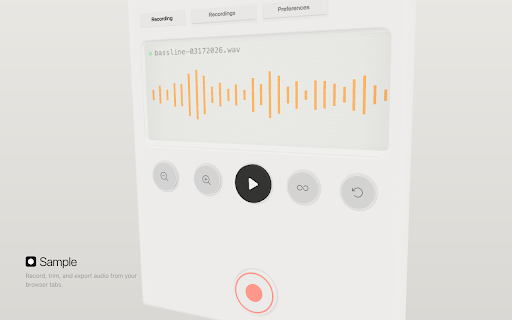
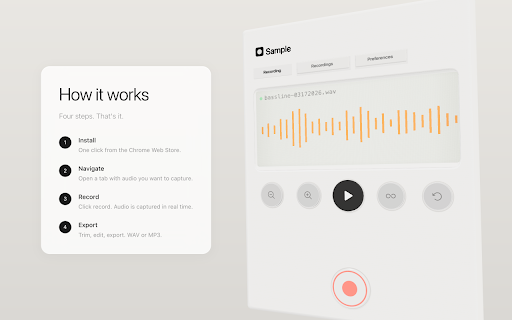
This is a browser-based audio utility that enables users to record system sound from any tab. It includes a built-in waveform editor for trimming, looping, and exporting audio in formats like WAV and MP3.

Developer:Roman Paskin
Version:3.3.0.0
Size:10.91MiB
Last updated:

Overview

Installs

300K+

Rating

4.6

1,789 reviews

Languages

1 locales

Includes English

Market analysis

Review-backed positioning, friction, and market signals for this Chrome extension.

Backed by review samples

Macro category

Automation & Workflow Efficiency

Pricing friction

Low review signal

Complaint intensity

High review signal

Listing & review signals
Observed signals from store listing text and review samples.

Listing positioning

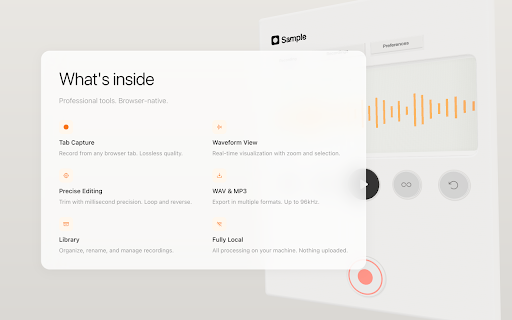
The extension is positioned as a local-first, precision audio sampling tool that allows users to record, trim, and export audio directly from their browser tabs. It emphasizes privacy by highlighting that all processing occurs locally on the user's machine without cloud uploads.

Inferred product pattern

Single-purpose utility tool suffering from significant post-update quality control issues.

Review-backed pain points

Users frequently report that recent updates have rendered the recording functionality completely broken, with the record button becoming unresponsive. There are also reports of audio processing issues, such as crackling, audio gating cutting off sounds, and interface glitches.

Observed feature gaps

Lack of stability across updates, missing support/reversion for previous versions, and intermittent failures in the recording/saving workflow.

Tags
Audio RecorderMusic ProductionBrowser AudioSampler
Target users

- Music Producers

- Content Creators

- Audio Enthusiasts

Primary use cases

- Recording audio from browser-based media

- Trimming audio clips for music production

- Exporting browser audio to local storage

Positive themes

- Easy to use interface

- Effective for music sampling from video content

- Valuable local storage feature

- High quality output for small files

Negative themes

- Post-update functionality breakage

- Recording button non-responsiveness

- Audio quality degradation (cracking/clipping)

- Files failing to save or appearing missing

Observed friction

- Performance complaints detected

- No specific pricing friction reported; the tool appears to be free to use.

Evidence boundary: The evidence is derived from 20 user reviews, highlighting a clear divide between long-term satisfied users and recent users facing critical post-update breakage. Review data is concentrated around recent updates, which may skew sentiment toward recent technical issues rather than core feature satisfaction.
Complaint summaries
Review-backed complaint signals grouped by operational area.

Support

Users express high frustration with post-update bugs and a lack of apparent fixes, leading some to uninstall the extension.

Reliability

Significant complaints regarding the 'Record' button failing to function and technical regressions following software updates.

Privacy

Minimal privacy concerns noted, though one user expressed hesitation regarding increased permission requests in a recent update.

Access & pricing

- No clear monetization signal

- No account requirement observed

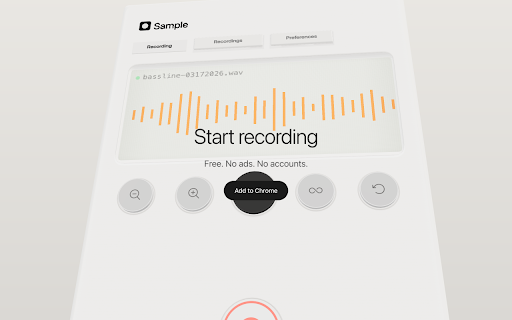
- Free plan or free usage claimed

Store listing facts

Listing assets

- Screenshots: 4

- Videos: 1

- Languages: 1

Trust signals

- Developer contact

Store metadata

- Version: 3.3.0.0

- Size: 10.91MiB

- Last updated:

Store description excerpt
Short excerpt from the public Chrome Web Store listing; full copy is available on the official store page.
Record, trim, and export audio directly from any browser tab. Clean, fast, and fully local. Features - One-click recording from any tab - Waveform editor with precision trimming down to the millisecond - Loop and reverse playback - Export as WAV or MP3 - Sample rates up to 96kHz - Stereo or mono recording - Recording library - all your recordings saved locally for playback, editing, and download - Fully offline - nothing is uploaded, all processing happens on your machine Questions or feedback? [email protected]

Listing SEO keywords

Search intent keywords
Keyword signals for evaluating how users may discover, compare, or search for this extension category.

Core discovery

browser audio recorderrecord tab audioonline audio samplerwav audio trimmer

Comparison

best audio recording extensionalternative to recording software

Problem

extension not recordingaudio crackling issuesrecord button broken

Alternative

audio capture toolchrome audio downloader

Similar extensions

Jump to related discovery paths:

FAQ

What is Sample mainly used for?
This is a browser-based audio utility that enables users to record system sound from any tab. It includes a built-in waveform editor for trimming, looping, and exporting audio in formats like WAV and MP3.
What market signals stand out?
Established adoption with substantial review base. Last known update: 03/18/2026.
What should builders compare before entering this space?
Compare install concentration, rating quality, update recency, screenshots, developer portfolio, listing claims, and review-backed friction signals.
Is this page review-backed?
Backed by review samples. This page combines store metadata with selected review signals, while raw store metrics remain visible for comparison.

Screenshots

Sample screenshot
Sample screenshot
Sample screenshot
Sample screenshot

Links

Videos: Watch

Recommended Chrome extensions

Related listings from the same category, trending peers, and the same publisher portfolio.

Browse tools
BetterTTV icon

BetterTTV

NightDev, LLC

BetterTTV enhances Twitch and YouTube with new features, emotes, and more.

Installs

3.0M+

Rating

4.6

Ad Blocker: Stands AdBlocker icon

Ad Blocker: Stands AdBlocker

Stands

Stands AdBlocker – it's a free ad blocker for YouTube, Twitch, Pop-Ups, Video Ads, and websites. Block ads everywhere with Stands!

Installs

3.0M+

Rating

4.8

Google Input Tools icon

Google Input Tools

cloud-input-team

Input Tools lets you type in the language of your choice.

Installs

3.0M+

Rating

4.0

Microsoft Bing Search with Rewards icon

Microsoft Bing Search with Rewards

Microsoft Corporation

Use the Microsoft Rewards extension to find new ways to earn every day, easily track your points and set your default search to Bing

Installs

3.0M+

Rating

4.4

Google Scholar Button icon

Google Scholar Button

scholar-chrome-extensions

Lookup scholarly articles as you browse the web.

Installs

3.0M+

Rating

4.6

ЮБуст - VPN для YouTube. Обход блокировки Ютуб без ВПН. VPN для браузера icon

ЮБуст - VPN для YouTube. Обход блокировки Ютуб без ВПН. VPN для браузера

Uboost

Ускоритель Ютуб без ВПН, VPN для браузера Яндекс, Chrome, Opera, Edge. Обход замедления Ютуба.

Installs

2.0M+

Rating

4.2

Pie Adblock - A Powerful Free Ad Blocker icon

Pie Adblock - A Powerful Free Ad Blocker

Pie Extensions

Pie Adblock blocks ads & pop-ups, plus YouTube & Twitch video ads. You can customize your ad experience with Pie!

Installs

2.0M+

Rating

4.9

Smallpdf—Edit, Convert, Compress, & AI Summarize PDF icon

Smallpdf—Edit, Convert, Compress, & AI Summarize PDF

Smallpdf AG

Easy-to-use PDF tools to compress, convert, merge, chat to, split, e-sign, and edit PDF files in your browser.

Installs

2.0M+

Rating

4.6

Google Dictionary (by Google) icon

Google Dictionary (by Google)

dictionary-extension-dev

View definitions easily as you browse the web.

Installs

2.0M+

Rating

4.4

AI Chat for Search icon

AI Chat for Search

AI Chat for Search Team

Display AI Chat response alongside search engine results

Installs

2.0M+

Rating

4.6