Google Translate icon

Google Translate Chrome Extension Analysis

Automation & Workflow Efficiency

Chrome extension ID: aapbdbdomjkkjkaonfhkkikfgjllcleb

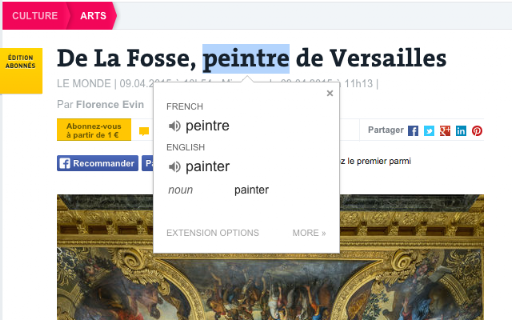
Google Translate is a browser extension designed to provide instant translation of highlighted text on web pages. It serves as a shortcut to translate words or phrases directly within the browser interface, though many page-level translation functions are now handled natively by Chrome.

Version:2.0.16
Size:1.09MiB
Last updated:

Overview

Installs

32.0M+

Rating

4.2

44,772 reviews

Languages

53 locales

Includes Deutsch, English, English (United Kingdom), Filipino...

Market analysis

Review-backed positioning, friction, and market signals for this Chrome extension.

Backed by review samples

Macro category

Automation & Workflow Efficiency

Pricing friction

Low review signal

Complaint intensity

High review signal

Listing & review signals
Observed signals from store listing text and review samples.

Listing positioning

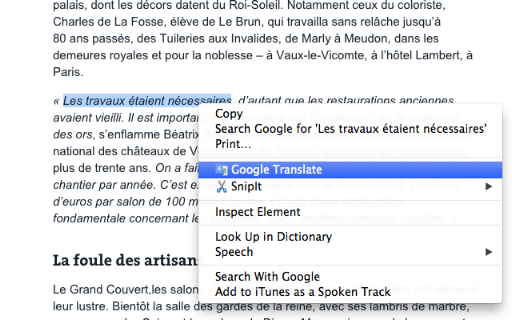
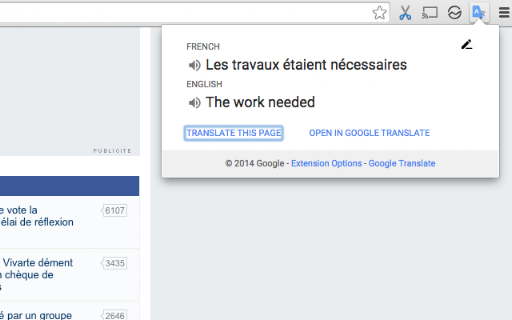
The store listing positions this extension as a convenient tool for immediate text translation while browsing. It emphasizes its ability to handle text selection and right-click interactions to provide quick translations without navigating away from the current page.

Inferred product pattern

Legacy utility extension being phased out or subsumed by browser-native functionality.

Review-backed pain points

Users are heavily frustrated by recent updates that redirect translation tasks to Chrome's native page-translation feature, effectively killing the convenience of the small, targeted text pop-up they previously relied on.

Observed feature gaps

Missing language swap/reverse translation button in the pop-up, lack of manual target-language locking, and inconsistent detection of similar languages (e.g., German vs. Luxembourgish).

Tags
TranslationLanguage ToolBrowser ProductivityQuick Translate
Target users

- Multilingual researchers

- International students

- Casual web browsers

Primary use cases

- Translating selected text snippets

- Quick language lookup while reading foreign-language websites

Positive themes

- Utility for quick, short-form translations

- Convenience of the pop-up interface

Negative themes

- Frustration over native browser feature takeover

- Loss of specific UI features like language swapping

- Degradation of translation accuracy and formatting

- Pop-up failing to appear

Observed friction

- Performance complaints detected

- None reported; the tool is free.

Evidence boundary: Evidence based on recent user complaints regarding feature removal following Chrome updates and reports of declining translation quality. Reviews focus heavily on recent version changes; historical sentiment prior to the latest updates may not be fully represented.
Complaint summaries
Review-backed complaint signals grouped by operational area.

Support

Users express strong dissatisfaction with the removal of features in favor of native Chrome functionality without clear communication.

Reliability

High; users report that the pop-up tool often fails to appear and that recent translation quality has introduced unexpected formatting characters like asterisks.

Privacy

None reported.

Access & pricing

- Free usage observed

- No account requirement observed

- Free plan or free usage claimed

Store listing facts

Listing assets

- Screenshots: 3

- Videos: 0

- Languages: 53

Trust signals

- Privacy policy

- Developer contact

- Official website

Store metadata

- Version: 2.0.16

- Size: 1.09MiB

- Last updated:

Store description excerpt
Short excerpt from the public Chrome Web Store listing; full copy is available on the official store page.
Highlight or right-click on a section of text and click on Translate icon next to it to translate it to your language. Learn more about Google Translate at https://support.google.com/translate. By installing this extension, you agree to the Google Terms of Service and Privacy Policy at https://www.google.com/intl/en/policies. UPDATE (v.2.0): Now you can highlight or right-click a text and translate it vs. translate the entire page. You can also change extension options to automatically show translation every time you highlight text. UPDATE (v.2.14+): Page translation is now supported natively in Chrome browsers and is no longer supported in the Google Translate extension. See https://support.google.com/chrome/answer/173424 to learn how to use it.

Listing SEO keywords

Search intent keywords
Keyword signals for evaluating how users may discover, compare, or search for this extension category.

Core discovery

Chrome translation extensiontranslate highlighted textbrowser language tool

Comparison

Google Translate vs DeepL extensionbrowser translator plugin

Problem

Google Translate extension brokenextension stopped working Chrome

Alternative

DeepL extensionImTranslatorMate Translate

Similar extensions

Jump to related discovery paths:

FAQ

What is Google Translate mainly used for?
Google Translate is a browser extension designed to provide instant translation of highlighted text on web pages. It serves as a shortcut to translate words or phrases directly within the browser interface, though many page-level translation functions are now handled natively by Chrome.
What market signals stand out?
Large installed base with very deep review base. Last known update: 09/05/2024.
What should builders compare before entering this space?
Compare install concentration, rating quality, update recency, screenshots, developer portfolio, listing claims, and review-backed friction signals.
Is this page review-backed?
Backed by review samples. This page combines store metadata with selected review signals, while raw store metrics remain visible for comparison.

Screenshots

Google Translate screenshot

Links

Recommended Chrome extensions

Related listings from the same category, trending peers, and the same publisher portfolio.

Browse education
Chrome Remote Desktop icon

Chrome Remote Desktop

Chrome Remote Desktop Release Managers

Chrome Remote Desktop extension

Installs

34.0M+

Rating

3.2

オクリンクプラス Webページスクリーンショット機能 icon

オクリンクプラス Webページスクリーンショット機能

ベネッセコーポレーション

オクリンクプラスのカードにWebページのスクリーンショットを挿入し、リンクを埋め込むことができます!

Installs

500K+

Rating

3.0

GPTZero: AI Detection & Writing Replay icon

GPTZero: AI Detection & Writing Replay

chrome-extension-publisher

Bring AI detection, citation checks, live essay feedback, and writing replays directly into Google Docs and your workflow.

Installs

400K+

Rating

4.7

Google Meet Attendance List icon

Google Meet Attendance List

MeetList

Easiest way to save the attendance list for your meetings or lectures

Installs

400K+

Rating

4.7

Cite This For Me: Web Citer icon

Cite This For Me: Web Citer

Chegg Writing Tools

Automatically create website citations in the APA, MLA, Chicago, or Harvard referencing styles at the click of a button.

Installs

400K+

Rating

3.8

Trancy - AI Translator & Dual Subtitles icon

Trancy - AI Translator & Dual Subtitles

Trancy

Trancy provides bilingual subtitle for platforms like YouTube, Disney+, as well as AI translator for websites.

Installs

300K+

Rating

4.7

Assessment Lock (Vretta) icon

Assessment Lock (Vretta)

google-web-store-admin

Assessment Security extension for e-Assessments running on ChromeOS

Installs

300K+

Rating

1.9

edpuzzle icon

edpuzzle

Edpuzzle

Import your favorite educational YouTube video into Edpuzzle with a click!

Installs

300K+

Rating

4.2

Certificate Enrollment for ChromeOS icon

Certificate Enrollment for ChromeOS

google.com

Request a certificate for your device.

Installs

300K+

Rating

4.4

rikaikun icon

rikaikun

Erek Speed

rikaikun shows the reading and English definition of Japanese words when you hover over Japanese text in the browser.

Installs

200K+

Rating

4.7