Chrome Remote Desktop icon

Chrome Remote Desktop Chrome Extension Analysis

Automation & Workflow Efficiency

Chrome extension ID: inomeogfingihgjfjlpeplalcfajhgai

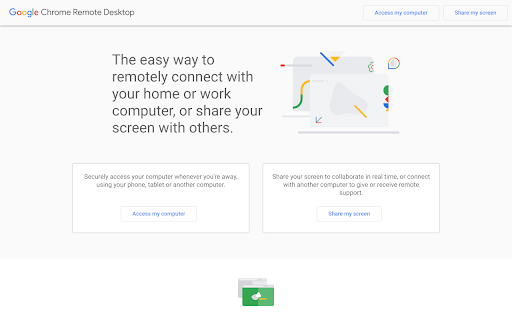
Chrome Remote Desktop is a free utility that allows users to remotely control one computer from another device using the Chrome browser. It is designed for both ad hoc remote assistance and long-term remote access to applications and files.

Version:2.1
Size:22.66KiB
Last updated:

Overview

Installs

34.0M+

Rating

3.2

2,910 reviews

Languages

1 locales

Includes English

Market analysis

Review-backed positioning, friction, and market signals for this Chrome extension.

Backed by review samples

Macro category

Automation & Workflow Efficiency

Pricing friction

Low review signal

Complaint intensity

Moderate review signal

Listing & review signals
Observed signals from store listing text and review samples.

Listing positioning

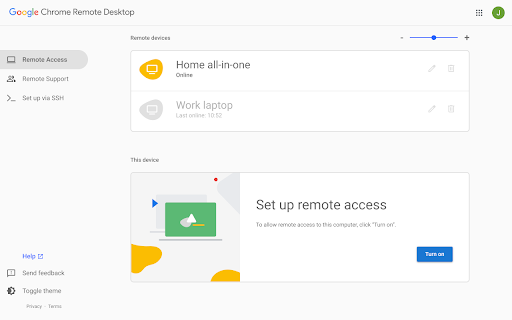
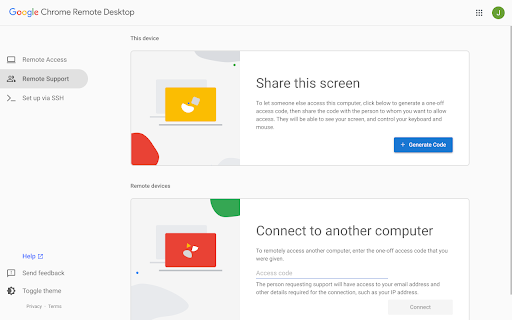
The store listing positions this extension as a companion utility for the Chrome Remote Desktop web interface. It facilitates the installation and management of the native client, enabling secure remote access across Windows, Mac, Linux, and Chromebooks.

Inferred product pattern

A native-bridging browser utility that relies on a secondary cloud-based web dashboard for core functionality.

Review-backed pain points

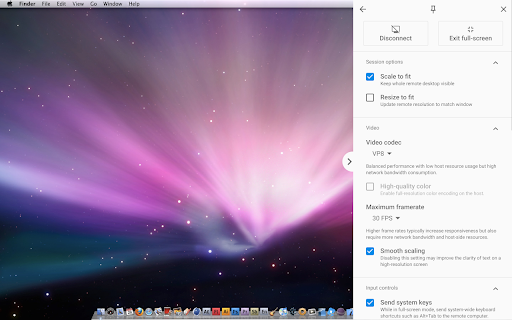
Users frequently report 'Unable to connect' errors, issues with detecting offline/online status correctly, and difficulties viewing specific software windows or multiple monitors during remote sessions.

Observed feature gaps

Lack of administrative domain-based access controls for enterprise/education and missing interface convenience features like desktop shortcuts.

Tags
Remote DesktopRemote AccessCloud ComputingScreen SharingIT Support
Target users

- IT Support Professionals

- Remote Workers

- Educators

- Personal Power Users

Primary use cases

- Ad hoc remote technical support

- Accessing personal files from a remote location

- Managing multiple workstations from a single device

Positive themes

- Historical reputation for stability

- Utility for remote device management in educational environments

Negative themes

- Persistent connection errors

- Incompatibility with certain display configurations (multi-monitor issues)

- Regional access restrictions

- Lack of granular administrative controls for enterprise/educational use

Observed friction

- Performance complaints detected

- No pricing friction; the product is free to use.

Evidence boundary: The extraction is based on a mix of official store descriptions and user feedback from the Chrome Web Store, highlighting a disparity between the product's intended function and current connection reliability. Review data is anecdotal and localized; negative sentiment may be skewed by regional connectivity issues and specific hardware/software environment conflicts.
Complaint summaries
Review-backed complaint signals grouped by operational area.

Support

Support is directed to public Google support channels; users express frustration with the lack of direct troubleshooting assistance for connection failures.

Reliability

Significant complaints regarding intermittent connection drops, 'device offline' errors despite connectivity, and failure to bridge specific software windows across remote sessions.

Privacy

No specific privacy complaints found; product adheres to Google's standard privacy policies.

Access & pricing

- Free usage observed

- Account required for core usage

- Free plan or free usage claimed

Store listing facts

Listing assets

- Screenshots: 4

- Videos: 0

- Languages: 1

Trust signals

- Developer contact

- Official website

- Support link

Store metadata

- Version: 2.1

- Size: 22.66KiB

- Last updated:

Store description excerpt
Short excerpt from the public Chrome Web Store listing; full copy is available on the official store page.
This is the companion extension for the Chrome Remote Desktop website (https://remotedesktop.google.com). This extension enables you to install, view, and modify the Chrome Remote Desktop native client from the web UI. Chrome Remote Desktop allows users to remotely access another computer through Chrome browser or a Chromebook. Computers can be made available on an short-term basis for scenarios such as ad hoc remote support, or on a more long-term basis for remote access to your applications and files. All connections are fully secured. Chrome Remote Desktop is fully cross-platform. Provide remote assistance to Windows, Mac and Linux users, or access your Windows and Mac desktops at any time, all from the Chrome browser on virtually any device, including Chromebooks. For information about privacy, please see the Google Privacy Policy and the Chrome Privacy Notice. For help or troublesh…

Listing SEO keywords

Search intent keywords
Keyword signals for evaluating how users may discover, compare, or search for this extension category.

Core discovery

remote desktop chromechrome remote access extensioncontrol computer remotelyremote support tool

Comparison

Chrome Remote Desktop vs TeamViewerremote desktop alternatives

Problem

Chrome remote desktop not connectingcannot access remote computerchrome remote desktop offline error

Alternative

AnyDeskTeamViewerMicrosoft Remote Desktop

Similar extensions

Jump to related discovery paths:

FAQ

What is Chrome Remote Desktop mainly used for?
Chrome Remote Desktop is a free utility that allows users to remotely control one computer from another device using the Chrome browser. It is designed for both ad hoc remote assistance and long-term remote access to applications and files.
What market signals stand out?
Large installed base with substantial review base. Last known update: 08/09/2024.
What should builders compare before entering this space?
Compare install concentration, rating quality, update recency, screenshots, developer portfolio, listing claims, and review-backed friction signals.
Is this page review-backed?
Backed by review samples. This page combines store metadata with selected review signals, while raw store metrics remain visible for comparison.

Screenshots

Chrome Remote Desktop screenshot

Links

Recommended Chrome extensions

Related listings from the same category, trending peers, and the same publisher portfolio.

Browse workflow
Google Translate icon

Google Translate

google-translate-chrome-extension-owners

View translations easily as you browse the web. By the Google Translate team.

Installs

32.0M+

Rating

4.2

Sound Booster - increase volume up icon

Sound Booster - increase volume up

Sound-ultimate.com

Volume Booster helps boost sound video or music on any tab! Increase volume and bass booster, equalizer. Volume control.

Installs

2.0M+

Rating

4.5

Evernote Web Clipper icon

Evernote Web Clipper

Evernote

Use the Evernote extension to save things you see on the web into your Evernote account.

Installs

2.0M+

Rating

4.7

Clever icon

Clever

Clever

Allows students and staff to access apps in Clever Portal.

Installs

2.0M+

Rating

2.5

Microsoft Defender Browser Protection icon

Microsoft Defender Browser Protection

Microsoft Corporation

Protect yourself against online threats, like phishing and malicious websites, with real-time protection from Microsoft.

Installs

2.0M+

Rating

4.1

Визуальные закладки icon

Визуальные закладки

Yandex

Визуальные закладки – это страница, на которой собраны ваши любимые сайты

Installs

2.0M+

Rating

3.4

Web Signer icon

Web Signer

Softplan Websigner Developers

Extensão para assinatura digital no browser

Installs

2.0M+

Rating

2.9

Screen Recorder icon

Screen Recorder

Erich Behrens

Record a video from the camera or capture it from the screen (desktop, specific application window or browser tab)

Installs

2.0M+

Rating

3.8

Адаптер Рутокен Плагин icon

Адаптер Рутокен Плагин

АО "Актив-Софт"

Позволяет использовать Рутокен Плагин

Installs

2.0M+

Rating

2.5

Content Server Browser Web Extension icon

Content Server Browser Web Extension

OpenText Corporation

Content Server Browser Web Extension for Chrome

Installs

2.0M+

Rating

2.7