html.to.design icon

html.to.design Chrome Extension Analysis

Developer & Designer Tools

Chrome extension ID: ldnheaepmnmbjjjahokphckbpgciiaed

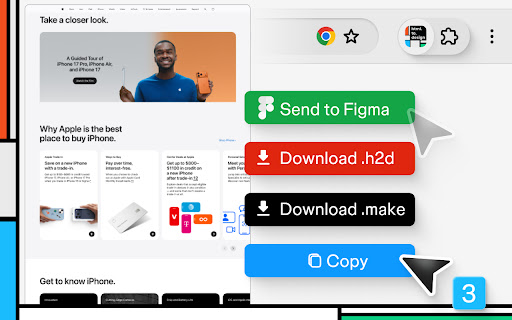
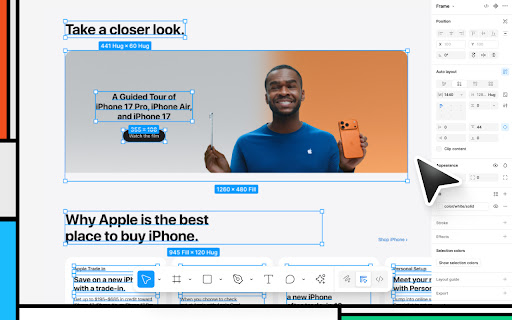
This tool captures live web page HTML and converts it into fully editable Figma layers. It supports various export methods, including direct import to Figma, local .h2d files, and integration with AI-based tools like ChatGPT and Bolt. Users can capture entire web layouts to bypass the manual process of building components from scratch.

Developer:‹div›RIOTS
Version:0.0.203
Size:855KiB
Last updated:

Overview

Installs

600K+

Rating

4.6

132 reviews

Languages

1 locales

Includes English

Market analysis

Review-backed positioning, friction, and market signals for this Chrome extension.

Backed by review samples

Macro category

Developer & Designer Tools

Pricing friction

Moderate review signal

Complaint intensity

Moderate review signal

Listing & review signals
Observed signals from store listing text and review samples.

Listing positioning

html.to.design positions itself as a specialized bridge between live websites and Figma, enabling users to convert web pages into editable design layers. The product emphasizes its utility in saving time by automating the recreation of existing web elements, while explicitly functioning as a companion to a required Figma plugin.

Inferred product pattern

Utility-based companion extension for a design platform ecosystem.

Review-backed pain points

Users report frustration with import failures consuming limited free monthly credits, occasional freezing on complex pages, and confusion about the installation path (extension vs. Figma plugin).

Observed feature gaps

Reviewers have requested more control over responsive screen sizes (e.g., mobile vs. desktop) during the import process.

Tags
FigmaWeb DesignUI/UXPrototypingDesign Workflow
Target users

- UI/UX Designers

- Web Developers

- Product Designers

- Agencies

Primary use cases

- Importing live sites to Figma for redesigns

- Rapid prototyping based on existing interfaces

- Analyzing development implementation of web UI

Positive themes

- Significant time savings for existing site updates

- Generous free tier for casual users

- Highly useful integration with Figma's auto-layout features

Negative themes

- Issues with import reliability and hanging during large page captures

- Confusion regarding the necessity of the Figma plugin

- Counting failed imports against the monthly free quota

Observed friction

- Free-tier complaints detected

- Performance complaints detected

- Some users find the credit consumption model aggressive, particularly when imports fail and still deduct from the monthly limit.

Evidence boundary: Data synthesized from 10 sample reviews covering user experiences from 2022 to 2026, including both free and pro user perspectives. The sample size is relatively small (129 total comments) and reflects a mix of technical feedback and workflow-specific feature requests.
Complaint summaries
Review-backed complaint signals grouped by operational area.

Support

Support is generally considered responsive by paying users, though some free users express confusion about pricing transparency.

Reliability

Occasional reports of the tool freezing during imports or failing to access specific web contents due to permission requirements.

Privacy

No specific privacy complaints found; extension requires debugging permissions to function correctly.

Access & pricing

- Free entry with paid features

- Login needed for core features

- Limited free usage observed

Store listing facts

Listing assets

- Screenshots: 4

- Videos: 0

- Languages: 1

Trust signals

- Privacy policy

- Developer contact

Store metadata

- Version: 0.0.203

- Size: 855KiB

- Last updated:

Store description excerpt
Short excerpt from the public Chrome Web Store listing; full copy is available on the official store page.
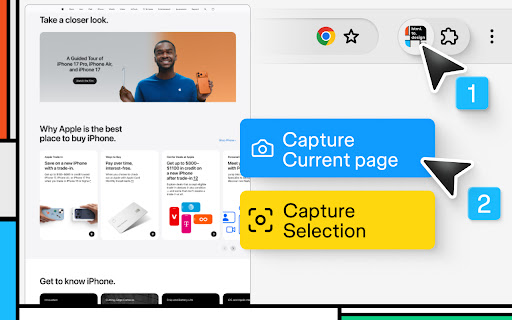
Import any website into Figma as fully editable designs! With html.to.design, convert any website into fully editable Figma layers. Leverage an existing website and import its HTML to Figma to start your own designs, without building each element from scratch. This Chrome extension is a companion to the html.to.design Figma plugin, which you’ll need to install for certain features. If you are using the “Copy to clipboard” option, you do not need to run the Figma plugin — simply paste (⌘+V) your captured webpage in your canvas! This extension also has built-in support for AI Tools like ChatGPT, Bolt and Lovable, and can directly capture their results without any extra steps. You can find the full list of AI tools supported here: https://html.to.design/docs/import-from-ai-tools How it works: =========== 1. Install the html.to.design Chrome extension by clicking on [Add to Chrome] on this…

Listing SEO keywords

Search intent keywords
Keyword signals for evaluating how users may discover, compare, or search for this extension category.

Core discovery

convert website to FigmaHTML to Figma pluginimport web design to FigmaFigma design tool

Comparison

html.to.design alternativesFigma web import tools

Problem

html.to.design not workingFigma import failedFigma plugin pricing

Alternative

design scrapersweb to design converter

Similar extensions

Jump to related discovery paths:

FAQ

What is html.to.design mainly used for?
This tool captures live web page HTML and converts it into fully editable Figma layers. It supports various export methods, including direct import to Figma, local .h2d files, and integration with AI-based tools like ChatGPT and Bolt. Users can capture entire web layouts to bypass the manual process of building components from scratch.
What market signals stand out?
Established adoption with moderate review base. Last known update: 06/17/2026.
What should builders compare before entering this space?
Compare install concentration, rating quality, update recency, screenshots, developer portfolio, listing claims, and review-backed friction signals.
Is this page review-backed?
Backed by review samples. This page combines store metadata with selected review signals, while raw store metrics remain visible for comparison.

Screenshots

html.to.design screenshot

Links

Recommended Chrome extensions

Related listings from the same category, trending peers, and the same publisher portfolio.

Browse tools