Reload All Tabs icon

Reload All Tabs Chrome Extension Analysis

Tab & Bookmark Productivity

Chrome extension ID: midkcinmplflbiflboepnahkboeonkam

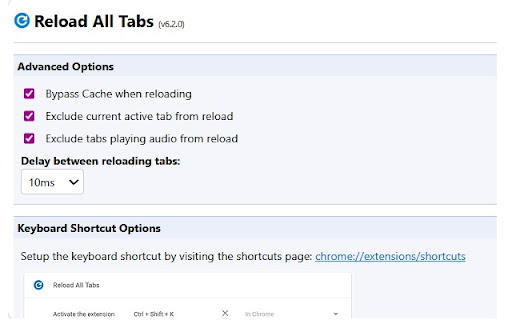
Reload All Tabs is a Chrome extension designed to batch refresh browser tabs using keyboard shortcuts, context menus, or scheduled jobs. It offers advanced customization to exclude certain URLs or add delays between reloads.

Version:6.6.0
Size:34.48KiB
Last updated:

Overview

Installs

100K+

Rating

4.3

249 reviews

Languages

1 locales

Includes English

Market analysis

Review-backed positioning, friction, and market signals for this Chrome extension.

Backed by review samples

Macro category

Tab & Bookmark Productivity

Pricing friction

Low review signal

Complaint intensity

High review signal

Listing & review signals
Observed signals from store listing text and review samples.

Listing positioning

The product is positioned as a powerful utility for developers and power users to manage multiple tabs through various trigger methods. It emphasizes granular control, such as scheduled reloads, bypass cache options, and specific URL filtering.

Inferred product pattern

A mature utility extension currently experiencing significant regression or stability issues following updates.

Review-backed pain points

Users report tabs becoming unresponsive or crashing during reload, failure to restore windows after browser restart, interference with opening links in new windows, and failure to reload within Chrome Tab Groups.

Observed feature gaps

Reported failure to effectively reload tabs contained within Chrome Tab Groups and a lack of integrated browser/context menu action workflows.

Tags
Tab ManagementBrowser AutomationDeveloper ToolsProductivity
Target users

- Web Developers

- Power Users

- Project Managers

Primary use cases

- Batch refreshing web applications

- Testing site changes with hard refresh

- Managing large workspace tab sets

- Automated page refreshing via schedules

Positive themes

- Previously highly regarded for reliability

- Versatile reloading options

Negative themes

- Recent functional breakage

- Performance degradation causing crashes

- Lack of developer responsiveness

- Concerns over increased permission requirements

Observed friction

- Performance complaints detected

- Privacy complaints detected

- No pricing friction observed in available data.

Evidence boundary: Analysis based on the extension's long description and a sample of user reviews covering functionality, stability, and privacy. The review sample contains a high density of recent negative feedback, which may indicate recent regressions rather than a permanent product state.
Complaint summaries
Review-backed complaint signals grouped by operational area.

Support

Users have reported a lack of response from the developer via support channels.

Reliability

Significant reports of the extension failing to work on certain sites, causing browser tabs to crash, or failing to function correctly after browser reboots.

Privacy

Users have expressed suspicion regarding recent updates requiring more permissions.

Access & pricing

- No clear monetization signal

- No account requirement observed

- No clear pricing signal

Store listing facts

Listing assets

- Screenshots: 5

- Videos: 0

- Languages: 1

Trust signals

- Privacy policy

- Developer contact

- Official website

- Support link

Store metadata

- Version: 6.6.0

- Size: 34.48KiB

- Last updated:

Store description excerpt
Short excerpt from the public Chrome Web Store listing; full copy is available on the official store page.
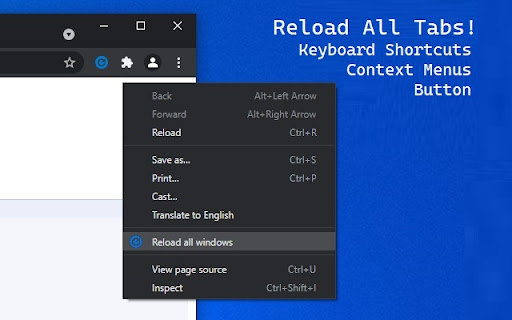
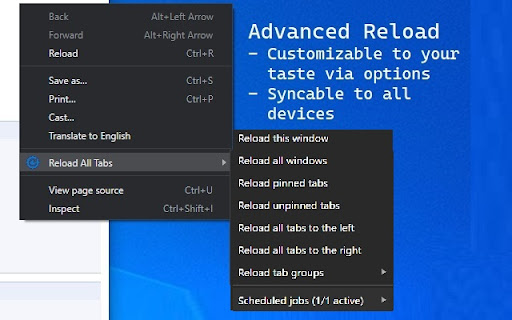
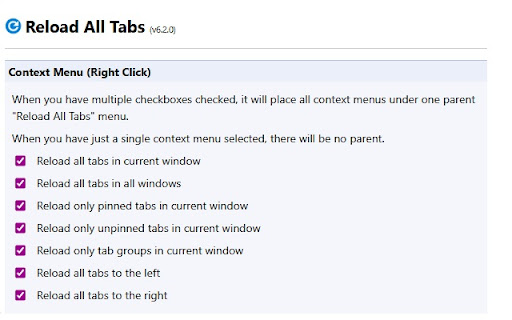
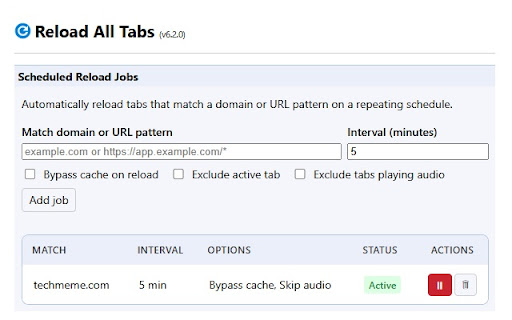
Powerful tab management extension to reload multiple tabs with customizable options and keyboard shortcuts. FOLLOW ME ON TWITTER: https://twitter.com/mohamedmansour SOURCE CODE: http://goo.gl/dGDD (GitHub) 🚀 WAYS TO RELOAD TABS: - Right-click context menu with multiple reload options - Click the blue arrow icon in the toolbar - Keyboard shortcut: Ctrl+Shift+R (Command+Shift+R on Mac) - Scheduled reload jobs per URL ⚙️ CONTEXT MENU OPTIONS (Enable what you need): - Reload all tabs in current window (enabled by default) - Reload all tabs in all windows - Reload all tabs within specific tab groups (with color indicators) - Reload only pinned tabs in current window - Reload only unpinned tabs in current window - Reload all tabs to the left of current tab - Reload all tabs to the right of current tab - Reload tabs matching specific URLs (comma-separated list) - Reload tabs not matching spec…

Listing SEO keywords

Search intent keywords
Keyword signals for evaluating how users may discover, compare, or search for this extension category.

Core discovery

reload all tabsbatch refresh tabschrome tab managerscheduled tab reloadhard refresh tabs

Comparison

Awesome Reload All Tabs

Problem

tabs crashingtabs not refreshingbrowser lagtab group reload fail

Alternative

tab management extensionbrowser automation tool

Similar extensions

Jump to related discovery paths:

FAQ

What is Reload All Tabs mainly used for?
Reload All Tabs is a Chrome extension designed to batch refresh browser tabs using keyboard shortcuts, context menus, or scheduled jobs. It offers advanced customization to exclude certain URLs or add delays between reloads.
What market signals stand out?
Established adoption with moderate review base. Last known update: 04/25/2026.
What should builders compare before entering this space?
Compare install concentration, rating quality, update recency, screenshots, developer portfolio, listing claims, and review-backed friction signals.
Is this page review-backed?
Backed by review samples. This page combines store metadata with selected review signals, while raw store metrics remain visible for comparison.

Screenshots

Reload All Tabs screenshot

Links

Recommended Chrome extensions

Related listings from the same category, trending peers, and the same publisher portfolio.

Browse developer