User JavaScript and CSS icon

User JavaScript and CSS Chrome Extension Analysis

Developer & Designer Tools

Chrome extension ID: nbhcbdghjpllgmfilhnhkllmkecfmpld

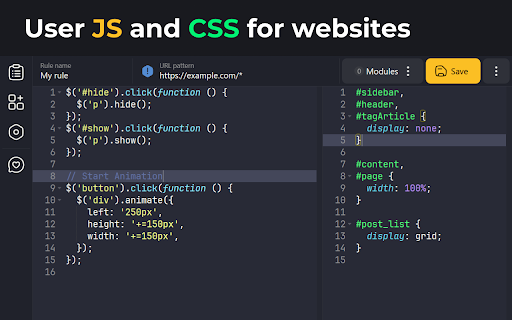
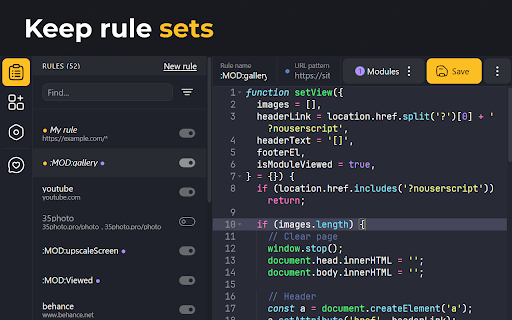
User JavaScript and CSS is a browser extension that allows users to write and execute custom code to modify the appearance and behavior of websites. It provides an integrated editor to manage rules, support for SASS/Prettier, and options to apply scripts to specific URL patterns or iframes.

Developer:tenRabbits
Version:3.1.2
Size:1.72MiB
Last updated:

Overview

Installs

200K+

Rating

4.8

656 reviews

Languages

2 locales

Includes English, русский

Market analysis

Review-backed positioning, friction, and market signals for this Chrome extension.

Backed by review samples

Macro category

Developer & Designer Tools

Pricing friction

Low review signal

Complaint intensity

Moderate review signal

Listing & review signals
Observed signals from store listing text and review samples.

Listing positioning

The store listing positions this tool as a simple, high-utility extension for injecting custom JavaScript and CSS into any website. It emphasizes technical features like URL masking, custom library support, and multi-mode injection to ensure compatibility and performance across various web environments.

Inferred product pattern

Free, standalone utility tool for advanced browser modification without requiring account registration.

Review-backed pain points

Users report that CSS rules sometimes fail to apply without a page refresh, occasional regression bugs following version updates, and difficulty identifying the 'on/off' status of settings due to poor color contrast.

Observed feature gaps

Lack of automatic cloud synchronization between devices and no centralized repository or community library for sharing custom rules.

Tags
JavaScript InjectorCSS InjectorWeb CustomizationUserscript ManagerBrowser Developer Tool
Target users

- Web Developers

- Power Users

- UI/UX Designers

- Browser Customizers

Primary use cases

- Applying custom CSS to hide website elements

- Injecting custom JavaScript for site behavior modification

- Debugging UI changes

- Enforcing consistent design overrides across specific domains

Positive themes

- Simplicity and ease of use

- Effective delivery of core functionality

- Good feature set for custom code management

- Useful for simple UI overrides

Negative themes

- Code injection inconsistencies

- Bugs following extension updates

- UI/UX issues regarding toggle status visibility

- Desire for automatic cloud synchronization

Observed friction

- Performance complaints detected

- None identified; the extension is free to use.

Evidence boundary: Evidence is drawn from 654 public reviews and consistent developer update logs indicating ongoing maintenance. Review data reflects individual user experiences which may be influenced by specific browser configurations or conflicting extensions.
Complaint summaries
Review-backed complaint signals grouped by operational area.

Support

No specific complaints regarding support responses, though users expressed frustration with update-related bugs.

Reliability

Users occasionally encounter issues where injected CSS does not apply to active tabs without a refresh, and some report regression bugs following version updates.

Privacy

None identified.

Access & pricing

- Free usage observed

- No account requirement observed

- Free plan or free usage claimed

Store listing facts

Listing assets

- Screenshots: 3

- Videos: 0

- Languages: 2

Trust signals

- Developer contact

Store metadata

- Version: 3.1.2

- Size: 1.72MiB

- Last updated:

Store description excerpt
Short excerpt from the public Chrome Web Store listing; full copy is available on the official store page.
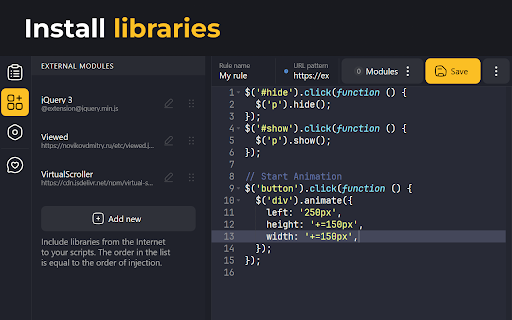
Userscript's and userstyle's — simple extension to inject own JavaScript or CSS rules to any page. Features: - Instant execution - Custom libs include - URL masking allows use one script or CSS on many pages Documentation: https://tenrabbits.github.io/user-js-css-docs/ Change log: Version 3.1.0 - Starting from Chrome version 138, the method for allowing user scripts in the browser has changed - Fixed a bug where styles weren't removed when a rule was deleted - Fixed a bug where not all rules applied to the page were shown in the rules popup Version 3.0.6 beta - `try catch` wrapper removed - CSS injection improved - added button to save converted URL Version 3.0.5 beta - the mode of injection of styles into the DOM has been returned - minor fixes Version 3.0.3 beta - modules are now in the same scope - CSS injection improvement - and other minor fixes Version 3.0.2 beta - hotfix: fixed b…

Listing SEO keywords

Search intent keywords
Keyword signals for evaluating how users may discover, compare, or search for this extension category.

Core discovery

inject javascript chrome extensioncustom css browser extensionuserscript managerweb page customizerinject css on website

Comparison

stylish alternativeuser javascript vs stylishbest chrome extension for custom css

Problem

css not applyingjavascript not executing on pageextension bugs

Alternative

TampermonkeyStylusUserCSS

Similar extensions

Jump to related discovery paths:

FAQ

What is User JavaScript and CSS mainly used for?
User JavaScript and CSS is a browser extension that allows users to write and execute custom code to modify the appearance and behavior of websites. It provides an integrated editor to manage rules, support for SASS/Prettier, and options to apply scripts to specific URL patterns or iframes.
What market signals stand out?
Established adoption with moderate review base. Last known update: 07/07/2025.
What should builders compare before entering this space?
Compare install concentration, rating quality, update recency, screenshots, developer portfolio, listing claims, and review-backed friction signals.
Is this page review-backed?
Backed by review samples. This page combines store metadata with selected review signals, while raw store metrics remain visible for comparison.

Screenshots

User JavaScript and CSS screenshot

Recommended Chrome extensions

Related listings from the same category, trending peers, and the same publisher portfolio.

Browse developer