Companion icon

Companion Chrome Extension Analysis

AI & Writing Assistants

Chrome extension ID: nebllepgnfggknadgoiokblfddbbgldn

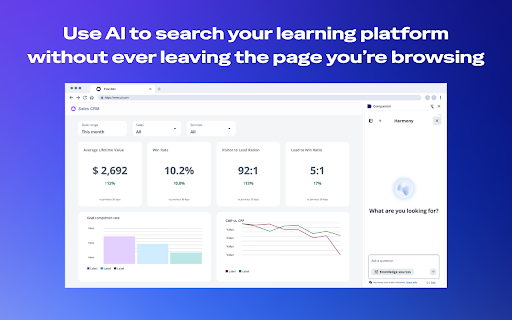
A browser extension developed by Docebo that connects to an organization's learning platform. It provides contextual guidance, AI-powered search, and training resources via a side panel based on the user's current web activity.

Developer:Docebo
Version:1.1.3
Size:11.32MiB
Last updated:

Overview

Installs

10K+

Rating

3.5

2 reviews

Languages

1 locales

Includes English

Market analysis

Review-backed positioning, friction, and market signals for this Chrome extension.

Backed by review samples

Macro category

AI & Writing Assistants

Pricing friction

Moderate review signal

Complaint intensity

Moderate review signal

Listing & review signals
Observed signals from store listing text and review samples.

Listing positioning

The product is positioned as an AI-powered learning assistant that integrates corporate training directly into the browser. It emphasizes 'learning in the flow of work' to eliminate the need for tab-switching and interruptions.

Inferred product pattern

Enterprise L&D side-panel integration linked to a centralized LMS.

Review-backed pain points

The extension may interfere with the login process of other training websites, specifically Google Skillshop.

Observed feature gaps

Compatibility issues with third-party educational platforms (e.g., Google Skillshop) causing login failures.

Tags
AI LearningCorporate TrainingDocebo AssistantKnowledge ManagementEmployee Onboarding
Target users

- Employees of organizations using Docebo

- L&D (Learning and Development) administrators

- New hires in onboarding

Primary use cases

- Accessing training materials while working

- Using AI to find precise answers from company resources

- Completing contextual learning modules without leaving the page

Positive themes

No positive theme data.

Negative themes

- Technical conflicts with external website authentication

Observed friction

- Payment required for meaningful usage

- Performance complaints detected

- No pricing friction reported; the tool is included as part of the Docebo platform plan.

Evidence boundary: Data extracted from the official store listing and one user review. Extremely limited review sample size consisting of only one rating, which does not represent a broad sentiment distribution.
Complaint summaries
Review-backed complaint signals grouped by operational area.

Support

No support or account management complaints observed.

Reliability

One report of the extension breaking the login functionality of an external training site.

Privacy

No privacy or security complaints observed.

Access & pricing

- Subscription model observed

- Account required for core usage

- Paid-only usage observed

Store listing facts

Listing assets

- Screenshots: 5

- Videos: 0

- Languages: 1

Trust signals

- Privacy policy

- Developer contact

- Support link

Store metadata

- Version: 1.1.3

- Size: 11.32MiB

- Last updated:

Store description excerpt
Short excerpt from the public Chrome Web Store listing; full copy is available on the official store page.
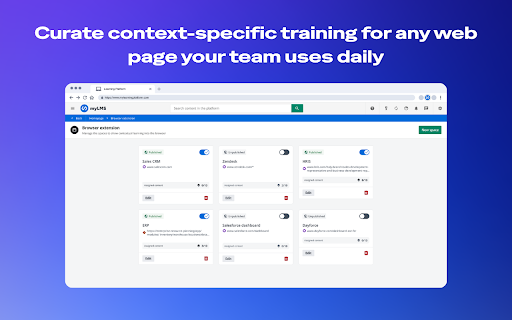
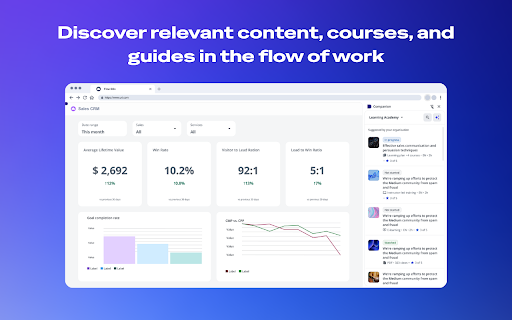
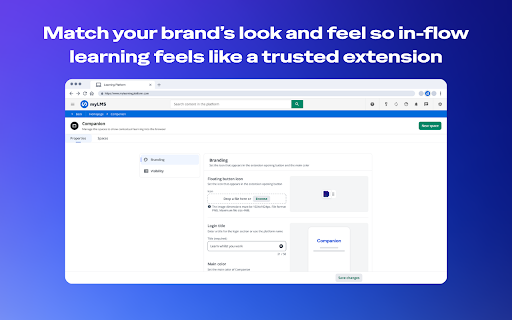
What it is Companion is your AI-powered learning assistant for the web. It connects to your organization's learning platform and brings training, search, and AI-powered guidance directly into your browser — right on the pages you're already visiting. No switching tabs. No separate login. No interruptions. Just the knowledge you need, the moment you need it. Why it's helpful - Learn in the flow of work: Training and guidance appear in context — based on where you're browsing — so you never have to stop what you're doing to find what you need. - Find answers fast: AI-powered search delivers precise answers and relevant resources in seconds. Ask a question in plain language and get a real response — not just a list of links. - Stay focused: Companion lives in a side panel. It's there when you need it and out of the way when you don't. - Grow with purpose: Discover short tips, courses, and…

Listing SEO keywords

Search intent keywords
Keyword signals for evaluating how users may discover, compare, or search for this extension category.

Core discovery

Docebo AI assistantcontextual learning extensionenterprise training browser tool

Comparison

Docebo Companion vs traditional LMSAI learning assistant for business

Problem

tab switching for trainingfinding corporate answers fastemployee onboarding friction

Alternative

Docebo alternativeAI knowledge base extension

Similar extensions

Jump to related discovery paths:

FAQ

What is Companion mainly used for?
A browser extension developed by Docebo that connects to an organization's learning platform. It provides contextual guidance, AI-powered search, and training resources via a side panel based on the user's current web activity.
What market signals stand out?
Visible niche traction with limited review base. Last known update: 06/09/2026.
What should builders compare before entering this space?
Compare install concentration, rating quality, update recency, screenshots, developer portfolio, listing claims, and review-backed friction signals.
Is this page review-backed?
Backed by review samples. This page combines store metadata with selected review signals, while raw store metrics remain visible for comparison.

Screenshots

Companion screenshot

Links

Recommended Chrome extensions

Related listings from the same category, trending peers, and the same publisher portfolio.

Browse education
xFanatical Safe Doc icon

xFanatical Safe Doc

xFanatical

xFanatical Safe Doc smooths the way for schools managing Google Workspace for Education features (Docs, Sheets, Slides, Classroom,…

Installs

200K+

Rating

1.4

Mouse Tooltip Translator - PDF & Netflix YouTube dual subs icon

Mouse Tooltip Translator - PDF & Netflix YouTube dual subs

ttop324

Mouse Tooltip Translator translate mouseover text using google translate. Support OCR, TTS, manga translator & pdf translator.

Installs

200K+

Rating

4.6

Paperpile Extension icon

Paperpile Extension

Paperpile

Collect, organize, annotate and cite your research papers in Chrome.

Installs

200K+

Rating

4.6

Rapid Journal Quality Check icon

Rapid Journal Quality Check

jrk.devgit

Displays rankings and h-index for academic journals next to Google Scholar search results.

Installs

200K+

Rating

4.2

OpenDyslexic for Chrome icon

OpenDyslexic for Chrome

OpenDyslexic

Format pages using the OpenDyslexic font and low contrast help

Installs

200K+

Rating

4.1

Google Meet Breakout by Robert Hudek icon

Google Meet Breakout by Robert Hudek

Unknown developer

Only the teacher needs to install. Completely Free and your Data is Private. Google Classroom integration, Slider Control.

Installs

200K+

Rating

4.4

Reverso – Translation, dictionary icon

Reverso – Translation, dictionary

Reverso Technologies Inc.

Translate and learn languages while browsing and watching movies, it’s free.

Installs

200K+

Rating

4.6

Toucan by Babbel - Language Learning icon

Toucan by Babbel - Language Learning

jointoucan.com

Learn a new language just by browsing the internet.

Installs

200K+

Rating

4.6

Add to Google Classroom icon

Add to Google Classroom

Canopy

This extension adds the current site to Google Classroom

Installs

200K+

Rating

4.2

Knowt: Quizlet Import, AI Notes & Flashcards icon

Knowt: Quizlet Import, AI Notes & Flashcards

Knowt

Automatically import flashcards and notes from any video, PDF, article, or flashcard site. Knowt is the fastest way to study.

Installs

100K+

Rating

4.9