GQueues Chrome Extension icon

GQueues Chrome Extension Chrome Extension Analysis

Automation & Workflow Efficiency

Chrome extension ID: nfaboplgcinooacenccbofkaadcfbkkb

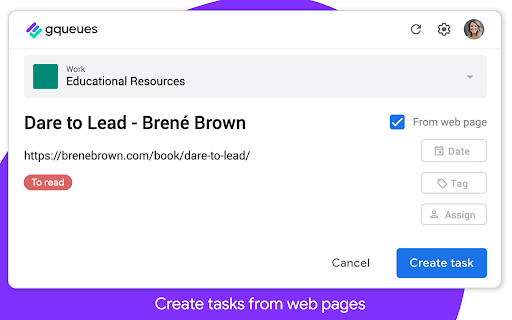
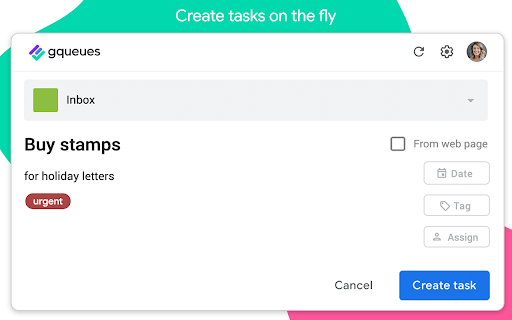
This extension acts as an entry point for the GQueues task management platform. It allows users to capture to-dos from any webpage, automatically attaching the page URL, and syncing the data to the central GQueues inbox.

Developer:Boomerang
Version:1.2.4
Size:755KiB
Last updated:

Overview

Installs

10K+

Rating

4.5

61 reviews

Languages

1 locales

Includes English

Market analysis

Review-backed positioning, friction, and market signals for this Chrome extension.

Backed by review samples

Macro category

Automation & Workflow Efficiency

Pricing friction

Moderate review signal

Complaint intensity

Moderate review signal

Listing & review signals
Observed signals from store listing text and review samples.

Listing positioning

The GQueues Chrome Extension is positioned as a lightweight capture tool designed for teams using Google Workspace. It focuses on enabling users to quickly log tasks and web URLs directly to their GQueues account without derailing their current workflow.

Inferred product pattern

Workflow-specific capture extension requiring a primary SaaS account.

Review-backed pain points

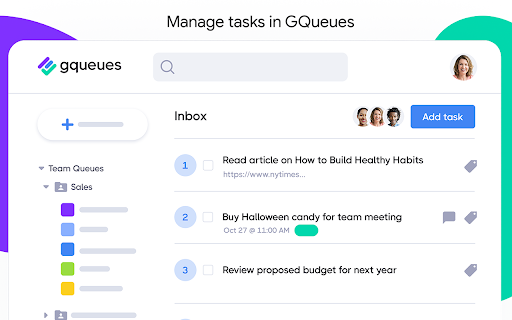
Users frequently express a desire for more comprehensive functionality, specifically the ability to view, sort, and edit existing tasks or repeating task status directly from the extension interface rather than just adding new items.

Observed feature gaps

The extension lacks a task list viewer, granular task management options like 'repeating task' scheduling, and 'top/bottom' list placement controls, forcing users to visit the main web app to complete these actions.

Tags
Task ManagementGQueuesGoogle WorkspaceProductivity
Target users

- GQueues users

- Google Workspace teams

- Project managers

Primary use cases

- Saving web articles for research

- Capturing quick to-dos from the browser

- Adding tasks with webpage context

Positive themes

- Seamless integration with web browsing

- Effectiveness in capturing tasks on the fly

- Flexible and intuitive configuration

Negative themes

- Lack of ability to view or manage existing lists within the extension

- Limited feature parity compared to the main app (e.g., missing repeating task settings)

- Requirement of a paid subscription for full service

Observed friction

- Payment required for meaningful usage

- Some users have expressed frustration regarding the transition from a free model to a subscription-based model.

Evidence boundary: Evidence derived from public store description and user reviews highlighting utility for task capture versus missing advanced management features. Review data spans over a decade, meaning some historical complaints may refer to older versions or outdated pricing structures.
Complaint summaries
Review-backed complaint signals grouped by operational area.

Support

No specific support or refund complaints were identified in the analyzed sample.

Reliability

Minor performance friction noted regarding server polling times before the task addition dialog appears.

Privacy

No specific privacy or security complaints identified.

Access & pricing

- Subscription model observed

- Account required for core usage

- Trial or limited free usage before paid plan

Store listing facts

Listing assets

- Screenshots: 3

- Videos: 1

- Languages: 1

Trust signals

- Privacy policy

- Developer contact

- Official website

Store metadata

- Version: 1.2.4

- Size: 755KiB

- Last updated:

Store description excerpt
Short excerpt from the public Chrome Web Store listing; full copy is available on the official store page.
Capture your to-dos on the fly from anywhere on the web. Quickly create a new task to send right to your GQueues account, then get back to what you were doing. Want to save an article for your team meeting? Come across a source that could be useful for research on a big project? Just remembered you still need to book a babysitter for this Saturday? The GQueues Chrome Extension’s got you covered. Just log your thought and send it off to your GQueues inbox. If you select “From web page,” the URL of the site you’re on will be automatically added to the task so it’s easy to return to later. No more getting derailed from your work at hand. No more opening tabs on tabs on tabs of pages you want to read. The Chrome Extension makes it easy to capture it all in one central location so it’s not forgotten. --------------------------------------------------------------- The GQueues Chrome Extension…

Listing SEO keywords

Search intent keywords
Keyword signals for evaluating how users may discover, compare, or search for this extension category.

Core discovery

GQueues chrome extensiontask manager for google workspacesave web links to tasksproductivity browser tool

Comparison

GQueues alternativeGoogle tasks extension

Problem

cannot view task listmissing repeating task feature

Alternative

task capture extension

Similar extensions

Jump to related discovery paths:

FAQ

What is GQueues Chrome Extension mainly used for?
This extension acts as an entry point for the GQueues task management platform. It allows users to capture to-dos from any webpage, automatically attaching the page URL, and syncing the data to the central GQueues inbox.
What market signals stand out?
Visible niche traction with limited review base. Last known update: 03/20/2023.
What should builders compare before entering this space?
Compare install concentration, rating quality, update recency, screenshots, developer portfolio, listing claims, and review-backed friction signals.
Is this page review-backed?
Backed by review samples. This page combines store metadata with selected review signals, while raw store metrics remain visible for comparison.

Screenshots

GQueues Chrome Extension screenshot

Links

Website: gqueues.com

Privacy policy: https://www.gqueues.com/privacy

Videos: Watch

Recommended Chrome extensions

Related listings from the same category, trending peers, and the same publisher portfolio.

Browse workflow