GQueues for Google Calendar icon

GQueues for Google Calendar Chrome Extension Analysis

Automation & Workflow Efficiency

Chrome extension ID: fghnmlcmakpmbjgplmcbkhgkeegofhll

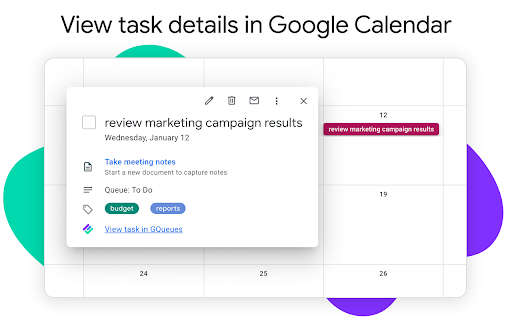
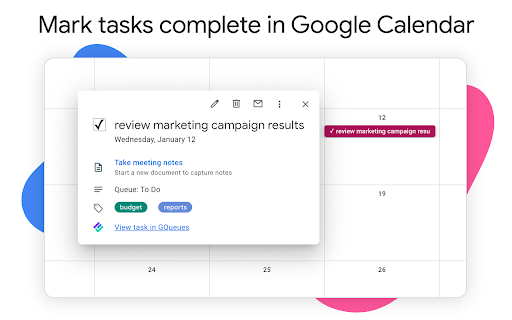
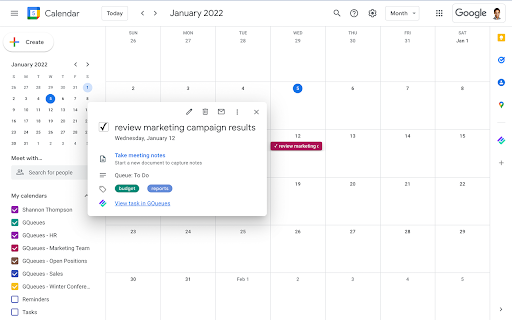
GQueues for Google Calendar is a Chrome extension that integrates with the GQueues task management application. It allows users to view and mark GQueues tasks as complete directly within their Google Calendar interface. The extension requires a GQueues account and is designed to enhance productivity for teams using Google Workspace.

Developer:Boomerang
Version:1.2.4
Size:500KiB
Last updated:

Overview

Installs

10K+

Rating

5.0

18 reviews

Languages

1 locales

Includes English (United States)

Market analysis

Review-backed positioning, friction, and market signals for this Chrome extension.

Backed by review samples

Macro category

Automation & Workflow Efficiency

Pricing friction

Low review signal

Complaint intensity

Low review signal

Listing & review signals
Observed signals from store listing text and review samples.

Listing positioning

The GQueues for Google Calendar extension is positioned as a productivity enhancer for users who live in Google Calendar. It allows for seamless task management directly within the calendar interface, eliminating the need to switch between applications. The extension aims to improve organization and workflow by integrating GQueues tasks with Google Calendar.

Inferred product pattern

A browser extension that provides enhanced functionality for a separate web application by integrating it into another common browser-based tool.

Review-backed pain points

One user mentioned missing the sidebar list functionality present in a previous version of the integration, though they still considered the current extension a significant improvement.

Observed feature gaps

One reviewer expressed a minor wish for the return of a sidebar list feature that was present in an older version of the integration.

Tags
Google CalendarTask ManagementProductivity
Target users

- Google Workspace users

- Project managers

- Individuals managing tasks via Google Calendar

Primary use cases

- Marking tasks complete within Google Calendar

- Viewing GQueues tasks alongside calendar events

- Streamlining task management workflow

Positive themes

- Seamless integration with Google Calendar

- Convenient task completion directly from Calendar

- Overall improvement in productivity and organization

- Elegant, simple, and sleek design

- Excellent G-Cal integration and two-way live updates

Negative themes

- User misses the sidebar list feature from the previous 'gadget' version, but acknowledges the current version is a vast improvement.

Observed friction

- The extension itself is free, but requires a GQueues account, which may have its own pricing structure.

Evidence boundary: Store listing details and user reviews were used. The available reviews are overwhelmingly positive and do not cover a wide range of potential issues. The monetization model and precise pricing of the core GQueues service are not detailed in the provided data.
Complaint summaries
Review-backed complaint signals grouped by operational area.

Support

No negative feedback regarding support was observed.

Reliability

No negative feedback regarding reliability or performance was observed.

Privacy

No negative feedback regarding privacy or security was observed.

Access & pricing

- No clear monetization signal

- Account required for core usage

- No clear pricing signal

Store listing facts

Listing assets

- Screenshots: 3

- Videos: 1

- Languages: 1

Trust signals

- Privacy policy

- Developer contact

- Official website

Store metadata

- Version: 1.2.4

- Size: 500KiB

- Last updated:

Store description excerpt
Short excerpt from the public Chrome Web Store listing; full copy is available on the official store page.
If you live in Google Calendar, you understand the importance of a timely reminder to get to work, and blocking out meeting-free time so you have space to actually get that work done. With the GQueues Google Calendar extension, you can view full details for GQueues tasks syncing to Google Calendar, and mark those tasks complete right from the Calendar interface. No switching back and forth between the two apps to keep track of what you’ve accomplished. If you’ve already activated Calendar syncing for your GQueues account, the next step is to install this extension to push that integration (and your productivity) to the next level. --------------------------------------------------------------- The GQueues for Google Calendar Chrome Extension requires a GQueues account to work. GQueues is a task management app specifically designed for teams on Google Workspace. With GQueues you get: • D…

Listing SEO keywords

Search intent keywords
Keyword signals for evaluating how users may discover, compare, or search for this extension category.

Core discovery

GQueues Google CalendarGoogle Calendar tasksGQueues Chrome extensionTask management CalendarProductivity Google Calendar

Comparison

Google Calendar integrationTask app Google Calendar

Problem

Manage tasks Google CalendarComplete tasks Calendar

Alternative

GQueues alternativeGoogle Calendar productivity tools

Similar extensions

Jump to related discovery paths:

FAQ

What is GQueues for Google Calendar mainly used for?
GQueues for Google Calendar is a Chrome extension that integrates with the GQueues task management application. It allows users to view and mark GQueues tasks as complete directly within their Google Calendar interface. The extension requires a GQueues account and is designed to enhance productivity for teams using Google Workspace.
What market signals stand out?
Visible niche traction with limited review base. Last known update: 11/13/2024.
What should builders compare before entering this space?
Compare install concentration, rating quality, update recency, screenshots, developer portfolio, listing claims, and review-backed friction signals.
Is this page review-backed?
Backed by review samples. This page combines store metadata with selected review signals, while raw store metrics remain visible for comparison.

Screenshots

GQueues for Google Calendar screenshot

Links

Website: gqueues.com

Privacy policy: https://www.gqueues.com/privacy

Videos: Watch

Recommended Chrome extensions

Related listings from the same category, trending peers, and the same publisher portfolio.

Browse workflow