Equalizer for YouTube™ icon

Equalizer for YouTube™ Chrome Extension Analysis

Niche Lifestyle & Gaming Hacks

Chrome extension ID: oggiagogblgafoilijjdhcmflgekfmja

A Chrome extension that allows users to adjust the balance of audio frequency components on YouTube videos. It provides a variety of presets such as pop, club, and soft rock to improve sound quality or compensate for hardware limitations.

Developer:Muyor
Version:0.1.8
Size:32.42KiB
Last updated:

Overview

Installs

70K+

Rating

3.8

218 reviews

Languages

1 locales

Includes English

Market analysis

Review-backed positioning, friction, and market signals for this Chrome extension.

Backed by review samples

Macro category

Niche Lifestyle & Gaming Hacks

Pricing friction

Low review signal

Complaint intensity

Moderate review signal

Listing & review signals
Observed signals from store listing text and review samples.

Listing positioning

The product positions itself as a lite, specialized audio equalizer specifically for YouTube and embedded videos. It emphasizes ease of use by placing the control button directly on the YouTube page and offering 18 predefined audio presets.

Inferred product pattern

Single-purpose utility extension utilizing DOM injection to add audio controls to a specific platform.

Review-backed pain points

Users report the extension frequently stops working after YouTube updates the site UI. Some experience severe bugs where videos fail to start or playback speed slows down significantly.

Observed feature gaps

Lack of a clear visual indicator for the active preset and failure to maintain compatibility with YouTube's evolving interface.

Tags
Audio EqualizerYouTube ToolSound EnhancementAudio Presets
Target users

- YouTube viewers

- Music listeners on YouTube

- Users with poor audio hardware

- Users watching poorly recorded lectures or documentaries

Primary use cases

- Tuning bass and treble for specific speakers

- Improving clarity of poor audio recordings

- Applying genre-specific audio presets to music videos

Positive themes

- Effective sound correction when functional

- Useful for compensating for hardware issues like excessive bass

- Helpful for enhancing poorly recorded audio

Negative themes

- Breakage following YouTube UI updates

- Intermittent functionality and failure to load

- Audio distortion

- Video playback performance degradation

Observed friction

- Performance complaints detected

- Privacy complaints detected

- No pricing friction observed as the product appears to be free.

Evidence boundary: Extracted from store listing and a sample of helpful and low-rating reviews. The review sample is small compared to the total user base.
Complaint summaries
Review-backed complaint signals grouped by operational area.

Support

Users expressed frustration over the lack of developer updates and fixes after the extension stopped working due to site changes.

Reliability

Significant reliability issues including extensions not opening post-installation, intermittent loading, and complete breakage after UI updates.

Privacy

One user reported concerns regarding suspicious tracking of their YouTube activity.

Access & pricing

- Free usage observed

- No account requirement observed

- Free plan or free usage claimed

Store listing facts

Listing assets

- Screenshots: 1

- Videos: 0

- Languages: 1

Trust signals

- Developer contact

- Official website

Store metadata

- Version: 0.1.8

- Size: 32.42KiB

- Last updated:

Store description excerpt
Short excerpt from the public Chrome Web Store listing; full copy is available on the official store page.
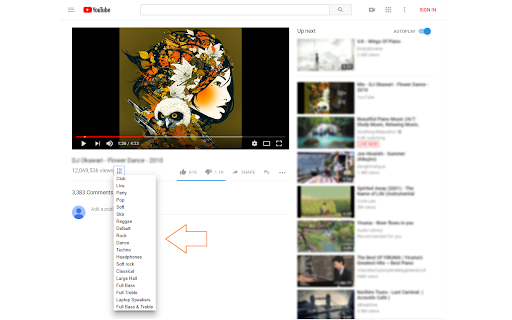
Equalizer for YouTube™ is an extension that lets you easily adjust audio settings (the balance between frequency components in an audio file) for YouTube videos. Important note: Equalizer for YouTube™ extension does NOT belong or relate to YouTube and has NO affiliations with Google Inc. or YouTube website at all. It is an unofficial extension that is developed and maintained independently by its author. Note, YouTube™ is a registered trademark of Google Inc. Note #1: this add-on is a simplified version of Audio Equalizer add-on and specifically designed for the YouTube website only. It is very lite and has no toolbar button (the equalizer button is placed on YouTube page). The add-on works for both YouTube website and all other YouTube embedded videos. There are 18 audio presets available to choose from in the preset drop-down list. For example, you can choose, pop, club, party, soft r…

Listing SEO keywords

Search intent keywords
Keyword signals for evaluating how users may discover, compare, or search for this extension category.

Core discovery

YouTube equalizerYouTube sound boosteraudio frequency adjuster YouTubeYouTube audio presets

Comparison

Audio Equalizer vs Equalizer for YouTubebest YouTube equalizer extension

Problem

YouTube audio too bassyYouTube poor audio qualityYouTube sound distortion

Alternative

YouTube audio equalizer alternativebest chrome extension for youtube sound

Similar extensions

Jump to related discovery paths:

FAQ

What is Equalizer for YouTube™ mainly used for?
A Chrome extension that allows users to adjust the balance of audio frequency components on YouTube videos. It provides a variety of presets such as pop, club, and soft rock to improve sound quality or compensate for hardware limitations.
What market signals stand out?
Visible niche traction with moderate review base. Last known update: 05/03/2026.
What should builders compare before entering this space?
Compare install concentration, rating quality, update recency, screenshots, developer portfolio, listing claims, and review-backed friction signals.
Is this page review-backed?
Backed by review samples. This page combines store metadata with selected review signals, while raw store metrics remain visible for comparison.

Screenshots

Equalizer for YouTube™ screenshot

Links

Recommended Chrome extensions

Related listings from the same category, trending peers, and the same publisher portfolio.

Browse tools
Allow CORS: Access-Control-Allow-Origin icon

Allow CORS: Access-Control-Allow-Origin

Muyor

Easily add (Access-Control-Allow-Origin: *) rule to the response header.

Installs

800K+

Rating

3.4

Open With Download Manager icon

Open With Download Manager

Muyor

Open and download desired links with internet download manager.

Installs

90K+

Rating

3.6

Sider: Chat with all AI: GPT-5, Claude, DeepSeek, Gemini, Grok icon

Sider: Chat with all AI: GPT-5, Claude, DeepSeek, Gemini, Grok

ChatGPT Sidebar

ChatGPT, DeepSeek, Gemini, Claude, Grok all in one AI sidebar, for AI search, read, and write.

Installs

5.0M+

Rating

4.9

Norton Safe Search icon

Norton Safe Search

NortonLifeLock Inc

Search safely online by enabling Norton Safe Search as your default search provider for maximum protection on Chrome.

Installs

5.0M+

Rating

2.4

Shazam: Find song names from your browser icon

Shazam: Find song names from your browser

Shazam

Identify music, search lyrics & more

Installs

5.0M+

Rating

4.7

IE Tab icon

IE Tab

Blackfish Software

Display web pages using IE within Chrome. Use Java, Silverlight, ActiveX, Sharepoint, and more.

Installs

4.0M+

Rating

4.3

Microsoft Bing Homepage & Search for Chrome icon

Microsoft Bing Homepage & Search for Chrome

Microsoft Corporation

Set Microsoft Bing as your default homepage and default search engine

Installs

4.0M+

Rating

3.8

Immersive Translate: AI Web, PDF & Video Translator icon

Immersive Translate: AI Web, PDF & Video Translator

Immersive Translate

Free Translate Website, Translate PDF & Epub eBook, Translate Video Subtitles in Bilingual

Installs

3.0M+

Rating

4.0

BetterTTV icon

BetterTTV

NightDev, LLC

BetterTTV enhances Twitch and YouTube with new features, emotes, and more.

Installs

3.0M+

Rating

4.6

Monica: All-In-One AI Assist & Smartest  AI Agent icon

Monica: All-In-One AI Assist & Smartest AI Agent

Monica Team

One stop AI Assistant with GPT, Claude, Gemini: Chat, Write, Translate, Search, Summarize, image generator, video generation

Installs

3.0M+

Rating

4.9