rikaikun icon

rikaikun Chrome Extension Analysis

Niche Lifestyle & Gaming Hacks

Chrome extension ID: jipdnfibhldikgcjhfnomkfpcebammhp

A browser extension designed for Japanese language learners that provides instant pop-up definitions and readings. It features dictionary switching for Kanji and names, text-to-speech capabilities, and a clipboard function for study purposes.

Developer:Erek Speed
Version:3.2.34
Size:28.28MiB
Last updated:

Overview

Installs

200K+

Rating

4.7

1,864 reviews

Languages

1 locales

Includes English

Market analysis

Review-backed positioning, friction, and market signals for this Chrome extension.

Backed by review samples

Macro category

Niche Lifestyle & Gaming Hacks

Pricing friction

Low review signal

Complaint intensity

Moderate review signal

Listing & review signals
Observed signals from store listing text and review samples.

Listing positioning

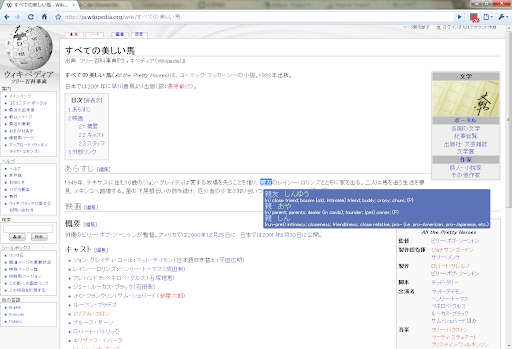
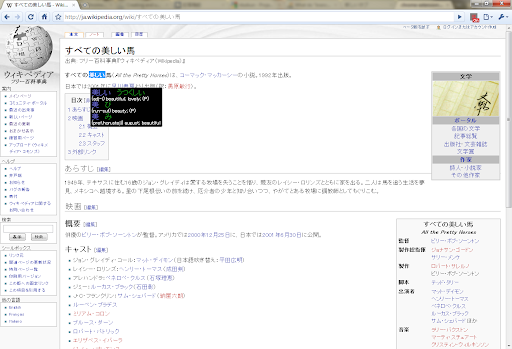
Rikaikun positions itself as a seamless Japanese dictionary that allows users to look up words without losing their reading flow. It emphasizes providing readings and English definitions via a simple hover action.

Inferred product pattern

A niche language utility using hover-based DOM parsing, currently struggling with technical stability and feature parity with its Firefox counterpart.

Review-backed pain points

Users frequently report that the extension stops working abruptly, fails to trigger on hover, or lacks the database depth to recognize essential names and places.

Observed feature gaps

Users have requested the ability to translate selected phrases rather than just hovered characters, more specialized internet slang/chattalk databases, and the ability to toggle off hiragana/katakana readings.

Tags
Japanese DictionaryLanguage LearningKanji ReaderHover Translation
Target users

- Japanese language learners

- Japanese speakers learning English

Primary use cases

- Reading Japanese websites

- Learning Kanji and vocabulary

- Creating flashcards

Positive themes

- Useful for Kanji learning

- Convenient for maintaining reading flow

Negative themes

- Technical unreliability and sudden failure to function

- Inability to recognize names and places

- Incomplete vocabulary database compared to competitors

Observed friction

- Performance complaints detected

- No pricing friction or information observed.

Evidence boundary: Evidence extracted from the product description and various user reviews highlighting utility and technical malfunctions. Review data shows high polarity, with some users finding it indispensable and others reporting total product failure.
Complaint summaries
Review-backed complaint signals grouped by operational area.

Support

No specific support complaints identified.

Reliability

Significant complaints regarding the extension becoming unresponsive, failing to detect text, and having perceived performance issues on Chrome compared to Firefox.

Privacy

No privacy complaints observed.

Access & pricing

- No clear monetization signal

- No account requirement observed

- No clear pricing signal

Store listing facts

Listing assets

- Screenshots: 3

- Videos: 1

- Languages: 1

Trust signals

- Developer contact

- Support link

Store metadata

- Version: 3.2.34

- Size: 28.28MiB

- Last updated:

Store description excerpt
Short excerpt from the public Chrome Web Store listing; full copy is available on the official store page.
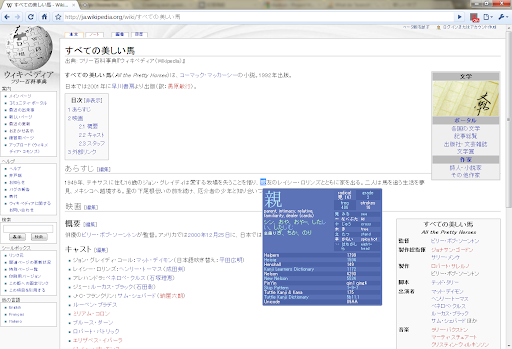
As a Japanese dictionary, rikaikun helps you look up the only the words you don't know without losing your place. It's also useful for Japanese speakers wanting to know how to say Japanese phrases in English. Features: * Using shift or enter, switch between word, names, and Kanji dictionaries. * Enable text to speech in the options to hear Japanese words you look up spoken out load. * Press 'c' to copy the current word and definitions to the clipboard for making flash cards. * Customize how the pop up dictionary looks and what content it shows. Activate the extension by clicking the 理 icon in the top right. When the introductory pop up appears, rikaikun is ready for action. When it's activated, when you hover over Japanese words they'll be translated in a pop up. If you hit shift/enter, you'll see some information about the first Kanji. Press 'd' to hide the English definitions; press i…

Listing SEO keywords

Search intent keywords
Keyword signals for evaluating how users may discover, compare, or search for this extension category.

Core discovery

Japanese dictionary extensionhover Japanese translationKanji dictionary Chrome

Comparison

RikaichanRikaikun vs Rikaichan

Problem

Japanese hover translation not workingKanji dictionary bug

Alternative

Japanese language learning toolsJapanese dictionary extension

Similar extensions

Jump to related discovery paths:

FAQ

What is rikaikun mainly used for?
A browser extension designed for Japanese language learners that provides instant pop-up definitions and readings. It features dictionary switching for Kanji and names, text-to-speech capabilities, and a clipboard function for study purposes.
What market signals stand out?
Established adoption with substantial review base. Last known update: 06/25/2026.
What should builders compare before entering this space?
Compare install concentration, rating quality, update recency, screenshots, developer portfolio, listing claims, and review-backed friction signals.
Is this page review-backed?
Backed by review samples. This page combines store metadata with selected review signals, while raw store metrics remain visible for comparison.

Screenshots

rikaikun screenshot
rikaikun screenshot
rikaikun screenshot

Links

Recommended Chrome extensions

Related listings from the same category, trending peers, and the same publisher portfolio.

Browse education
ProctorExam Activity Sharing icon

ProctorExam Activity Sharing

ProctorExam BV

Lets you share your browsing activity when taking an online exam on ProctorExam - https://www.proctorexam.com

Installs

800K+

Rating

1.6

eJOY AI Dictionary icon

eJOY AI Dictionary

ejoy-english.com

Your ultimate knowledge and English learning tool to discover the world and upskill yourself. Translate video, websites and PDF.

Installs

700K+

Rating

4.8

Voice In - Speech-To-Text Dictation icon

Voice In - Speech-To-Text Dictation

Dictanote

Use dictation to type in 10k+ sites in 50+ languages. VoiceIn transcribes your speech to text in real time.

Installs

600K+

Rating

4.4

Translate for Chrome -Translator, Dictionary icon

Translate for Chrome -Translator, Dictionary

Translator App.

Translate words, phrases or text on any webpage. Full page translator and dictionary, text to speech (TTS) using Google Translate.

Installs

600K+

Rating

4.7

オクリンクプラス Webページスクリーンショット機能 icon

オクリンクプラス Webページスクリーンショット機能

ベネッセコーポレーション

オクリンクプラスのカードにWebページのスクリーンショットを挿入し、リンクを埋め込むことができます!

Installs

500K+

Rating

3.0

GPTZero: AI Detection & Writing Replay icon

GPTZero: AI Detection & Writing Replay

chrome-extension-publisher

Bring AI detection, citation checks, live essay feedback, and writing replays directly into Google Docs and your workflow.

Installs

400K+

Rating

4.7

Google Meet Attendance List icon

Google Meet Attendance List

MeetList

Easiest way to save the attendance list for your meetings or lectures

Installs

400K+

Rating

4.7

Cite This For Me: Web Citer icon

Cite This For Me: Web Citer

Chegg Writing Tools

Automatically create website citations in the APA, MLA, Chicago, or Harvard referencing styles at the click of a button.

Installs

400K+

Rating

3.8

Trancy - AI Translator & Dual Subtitles icon

Trancy - AI Translator & Dual Subtitles

Trancy

Trancy provides bilingual subtitle for platforms like YouTube, Disney+, as well as AI translator for websites.

Installs

300K+

Rating

4.7

Assessment Lock (Vretta) icon

Assessment Lock (Vretta)

google-web-store-admin

Assessment Security extension for e-Assessments running on ChromeOS

Installs

300K+

Rating

1.9