Auto Clicker icon

Auto Clicker Chrome Extension Analysis

Automation & Workflow Efficiency

Chrome extension ID: opichklehbipklghohkoijlhfiffopah

Auto Clicker is a browser extension that allows users to automate mouse clicks on specific web page elements. It uses a configurable clicks-per-second (CPS) setting and requires users to define a target element via a selector, such as a CSS ID or class.

Version:1.5
Size:198KiB
Last updated:

Overview

Installs

603

Rating

3.8

8 reviews

Languages

1 locales

Includes English

Market analysis

Review-backed positioning, friction, and market signals for this Chrome extension.

Backed by review samples

Macro category

Automation & Workflow Efficiency

Pricing friction

Low review signal

Complaint intensity

Moderate review signal

Listing & review signals
Observed signals from store listing text and review samples.

Listing positioning

The extension positions itself as a high-performance auto-clicker developed by experts in click-speed testing. It emphasizes precise element targeting using CSS selectors, distinguishing itself from simpler alternatives that lack granular control.

Inferred product pattern

Technical utility extension requiring developer-level interaction (CSS selectors) for end-user tasks.

Review-backed pain points

Users struggle with the technical requirement of finding and inputting CSS element selectors to make the clicker function.

Observed feature gaps

The UI lacks user-friendly controls for selecting elements without performing manual browser 'Inspect' actions.

Tags
Auto ClickerAutomationClick SpeedProductivity Tool
Target users

- Gamers

- Power Users

- Web Automation Enthusiasts

Primary use cases

- Automated clicking in browser games

- Rapid-fire clicking tasks

- Click speed testing

Positive themes

- High speed and effective performance

- Works well for specific gaming use cases like Cookie Clicker

- Reliable functionality once configured

Negative themes

- Steep learning curve for non-technical users

- Difficult to understand how to select elements

- Lack of clear instructions for general use across different websites

Observed friction

- No pricing friction; the extension appears free.

Evidence boundary: Product information and user feedback confirm the tool's core functionality as an element-based auto-clicker, with usability identified as the primary barrier. The review sample size is small, limiting the breadth of feedback regarding cross-website compatibility and long-term reliability.
Complaint summaries
Review-backed complaint signals grouped by operational area.

Support

Users express frustration regarding the lack of documentation or tutorials on how to operate the tool effectively.

Reliability

Some users report difficulties getting the clicker to trigger, often linked to incorrect element targeting rather than tool failure.

Privacy

No privacy complaints observed.

Access & pricing

- Free usage observed

- No account requirement observed

- Free plan or free usage claimed

Store listing facts

Listing assets

- Screenshots: 1

- Videos: 0

- Languages: 1

Trust signals

- Privacy policy

- Developer contact

- Official website

Store metadata

- Version: 1.5

- Size: 198KiB

- Last updated:

Store description excerpt
Short excerpt from the public Chrome Web Store listing; full copy is available on the official store page.
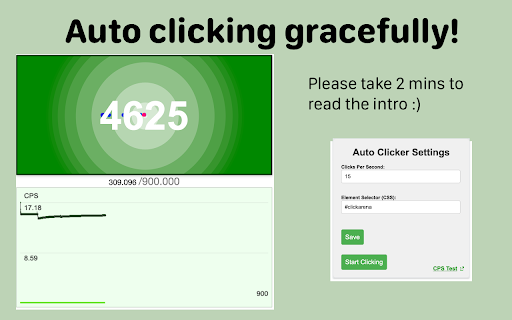
Tired of auto clickers that just don't work? 😤 We've got you covered! As the developers behind the online CPS (Clicks Per Second) test and seasoned extension creators, we've cracked the code. Other auto clickers let you precisely target the element on the page—that's where ours stands out! 🎯 Simply set your desired CPS and select your target element right from the popup, then start clicking away instantly! 🖱️💨 We've tested it on the CPS test website: https://www.arealme.com/click-speed-test/en/ Just enter #clickarena in the popup's Element Selector, and let the auto-clicking fun begin! 😎 Got questions? Feel free to reach out anytime. We're here to help! ✨

Listing SEO keywords

Search intent keywords
Keyword signals for evaluating how users may discover, compare, or search for this extension category.

Core discovery

auto clicker extensionfast auto clicker for chromemouse clicker automation

Comparison

best auto clicker for gameschrome auto clicker alternatives

Problem

how to use auto clicker on websiteauto clicker not working

Alternative

click botmacro clicker

Similar extensions

Jump to related discovery paths:

FAQ

What is Auto Clicker mainly used for?
Auto Clicker is a browser extension that allows users to automate mouse clicks on specific web page elements. It uses a configurable clicks-per-second (CPS) setting and requires users to define a target element via a selector, such as a CSS ID or class.
What market signals stand out?
Early or small audience with limited review base. Last known update: 10/08/2024.
What should builders compare before entering this space?
Compare install concentration, rating quality, update recency, screenshots, developer portfolio, listing claims, and review-backed friction signals.
Is this page review-backed?
Backed by review samples. This page combines store metadata with selected review signals, while raw store metrics remain visible for comparison.

Screenshots

Auto Clicker screenshot

Links

Recommended Chrome extensions

Related listings from the same category, trending peers, and the same publisher portfolio.

Browse tools
QR Code Generator icon

QR Code Generator

Awesome Extensions

A super handy QR Code Generator / Creator for you.

Installs

700K+

Rating

4.9

Chinese Script Variant Converter icon

Chinese Script Variant Converter

Awesome Extensions

Convert Chinese text between Simplified, Traditional, and region-specific variants

Installs

10K+

Rating

4.7

Google Input Tools icon

Google Input Tools

cloud-input-team

Input Tools lets you type in the language of your choice.

Installs

3.0M+

Rating

4.0

Microsoft Bing Search with Rewards icon

Microsoft Bing Search with Rewards

Microsoft Corporation

Use the Microsoft Rewards extension to find new ways to earn every day, easily track your points and set your default search to Bing

Installs

3.0M+

Rating

4.4

Google Scholar Button icon

Google Scholar Button

scholar-chrome-extensions

Lookup scholarly articles as you browse the web.

Installs

3.0M+

Rating

4.6

ЮБуст - VPN для YouTube. Обход блокировки Ютуб без ВПН. VPN для браузера icon

ЮБуст - VPN для YouTube. Обход блокировки Ютуб без ВПН. VPN для браузера

Uboost

Ускоритель Ютуб без ВПН, VPN для браузера Яндекс, Chrome, Opera, Edge. Обход замедления Ютуба.

Installs

2.0M+

Rating

4.2

Pie Adblock - A Powerful Free Ad Blocker icon

Pie Adblock - A Powerful Free Ad Blocker

Pie Extensions

Pie Adblock blocks ads & pop-ups, plus YouTube & Twitch video ads. You can customize your ad experience with Pie!

Installs

2.0M+

Rating

4.9

Smallpdf—Edit, Convert, Compress, & AI Summarize PDF icon

Smallpdf—Edit, Convert, Compress, & AI Summarize PDF

Smallpdf AG

Easy-to-use PDF tools to compress, convert, merge, chat to, split, e-sign, and edit PDF files in your browser.

Installs

2.0M+

Rating

4.6

Google Dictionary (by Google) icon

Google Dictionary (by Google)

dictionary-extension-dev

View definitions easily as you browse the web.

Installs

2.0M+

Rating

4.4

AI Chat for Search icon

AI Chat for Search

AI Chat for Search Team

Display AI Chat response alongside search engine results

Installs

2.0M+

Rating

4.6