Video Screenshot icon

Video Screenshot Chrome Extension Analysis

Video & Image Downloaders

Chrome extension ID: ppkojackhibeogijphhfnamhemklmial

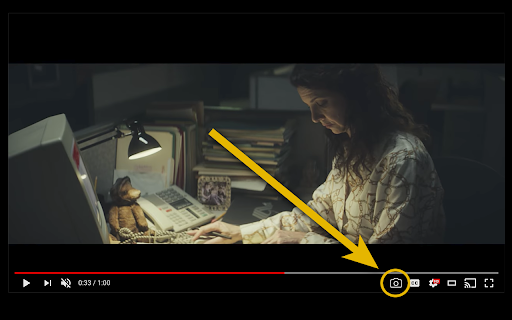
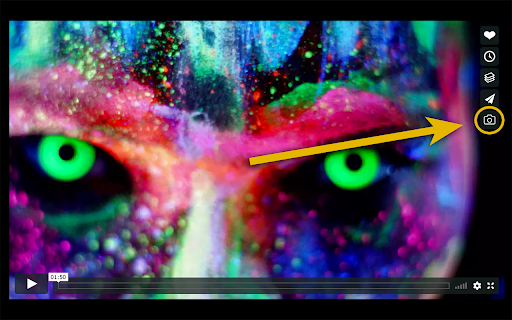
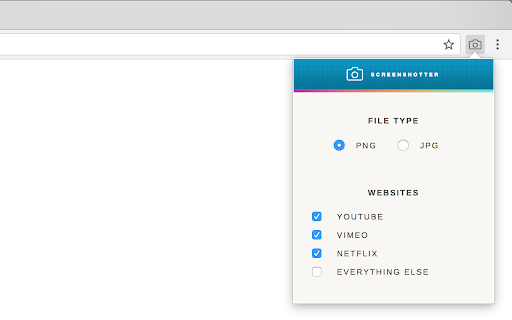
A Chrome extension that enables users to capture individual video frames as JPG or PNG files. It provides a camera icon within the video player and supports keyboard shortcuts for quick downloads or clipboard copying.

Version:7.0.1
Size:345KiB
Last updated:

Overview

Installs

100K+

Rating

4.2

774 reviews

Languages

1 locales

Includes English

Market analysis

Review-backed positioning, friction, and market signals for this Chrome extension.

Backed by review samples

Macro category

Video & Image Downloaders

Pricing friction

Moderate review signal

Complaint intensity

Moderate review signal

Listing & review signals
Observed signals from store listing text and review samples.

Listing positioning

The product is positioned as a tool to capture high-resolution, clean screenshots from major streaming services like YouTube, Netflix, and Disney+ without player controls or watermarks. It offers a premium subscription for advanced features like subtitle inclusion and letterbox cropping.

Inferred product pattern

A specialized media utility that relies on interacting with third-party video player DOMs, making its functionality highly dependent on the continuous maintenance of external website structures.

Review-backed pain points

Users report the extension frequently stops working on Netflix, Disney+, and Facebook. There are also complaints about the loss of subfolder organization and the inability to include video titles in filenames.

Observed feature gaps

Lack of custom download folder selection, absence of a feature to toggle the extension on specific sites, and missing tooltips or automatic file opening options.

Tags
Video ScreenshotFrame CaptureStreaming UtilitiesMedia Tools
Target users

- Content creators

- Video enthusiasts

- Media researchers

Primary use cases

- Capturing high-quality stills from streaming videos

- Extracting frames without UI overlays

- Saving video frames directly to local storage

Positive themes

- Effective functionality on YouTube

Negative themes

- Frequent breakage on major streaming platforms

- Regression in file management features

- Inconsistent UI behavior on various players

Observed friction

- Free-tier complaints detected

- Performance complaints detected

- Some users expressed suspicion that previously free features may have been moved behind the premium subscription wall.

Evidence boundary: Analysis based on Chrome Web Store listing and user reviews highlighting functional regressions and site-specific breakage. The review sample provided is a subset of total reviews and includes non-English feedback.
Complaint summaries
Review-backed complaint signals grouped by operational area.

Support

Users are requesting urgent fixes for broken features on specific sites but report a lack of resolution.

Reliability

High frequency of complaints regarding the extension failing to work on major streaming websites and losing previous file organization capabilities.

Privacy

No privacy or security complaints observed.

Access & pricing

- Subscription model observed

- No clear access signal

- Limited free usage observed

Store listing facts

Listing assets

- Screenshots: 3

- Videos: 0

- Languages: 1

Trust signals

- Privacy policy

- Developer contact

- Official website

Store metadata

- Version: 7.0.1

- Size: 345KiB

- Last updated:

Store description excerpt
Short excerpt from the public Chrome Web Store listing; full copy is available on the official store page.
***This extension only works in Chrome*** This extension allows you to download full resolution stills from YouTube, all major streaming services (Netflix, Disney+, Prime, etc.), and videos on most other websites without seeing the player controls or the surrounding webpage. When a video begins to play, you'll see a camera icon appear alongside the normal player controls. Clicking the camera button (or using a keyboard shortcut) downloads a screenshot of the current frame. The screenshot is then either saved in your downloads folder as a JPG or PNG, or copied to your clipboard. Premium Subscription The premium tier includes the option to include subtitles within the screenshot, compatibility with additional websites, and cropping for letterboxed content. Since this extension is reliant on other websites, it needs to be continuously maintained as those websites change.

Listing SEO keywords

Search intent keywords
Keyword signals for evaluating how users may discover, compare, or search for this extension category.

Core discovery

video screenshotcapture video frameyoutube screenshotnetflix frame captureextract video stills

Comparison

video frame grabberstreaming screenshot tool

Problem

video player controls in screenshotwatermark on video screenshot

Alternative

screen capture for videoframe grabber extension

Similar extensions

Jump to related discovery paths:

FAQ

What is Video Screenshot mainly used for?
A Chrome extension that enables users to capture individual video frames as JPG or PNG files. It provides a camera icon within the video player and supports keyboard shortcuts for quick downloads or clipboard copying.
What market signals stand out?
Established adoption with moderate review base. Last known update: 06/19/2026.
What should builders compare before entering this space?
Compare install concentration, rating quality, update recency, screenshots, developer portfolio, listing claims, and review-backed friction signals.
Is this page review-backed?
Backed by review samples. This page combines store metadata with selected review signals, while raw store metrics remain visible for comparison.

Screenshots

Video Screenshot screenshot

Links

Recommended Chrome extensions

Related listings from the same category, trending peers, and the same publisher portfolio.

Browse tools
Screen Recorder & Screenshot App for Chrome | Scrnli icon

Screen Recorder & Screenshot App for Chrome | Scrnli

scrnli

Screen recorder for Chrome: capture, edit, share screenshots and videos instantly

Installs

1.0M+

Rating

4.7

Transpose ▲▼ pitch ▹ speed ▹ loop icon

Transpose ▲▼ pitch ▹ speed ▹ loop

Tune73

Change the pitch and speed of music and loop sections directly on YouTube, Spotify and many other streaming platforms.

Installs

1.0M+

Rating

4.5

CSFloat Market Checker icon

CSFloat Market Checker

CSFloat Inc.

Shows the float value, paint seed, and more of Counter-Strike (CS:GO & CS2) items on the Steam Market or Inventories

Installs

1.0M+

Rating

3.9

Video Downloader Plus icon

Video Downloader Plus

Video Downloader Plus

Download and save videos from any website instantly. A fast, simple video downloader that just works.

Installs

1.0M+

Rating

4.5

Wordtune: AI Paraphrasing and Grammar Tool icon

Wordtune: AI Paraphrasing and Grammar Tool

Wordtune

Unlock your potential with Wordtune's free AI writer – paraphrase, rewrite, translate, fix grammar, and more.

Installs

1.0M+

Rating

4.6

Dark Mode icon

Dark Mode

Grephy

A global dark theme for the web.

Installs

1.0M+

Rating

3.6

AIPRM for ChatGPT icon

AIPRM for ChatGPT

AIPRM

AIPRM is your cheat code for ChatGPT. Adds a list of curated prompt templates and advanced features. Try today.

Installs

1.0M+

Rating

3.9

Enhancer for YouTube™ icon

Enhancer for YouTube™

Max RF

Take control of YouTube and boost your user experience!

Installs

1.0M+

Rating

4.7

Поиск Яндексa icon

Поиск Яндексa

Yandex

Вводите запросы в адресную строку и получайте ответы от Яндекса

Installs

1.0M+

Rating

3.3

Bing Search and Homepage icon

Bing Search and Homepage

Microsoft Corporation

Set Microsoft Bing as your default homepage and default search engine

Installs

1.0M+

Rating

1.8