SQLite Manager for Google Chrome™ icon

SQLite Manager for Google Chrome™ Chrome Extension Analysis

Developer & Designer Tools

Chrome extension ID: aejlocbcokogiclkcfddhfnpajhejmeb

A browser-based utility that allows users to perform CRUD operations and run SQL commands on SQLite databases. Users can load database files from their local machine or Google Drive without needing a desktop application.

Version:3.0.0
Size:1.02MiB
Last updated:

Overview

Installs

10K+

Rating

3.4

45 reviews

Languages

37 locales

Includes Deutsch, English, English (United States), Filipino...

Market analysis

Review-backed positioning, friction, and market signals for this Chrome extension.

Backed by review samples

Macro category

Developer & Designer Tools

Pricing friction

Low review signal

Complaint intensity

Moderate review signal

Listing & review signals
Observed signals from store listing text and review samples.

Listing positioning

Positions itself as a 100% free tool for viewing and editing SQLite databases directly within the Chrome browser. It emphasizes the ability to handle multiple databases simultaneously and integrate with Google Drive for file storage.

Inferred product pattern

Lightweight browser-based wrapper for SQLite database management aimed at users wanting to avoid desktop installations.

Review-backed pain points

Users report that the GUI is often inaccessible or non-existent, forcing them to use code only, and that the experience is heavily degraded by intrusive advertising.

Observed feature gaps

Lack of a functional/intuitive graphical user interface (GUI) and missing UI customization options like background color changes.

Tags
SQLite EditorDatabase ManagerSQL ToolDeveloper Utility
Target users

- Developers

- Database Administrators

- Chromebook Users

- SQL Students

Primary use cases

- Editing SQLite databases in-browser

- Running SQL commands on the fly

- Managing SQLite files stored on Google Drive

Positive themes

- Functionality on Chrome OS

- Ability to perform CRUD operations

- Graphical work capabilities

Negative themes

- Poor GUI accessibility

- Excessive advertising

- Non-intuitive user interface

- Loading state failures

Observed friction

- Performance complaints detected

- While claimed to be free, users report high friction due to the product being 'covered in advertising'.

Evidence boundary: Data extracted from the store listing and a sample of 10 user reviews. Small review sample size; one high-rating review contained contradictory text regarding functionality.
Complaint summaries
Review-backed complaint signals grouped by operational area.

Support

No specific support or account-related complaints observed in the provided samples.

Reliability

Reports of the extension being 'worthless', not working, or remaining stuck in a loading state.

Privacy

No privacy or security complaints observed in the provided samples.

Access & pricing

- Ad-supported model observed

- No account requirement observed

- Free plan or free usage claimed

Store listing facts

Listing assets

- Screenshots: 2

- Videos: 0

- Languages: 37

Trust signals

- Privacy policy

- Developer contact

- Official website

- Support link

Store metadata

- Version: 3.0.0

- Size: 1.02MiB

- Last updated:

Store description excerpt
Short excerpt from the public Chrome Web Store listing; full copy is available on the official store page.
SQLite Manager for Google Chrome™" allows you to edit/view SQLite databases directly on Google Chrome. You can read one or multiple SQLite databases and run SQLite commands right in your browser. On our web-site you can easily load SQLite databases from your PC or from your Google Drive, edit your database and save the db file onto your PC or right on your Google Drive without saving it onto your desktop computer. You can edit the SQLite database directly inside the Google Chrome browser. This software is 100% free and does not require you to pay. Disclaimer: Please note this extension is NOT made by Google and is made by an independent development team. All copyrights belong to their respective owners. Google doesn’t endorse or sponsor this Chrome extension. SQLite Manager for Google Chrome™ is not owned by, is not licensed by and is not a subsidiary of Google Inc.

Listing SEO keywords

Search intent keywords
Keyword signals for evaluating how users may discover, compare, or search for this extension category.

Core discovery

SQLite manager chromeonline sqlite editorbrowser sql vieweredit sqlite google drive

Comparison

SQLiteStudio alternativebrowser vs desktop sqlite manager

Problem

how to open sqlite file in chromesqlite editor for chromebook

Alternative

SQLiteStudioDB Browser for SQLite

Similar extensions

Jump to related discovery paths:

FAQ

What is SQLite Manager for Google Chrome™ mainly used for?
A browser-based utility that allows users to perform CRUD operations and run SQL commands on SQLite databases. Users can load database files from their local machine or Google Drive without needing a desktop application.
What market signals stand out?
Visible niche traction with limited review base. Last known update: 09/18/2022.
What should builders compare before entering this space?
Compare install concentration, rating quality, update recency, screenshots, developer portfolio, listing claims, and review-backed friction signals.
Is this page review-backed?
Backed by review samples. This page combines store metadata with selected review signals, while raw store metrics remain visible for comparison.

Screenshots

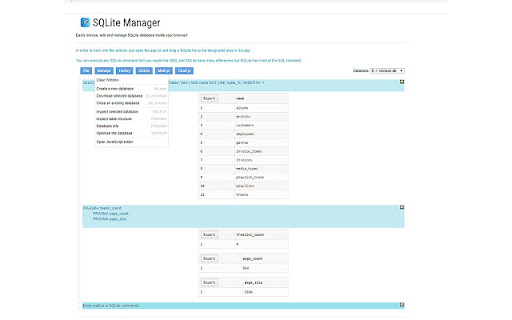
SQLite Manager for Google Chrome™ screenshot

Links

Recommended Chrome extensions

Related listings from the same category, trending peers, and the same publisher portfolio.

Browse developer