Settings icon

Settings Chrome Extension Analysis

Tab & Bookmark Productivity

Chrome extension ID: afcolgfopkbeailjgaablmhiemdnhlch

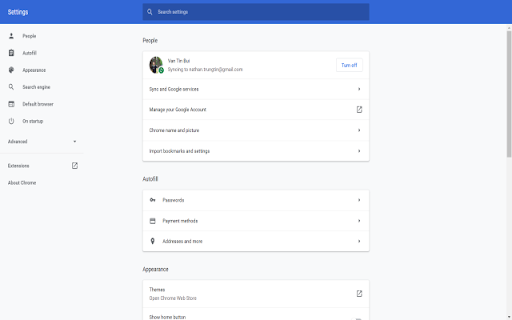
A lightweight browser extension designed to provide direct access to Google Chrome's settings page. Its primary goal is to streamline navigation for users who frequently modify browser configurations.

Version:3.0.1
Size:89.66KiB
Last updated:

Overview

Installs

100K+

Rating

4.5

163 reviews

Languages

41 locales

Includes Deutsch, English, English (United States), Filipino...

Market analysis

Review-backed positioning, friction, and market signals for this Chrome extension.

Backed by review samples

Macro category

Tab & Bookmark Productivity

Pricing friction

Low review signal

Complaint intensity

Moderate review signal

Listing & review signals
Observed signals from store listing text and review samples.

Listing positioning

The extension positions itself as a time-saving utility that reduces the effort required to access Chrome settings. It claims to provide a one-click solution to bypass the standard two-click browser menu or the space-consuming bookmark bar.

Inferred product pattern

A micro-utility aiming to optimize small browser workflows, facing significant user skepticism regarding its efficiency claims.

Review-backed pain points

Users frequently report that the extension actually requires two clicks (opening a menu then selecting settings), which contradicts the product's core value proposition.

Observed feature gaps

Lack of a direct-action option to bypass the intermediate menu and go straight to settings upon clicking the icon.

Tags
Chrome UtilityBrowser ShortcutSettings Access
Target users

- Efficiency-focused Chrome users

- Power users

Primary use cases

- Quickly navigating to browser settings

- Reducing menu navigation steps

Positive themes

- Helped users locate specific settings like passwords

Negative themes

- Discrepancy between 'one-click' claim and actual user experience

- Perceived redundancy of the extension compared to native features

Observed friction

- No pricing friction observed; the extension appears to be free.

Evidence boundary: Analysis based on store listing claims and user reviews regarding click efficiency and utility redundancy. Review sample size is relatively small and reflects a concentration of negative feedback regarding the core feature claim.
Complaint summaries
Review-backed complaint signals grouped by operational area.

Support

No support complaints observed.

Reliability

No major reliability issues observed, though the effectiveness of the shortcut is disputed by users.

Privacy

No privacy complaints observed.

Access & pricing

- Free usage observed

- No account requirement observed

- Free plan or free usage claimed

Store listing facts

Listing assets

- Screenshots: 1

- Videos: 0

- Languages: 41

Trust signals

- Developer contact

- Official website

Store metadata

- Version: 3.0.1

- Size: 89.66KiB

- Last updated:

Store description excerpt
Short excerpt from the public Chrome Web Store listing; full copy is available on the official store page.
Are you tired of clicking through to the Chrome browser Menu and selecting Settings to go to Google Chrome's settings page? This will open up the settings page with just one click. Why bother adding a separate extension for something that needs only two clicks in the Google Chrome Browser menu? We help you save one click, which is 50% of the effort needed. Why not just bookmark the settings page? It takes 2-3 clicks to navigate to the bookmark menu. We don't like using the bookmark bar as well as it takes up 1 valuable line of space at the top of the Google Chrome Browser.

Listing SEO keywords

Search intent keywords
Keyword signals for evaluating how users may discover, compare, or search for this extension category.

Core discovery

Chrome settings shortcutbrowser settings accessfast chrome settings

Comparison

Chrome menubookmark bar

Problem

too many clicks for settingsslow settings access

Alternative

Chrome settings bookmarknative chrome menu

Similar extensions

Jump to related discovery paths:

FAQ

What is Settings mainly used for?
A lightweight browser extension designed to provide direct access to Google Chrome's settings page. Its primary goal is to streamline navigation for users who frequently modify browser configurations.
What market signals stand out?
Established adoption with moderate review base. Last known update: 10/28/2023.
What should builders compare before entering this space?
Compare install concentration, rating quality, update recency, screenshots, developer portfolio, listing claims, and review-backed friction signals.
Is this page review-backed?
Backed by review samples. This page combines store metadata with selected review signals, while raw store metrics remain visible for comparison.

Screenshots

Settings screenshot

Links

Recommended Chrome extensions

Related listings from the same category, trending peers, and the same publisher portfolio.

Browse workflow