Microsoft Single Sign On icon

Microsoft Single Sign On Chrome Extension Analysis

Automation & Workflow Efficiency

Chrome extension ID: ppnbnpeolgkicgegkbkbjmhlideopiji

This is a utility developed by Microsoft to facilitate authentication synchronization between a device's OS-level credentials and browser-based web applications. It serves as a connector for enterprise identity management rather than a consumer-facing productivity tool.

Developer:Microsoft
Version:1.0.11
Size:8.05KiB
Last updated:

Overview

Installs

34.0M+

Rating

2.2

951 reviews

Languages

1 locales

Includes English

Market analysis

Review-backed positioning, friction, and market signals for this Chrome extension.

Backed by review samples

Macro category

Automation & Workflow Efficiency

Pricing friction

Low review signal

Complaint intensity

High review signal

Listing & review signals
Observed signals from store listing text and review samples.

Listing positioning

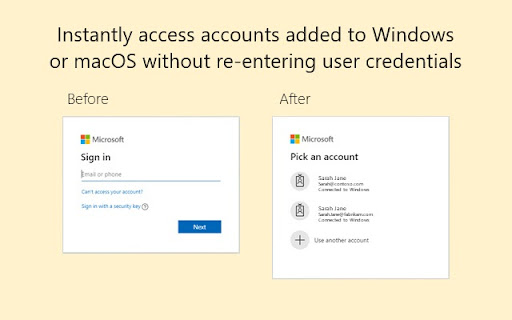
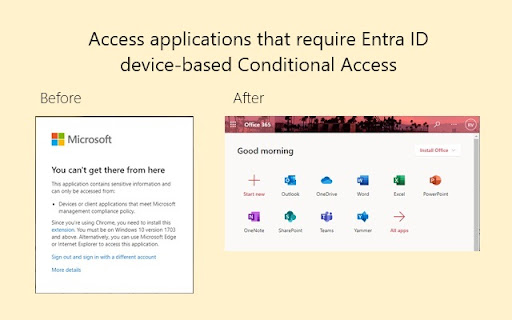
The extension is positioned as a mandatory bridge for Windows and macOS users to enable Single Sign On (SSO) for Microsoft Entra ID-protected websites. It explicitly frames itself as a technical requirement for organizations enforcing device-based conditional access policies.

Inferred product pattern

Mandatory enterprise identity management utility for browser integration.

Review-backed pain points

Users report that the extension often fails to perform its core function of 'single' sign-on, forcing repetitive authentication, and some express frustration over the extension triggering device management policies on personal hardware.

Observed feature gaps

Lack of robust error reporting, difficulty resolving persistent sign-in loops, and complex installation/policy configuration requirements.

Tags
SSOMicrosoft Entra IDEnterprise SecurityConditional Access
Target users

- Enterprise Employees

- IT Administrators

- Managed Device Users

Primary use cases

- Enabling Single Sign On for Microsoft work/school accounts

- Compliance with organizational conditional access policies

Positive themes

- No positive themes reported in current sample set

Negative themes

- Frequent sign-in loops (multi-login requirements)

- General failure to maintain authentication state

- Invasive behavior on personal devices regarding organization management

- Difficulty in troubleshooting and lack of direct support

Observed friction

- Account blocking complaints detected

- Performance complaints detected

- Privacy complaints detected

- None; the tool is a free utility for enterprise environments.

Evidence boundary: The evidence is derived from a high volume of negative user reviews highlighting technical instability and integration friction in enterprise environments. Reviews are heavily skewed toward negative technical experiences; positive usage in well-configured environments is not represented in the current sample.
Complaint summaries
Review-backed complaint signals grouped by operational area.

Support

Users report high frustration with the lack of direct support, as the developer explicitly redirects all inquiries to internal IT departments.

Reliability

Widespread reports of broken authentication flows, failure to recognize the extension as installed, and persistent login prompts despite active installation.

Privacy

Users expressed significant concern regarding 'Managed Device' triggers on personal computers, perceiving it as an overreach of organizational control.

Access & pricing

- Free usage observed

- Account required for core usage

- Free plan or free usage claimed

Store listing facts

Listing assets

- Screenshots: 2

- Videos: 0

- Languages: 1

Trust signals

- Privacy policy

- Developer contact

- Support link

Store metadata

- Version: 1.0.11

- Size: 8.05KiB

- Last updated:

Store description excerpt
Short excerpt from the public Chrome Web Store listing; full copy is available on the official store page.
Use this extension to sign in to supported websites with Microsoft work or school accounts on Windows (10 and later versions) or macOS (11 and later versions). If you have a Microsoft Entra ID on your Windows or macOS computer, this extension enables improved Single Sign On for supported websites. You may still see additional authentication prompts like multi-factor verification depending on the access requirements for various applications, resources, and organizations. This extension is required for certain device-based conditional access policies for Microsoft Entra ID. https://learn.microsoft.com/en-us/entra/identity/conditional-access/concept-conditional-access-conditions#supported-browsers For macOS, this extension requires the device to be managed and requires the additional installation of Company Portal: https://learn.microsoft.com/en-us/mem/intune/user-help/enroll-your-device-i…

Listing SEO keywords

Search intent keywords
Keyword signals for evaluating how users may discover, compare, or search for this extension category.

Core discovery

Microsoft SSO extensionEntra ID Chrome extensionconditional access browser auth

Comparison

Microsoft authentication errorSSO login issues

Problem

extension not workingtoo many sign-in promptsmanaged device conflict

Alternative

Windows Hello for webChrome CloudAPAuthEnabled

Similar extensions

Jump to related discovery paths:

FAQ

What is Microsoft Single Sign On mainly used for?
This is a utility developed by Microsoft to facilitate authentication synchronization between a device's OS-level credentials and browser-based web applications. It serves as a connector for enterprise identity management rather than a consumer-facing productivity tool.
What market signals stand out?
Large installed base with moderate review base. Last known update: 08/01/2024.
What should builders compare before entering this space?
Compare install concentration, rating quality, update recency, screenshots, developer portfolio, listing claims, and review-backed friction signals.
Is this page review-backed?
Backed by review samples. This page combines store metadata with selected review signals, while raw store metrics remain visible for comparison.

Screenshots

Microsoft Single Sign On screenshot

Links

Recommended Chrome extensions

Related listings from the same category, trending peers, and the same publisher portfolio.

Browse workflow