Tampermonkey icon

Tampermonkey Chrome Extension Analysis

Automation & Workflow Efficiency

Chrome extension ID: dhdgffkkebhmkfjojejmpbldmpobfkfo

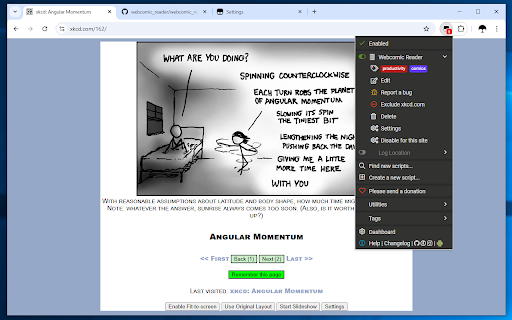
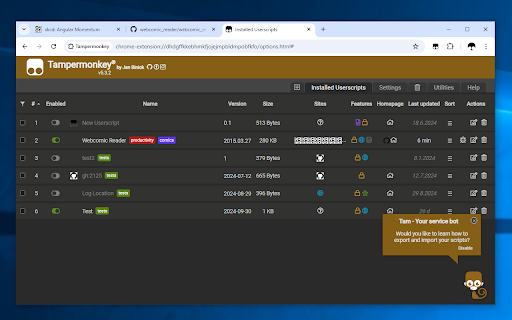
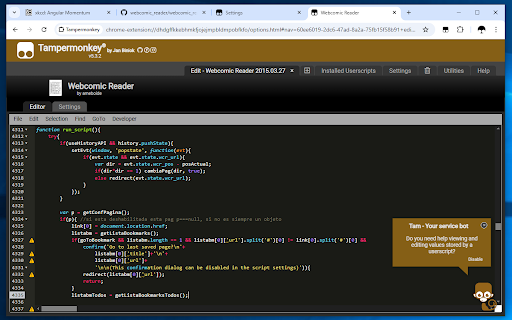
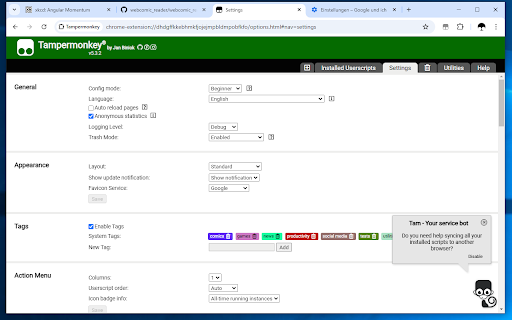
Tampermonkey is a popular browser extension that allows users to run custom JavaScript programs, known as userscripts, on specific web pages. These scripts can alter website layouts, add or remove features, and automate web actions to personalize browsing. The extension includes a built-in editor, cloud backup synchronization, and automatic update capabilities.

Developer:Jan Biniok
Version:5.5.0
Size:1.64MiB
Last updated:

Overview

Installs

12.0M+

Rating

4.7

72,913 reviews

Languages

30 locales

Includes Deutsch, English, Indonesia, Nederlands...

Market analysis

Review-backed positioning, friction, and market signals for this Chrome extension.

Backed by review samples

Macro category

Automation & Workflow Efficiency

Pricing friction

Low review signal

Complaint intensity

High review signal

Listing & review signals
Observed signals from store listing text and review samples.

Listing positioning

Tampermonkey positions itself as a versatile and widely-used browser extension that empowers users to customize and automate their web experience using userscripts. The listing highlights its capability to manage, edit, and automatically update scripts while offering seamless synchronization across various cloud services. It positions the product as an easy-to-use tool to modify page layouts and automate repetitive web actions.

Inferred product pattern

A local developer tool and scripts execution engine that runs directly in the browser environment with optional cloud-sync backups.

Review-backed pain points

The most severe pain point is a critical bug where Chrome flags the extension as corrupted, forcing users to repair it, which completely deletes all saved userscripts without warning or automated recovery options. Additionally, users experience significant frustration with persistent developer mode alerts and browser-wide performance lag when scripts or the dashboard editor are active.

Observed feature gaps

There is a notable gap in automatic local backup mechanisms or safe-fail states that protect user-created script data before Chrome's repair process wipes the database. Users also point to a lack of documentation or built-in guides on how to recover from corruption issues.

Tags
Userscript ManagerWeb AutomationScript EditorBrowser Customization
Target users

- Web developers and programmers

- Power users looking to automate repetitive web tasks

- Users wanting to customize or fix specific website interfaces

Primary use cases

- Executing custom userscripts to automate online workflows and reduce clicks

- Modifying web page structures and styling to improve usability

- Writing, testing, and managing custom JavaScript code directly in the browser

Positive themes

- Significantly reduces manual repetitive work on productivity platforms

- Saves users countless clicks by executing automated scripting features

Negative themes

- Chrome corruption errors that trigger a 'repair' process, which wipes out all saved scripts without warning

- Persistent and disruptive prompts to enable Developer Mode even when already activated

- Severe browser performance issues, lagging, and dashboard editor freezes

Observed friction

- Performance complaints detected

- No pricing friction was observed as the tool is entirely free, with no complaints regarding paywalls or monetization in the analyzed samples.

Evidence boundary: Based on the official Chrome Web Store listing describing features, data privacy policies, and 12M+ user scale, combined with 10 user reviews highlighting a mix of script automation benefits and recent critical bugs surrounding script loss, corruption, and performance lags. The review-based analysis is skewed towards recent highly critical complaints about version 5.4.x updates, which may not reflect the historical stability experienced by the broader base of over 12 million users.
Complaint summaries
Review-backed complaint signals grouped by operational area.

Support

Users report frustration that long-standing bugs, particularly the extension corruption and script loss issues, have gone unaddressed or ignored by the developers with no official recovery documentation provided.

Reliability

Recent updates have led to severe reliability issues, including scripts failing to inject, persistent prompts regarding developer mode, and critical corruption errors that result in total loss of user data during the repair process.

Privacy

No major privacy violations are reported in the reviews, though one user expressed suspicion about uninstallation behavior. The developer provides transparent notices regarding anonymous telemetry collection.

Access & pricing

- Free usage observed

- No account requirement observed

- Free plan or free usage claimed

Store listing facts

Listing assets

- Screenshots: 5

- Videos: 1

- Languages: 30

Trust signals

- Privacy policy

- Developer contact

- Official website

- Support link

Store metadata

- Version: 5.5.0

- Size: 1.64MiB

- Last updated:

Store description excerpt
Short excerpt from the public Chrome Web Store listing; full copy is available on the official store page.
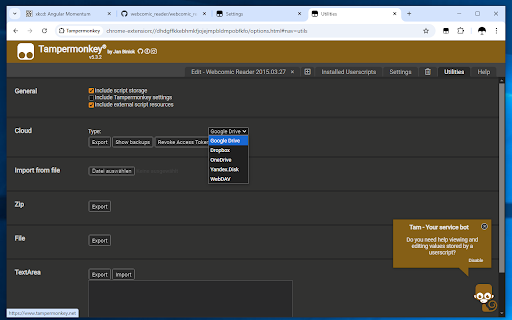
Enhance your browsing experience with Tampermonkey! 🌐🚀 Tampermonkey is a versatile browser extension with over 🔟 million users that enhances your browsing experience by allowing you to run userscripts on websites. Userscripts are small programs that modify page layouts, add or remove features, and automate actions to personalize your web experience. ### 🔑 Key Features: ### 🛠️ Efficiently manage and edit your userscripts ⚡ Swiftly activate and deactivate scripts with just two clicks 🔗 Synchronize scripts using Chrome Sync and various cloud storage services (Google Drive, Dropbox, OneDrive, Yandex.Disk, and WebDAV) 💾 Backup and restore options and userscripts through zip files and/or cloud storage 🔄 Automatic script updates for a seamless experience For a comprehensive overview, check out our frequently asked questions or simply install the extension. 💡 ### 🔍 Discover Userscript…

Listing SEO keywords

Search intent keywords
Keyword signals for evaluating how users may discover, compare, or search for this extension category.

Core discovery

tampermonkey chrome extensionuserscript manager chromerun userscripts in browsertampermonkey scripts

Comparison

tampermonkey vs violentmonkeytampermonkey vs greasemonkeybest userscript managers

Problem

tampermonkey corrupted error chrometampermonkey repair deleted my scriptstampermonkey lagging chrome browserplease enable developer mode tampermonkey

Alternative

violentmonkeygreasemonkeyfiremonkey

Similar extensions

Jump to related discovery paths:

FAQ

What is Tampermonkey mainly used for?
Tampermonkey is a popular browser extension that allows users to run custom JavaScript programs, known as userscripts, on specific web pages. These scripts can alter website layouts, add or remove features, and automate web actions to personalize browsing. The extension includes a built-in editor, cloud backup synchronization, and automatic update capabilities.
What market signals stand out?
Large installed base with very deep review base. Last known update: 05/09/2026.
What should builders compare before entering this space?
Compare install concentration, rating quality, update recency, screenshots, developer portfolio, listing claims, and review-backed friction signals.
Is this page review-backed?
Backed by review samples. This page combines store metadata with selected review signals, while raw store metrics remain visible for comparison.

Screenshots

Tampermonkey screenshot

Links

Recommended Chrome extensions

Related listings from the same category, trending peers, and the same publisher portfolio.

Browse workflow
Tampermonkey BETA icon

Tampermonkey BETA

Jan Biniok

Change the web at will with userscripts

Installs

700K+

Rating

4.8

Free Download Manager icon

Free Download Manager

Free Download Manager.ORG

Free Download Manager integration with browser

Installs

3.0M+

Rating

4.2

夸克网盘-网页嗅探 icon

夸克网盘-网页嗅探

广州市动悦信息技术有限公司

识别到网页资源时,可一键存夸克网盘

Installs

3.0M+

Rating

1.7

Mendeley Web Importer icon

Mendeley Web Importer

Mendeley

Fast, convenient import of references and PDFs to your Mendeley Reference Manager library.

Installs

3.0M+

Rating

2.3

Enable local file links icon

Enable local file links

Takashi Sugimoto (tksugimoto)

Make it possible to open by click a link to a local file that is disabled by Chrome.

Installs

3.0M+

Rating

3.9

Pop up blocker for Chrome™ - Poper Blocker icon

Pop up blocker for Chrome™ - Poper Blocker

dingosolutions

Block popups, ads, cookie requests, trackers, notifications, ads on social media & more. A clean browsing experience starts today.

Installs

2.0M+

Rating

4.8

Momentum icon

Momentum

Momentum

Transform your browser into a beautifully designed tab that helps you feel calm, keep focus, and stay energized.

Installs

2.0M+

Rating

4.5

Google Scholar PDF Reader icon

Google Scholar PDF Reader

scholar-chrome-extensions

Supercharge your paper reading: follow references, skim outline, jump to figures, cite and save.

Installs

2.0M+

Rating

4.1

Keeper® Password Manager & Digital Vault icon

Keeper® Password Manager & Digital Vault

Keeper Security

Generate strong passwords, autofill and protect your confidential info with zero-knowledge encryption.

Installs

2.0M+

Rating

4.8

AI Grammar Checker & Paraphraser – LanguageTool icon

AI Grammar Checker & Paraphraser – LanguageTool

lt-extension-publisher

Instantly Enhance Your Texts with LanguageTool’s Grammar Checker and Paraphrasing Tool

Installs

2.0M+

Rating

4.7