IP Flager icon

IP Flager Chrome Extension Analysis

Developer & Designer Tools

Chrome extension ID: ahbkagdfnimnpalcoanpgiaojgeaklae

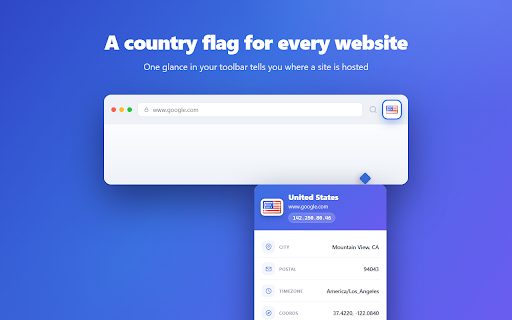
This extension places a country flag icon in the browser toolbar to indicate the hosting location of the current page. It offers a popup with more detailed geographic data, including coordinates and postal codes, and claims to function offline using a bundled IP database.

Developer:Spark
Version:2.0.0
Size:663KiB
Last updated:

Overview

Installs

1K+

Rating

3.6

58 reviews

Languages

39 locales

Includes Deutsch, English, Indonesia, Melayu...

Market analysis

Review-backed positioning, friction, and market signals for this Chrome extension.

Backed by review samples

Macro category

Developer & Designer Tools

Pricing friction

Low review signal

Complaint intensity

High review signal

Listing & review signals
Observed signals from store listing text and review samples.

Listing positioning

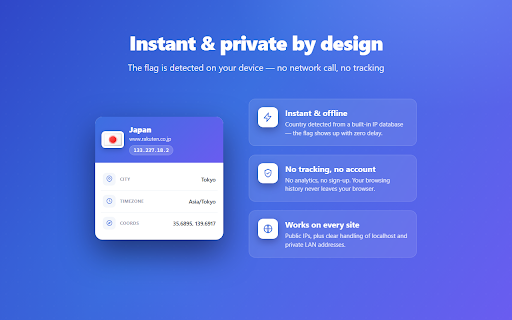
IP Flager positions itself as a lightweight, privacy-focused utility that displays the hosting country of a website via a toolbar icon. It aims to provide instant geographic insights, such as IP, city, and timezone, with a minimal UI and local database-driven detection.

Inferred product pattern

Simple utility browser extension with a reliance on bundled local databases for geo-location lookup.

Review-backed pain points

Users frequently report that the extension does not appear in the address bar as expected, suffers from inaccurate or stuck geolocation data, and causes browser stability issues ('Aw, snap!').

Observed feature gaps

The extension lacks consistent functionality across various websites and has an outdated IP database, leading to reported reliability issues.

Tags
IP TrackerGeo LocationWeb DevelopmentNetwork Utility
Target users

- Web Developers

- System Administrators

- SEO Researchers

- Security Analysts

Primary use cases

- Identifying server hosting locations

- Monitoring website infrastructure

- Performing quick geographic network checks

Positive themes

- Local geo-data processing

- Simple UI

Negative themes

- Inaccurate country detection

- Failure to display icons in the address bar

- Performance instability causing page crashes

- Excessive permission requirements

Observed friction

- Performance complaints detected

- Privacy complaints detected

- None; the product is free.

Evidence boundary: Evidence is based on user reviews highlighting significant discrepancies between advertised UI features and actual performance, alongside technical complaints regarding browser stability. Reviews are aged and may reflect older versions of the software; current performance may differ from historical feedback.
Complaint summaries
Review-backed complaint signals grouped by operational area.

Support

No direct support complaints, but users report persistent bugs without evidence of developer response.

Reliability

High; users report site crashes, extension failure on many URLs, and incorrect geolocation reporting.

Privacy

Users have expressed concern over broad permissions required to monitor browser requests.

Access & pricing

- Free usage observed

- No account requirement observed

- Free plan or free usage claimed

Store listing facts

Listing assets

- Screenshots: 3

- Videos: 0

- Languages: 39

Trust signals

- Privacy policy

- Developer contact

- Official website

Store metadata

- Version: 2.0.0

- Size: 663KiB

- Last updated:

Store description excerpt
Short excerpt from the public Chrome Web Store listing; full copy is available on the official store page.
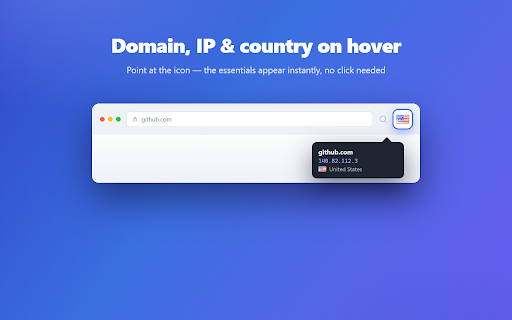
**Know where any website really lives — without leaving the page.** IP Flager puts a small country flag on your toolbar showing where the site you're viewing is hosted. One glance tells you the server's country; one click reveals the full picture — IP address, city, region, postal code, timezone and coordinates. **What it does** - 🏴 **Country flag in the toolbar** — automatically shows the flag of the country hosting the current site's server, updated as you browse. - 🖱️ **Hover for the essentials** — domain, serving IP and country right in the icon tooltip, instantly. - 📍 **Click for the full report** — a clean card with country, city, region, postal code, timezone and GPS coordinates. - ⚡ **Instant & offline** — country detection runs against a built-in IP database, so the flag appears immediately with no network call. - 🏠 **Knows local & private addresses** — clearly marks localh…

Listing SEO keywords

Search intent keywords
Keyword signals for evaluating how users may discover, compare, or search for this extension category.

Core discovery

IP location trackerwebsite server flagcheck server country

Comparison

IP location extensionwhere is this website hosted

Problem

IP location wrongextension causing crashes

Alternative

website location lookupIP address checker

Similar extensions

Jump to related discovery paths:

FAQ

What is IP Flager mainly used for?
This extension places a country flag icon in the browser toolbar to indicate the hosting location of the current page. It offers a popup with more detailed geographic data, including coordinates and postal codes, and claims to function offline using a bundled IP database.
What market signals stand out?
Early or small audience with limited review base. Last known update: 06/10/2026.
What should builders compare before entering this space?
Compare install concentration, rating quality, update recency, screenshots, developer portfolio, listing claims, and review-backed friction signals.
Is this page review-backed?
Backed by review samples. This page combines store metadata with selected review signals, while raw store metrics remain visible for comparison.

Screenshots

IP Flager screenshot

Links

Recommended Chrome extensions

Related listings from the same category, trending peers, and the same publisher portfolio.

Browse workflow