ClassLink OneClick Extension icon

ClassLink OneClick Extension Chrome Extension Analysis

Automation & Workflow Efficiency

Chrome extension ID: jgfbgkjjlonelmpenhpfeeljjlcgnkpe

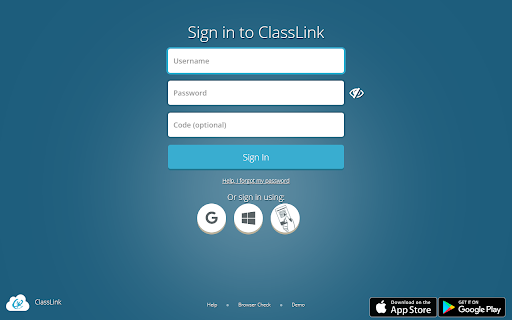
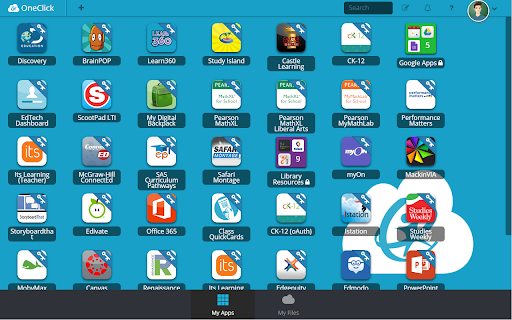
An administrative browser extension designed to automate logins and consolidate learning resources for K-12 students and educators. It provides direct, single-click portal access to educational apps, rosters, and cloud folders configured by a school district. The extension runs in the background to handle authentication across verified educational websites.

Developer:ClassLink
Version:12.6
Size:144KiB
Last updated:

Overview

Installs

3.0M+

Rating

1.7

614 reviews

Languages

1 locales

Includes English

Market analysis

Review-backed positioning, friction, and market signals for this Chrome extension.

Backed by review samples

Macro category

Automation & Workflow Efficiency

Pricing friction

Low review signal

Complaint intensity

High review signal

Listing & review signals
Observed signals from store listing text and review samples.

Listing positioning

The ClassLink OneClick Extension is positioned as an educational single sign-on (SSO) gateway designed to simplify access to digital resources for students and teachers. It connects users directly to over 6,000 learning apps and integrates with classroom file structures and cloud drives like Google Drive, Office 365, and Dropbox. The developer notes that the tool requires an active school or organization contract to function.

Inferred product pattern

Forced-installation enterprise SSO utility with high administrative friction and system overhead.

Review-backed pain points

Students and teachers encounter significant performance issues, reporting that the extension is slow, laggy, crashes active browser tabs, and consumes excessive memory. Users also report extreme frustration over forced administrative deployment, noting that the extension automatically installs on personal home computers if they log into their school Google profiles, and blocks them from deleting browsing history or opting out.

Observed feature gaps

Reviews indicate a critical need for local user control, such as a feature to disable the extension outside of school hours or prevent it from applying policies to personal devices. Additionally, users report recurrent session expirations and a failure of the extension to reliably keep them logged into critical educational databases.

Tags
Single Sign OnEducation TechnologyClassroom PortalSSO Utility
Target users

- K-12 Students

- School Teachers

- School District IT Administrators

Primary use cases

- Logging into school-mandated applications via Single Sign-On (SSO)

- Accessing school-linked file systems and cloud drives automatically

- Simplifying classroom logins on Chromebooks and school-managed devices

Positive themes

No positive theme data.

Negative themes

- Severe browser lag and high RAM consumption

- Perceived privacy violations and tracking concerns

- Inability to remove the extension due to administrative enforcement

- Automatic synchronization and installation on personal computers

Observed friction

- Performance complaints detected

- Privacy complaints detected

- There are no end-user financial pricing complaints, as the extension is provided for free to students and staff. However, because it requires an institutional subscription to function, individual independent users find it entirely useless.

Evidence boundary: Evaluated based on public Chrome Web Store metadata and 10 highly-rated critical user reviews describing performance problems, privacy fears, and school-enforced deployment issues. The review sample represents exclusively low-rating and frustrated student feedback, meaning the actual administrative usability benefits are not represented in the available comments.
Complaint summaries
Review-backed complaint signals grouped by operational area.

Support

No direct complaints about ClassLink's corporate customer support are present, but users express powerlessness regarding their school district IT departments, who force the installation and restrict permissions.

Reliability

The extension is frequently criticized for failing to keep users logged in and severely slowing down browser performance, particularly on lower-end school Chromebooks, making direct URL entry feel faster by comparison.

Privacy

Many reviews strongly accuse the extension of being 'spyware,' expressing concerns over location tracking, data collection, and restricted browsing history controls. Users are highly distressed when administrative policies leak onto personal devices.

Access & pricing

- Enterprise pricing observed

- Account required for core usage

- Paid-only usage observed

Store listing facts

Listing assets

- Screenshots: 2

- Videos: 1

- Languages: 1

Trust signals

- Privacy policy

- Developer contact

- Official website

- Support link

Store metadata

- Version: 12.6

- Size: 144KiB

- Last updated:

Store description excerpt
Short excerpt from the public Chrome Web Store listing; full copy is available on the official store page.
ClassLink empowers students and teachers with instant access to their learning resources. ClassLink® LaunchPad® includes a library of over 6,000 single sign-on apps and instant links to file folders at school and on Google, Office 365, and Dropbox cloud drives. ClassLink Roster Server easily and securely delivers class rosters to any publisher using open technology standards. ClassLink Analytics gives decision makers the usage data they need. Accessible from any computer, tablet or smartphone, ClassLink is ideal for 1to1 and Bring Your Own Device (BYOD) initiatives. PLEASE NOTE… Your school or organization must have ClassLink for this extension to work. Please contact your technology department or email [email protected].

Listing SEO keywords

Search intent keywords
Keyword signals for evaluating how users may discover, compare, or search for this extension category.

Core discovery

ClassLink OneClick Chrome ExtensionClassLink LaunchPad extensionschool single sign on extensionClassLink student login

Comparison

ClassLink vs CleverCK-Express vs ClassLink

Problem

ClassLink slowing down Chromehow to uninstall ClassLink school extensionClassLink high memory usage Chromebook

Alternative

Clever extensionschool portal bypass

Similar extensions

Jump to related discovery paths:

FAQ

What is ClassLink OneClick Extension mainly used for?
An administrative browser extension designed to automate logins and consolidate learning resources for K-12 students and educators. It provides direct, single-click portal access to educational apps, rosters, and cloud folders configured by a school district. The extension runs in the background to handle authentication across verified educational websites.
What market signals stand out?
Large installed base with moderate review base. Last known update: 06/02/2026.
What should builders compare before entering this space?
Compare install concentration, rating quality, update recency, screenshots, developer portfolio, listing claims, and review-backed friction signals.
Is this page review-backed?
Backed by review samples. This page combines store metadata with selected review signals, while raw store metrics remain visible for comparison.

Screenshots

ClassLink OneClick Extension screenshot

Links

Recommended Chrome extensions

Related listings from the same category, trending peers, and the same publisher portfolio.

Browse workflow
Awesome Screen Recorder & Screenshot icon

Awesome Screen Recorder & Screenshot

Screen Recorder

The best screen recorder and screen capture & screenshot tool to record screen.

Installs

3.0M+

Rating

4.7

Free Download Manager icon

Free Download Manager

Free Download Manager.ORG

Free Download Manager integration with browser

Installs

3.0M+

Rating

4.2

夸克网盘-网页嗅探 icon

夸克网盘-网页嗅探

广州市动悦信息技术有限公司

识别到网页资源时,可一键存夸克网盘

Installs

3.0M+

Rating

1.7

Mendeley Web Importer icon

Mendeley Web Importer

Mendeley

Fast, convenient import of references and PDFs to your Mendeley Reference Manager library.

Installs

3.0M+

Rating

2.3

Enable local file links icon

Enable local file links

Takashi Sugimoto (tksugimoto)

Make it possible to open by click a link to a local file that is disabled by Chrome.

Installs

3.0M+

Rating

3.9

Pop up blocker for Chrome™ - Poper Blocker icon

Pop up blocker for Chrome™ - Poper Blocker

dingosolutions

Block popups, ads, cookie requests, trackers, notifications, ads on social media & more. A clean browsing experience starts today.

Installs

2.0M+

Rating

4.8

Momentum icon

Momentum

Momentum

Transform your browser into a beautifully designed tab that helps you feel calm, keep focus, and stay energized.

Installs

2.0M+

Rating

4.5

Google Scholar PDF Reader icon

Google Scholar PDF Reader

scholar-chrome-extensions

Supercharge your paper reading: follow references, skim outline, jump to figures, cite and save.

Installs

2.0M+

Rating

4.1

Keeper® Password Manager & Digital Vault icon

Keeper® Password Manager & Digital Vault

Keeper Security

Generate strong passwords, autofill and protect your confidential info with zero-knowledge encryption.

Installs

2.0M+

Rating

4.8

AI Grammar Checker & Paraphraser – LanguageTool icon

AI Grammar Checker & Paraphraser – LanguageTool

lt-extension-publisher

Instantly Enhance Your Texts with LanguageTool’s Grammar Checker and Paraphrasing Tool

Installs

2.0M+

Rating

4.7