

Save Emails as PDF by cloudHQ Chrome Extension Analysis
Automation & Workflow EfficiencyChrome extension ID: dngbhajancmfmdnmhhdknhooljkddgnk
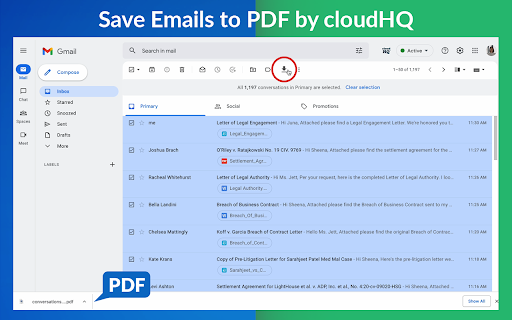
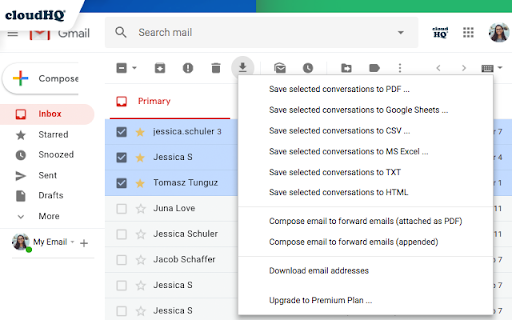
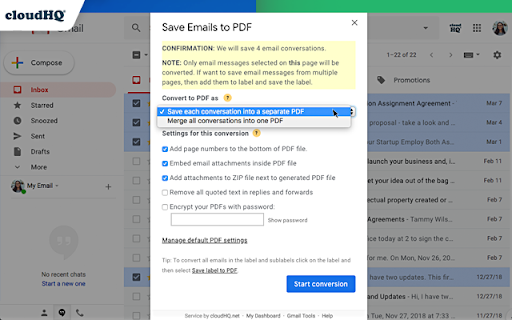
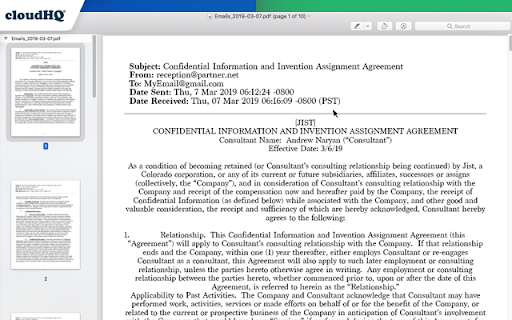
This extension enables users to convert single or multiple Gmail messages, entire labels, or filtered conversations into various formats like PDF, TXT, or HTML. It supports saving files to local drives or cloud storage services such as Google Drive, Dropbox, Box, Egnyte, and OneDrive, with additional options for attachment handling, merging, and password protection.
Overview
Installs
100K+
Rating
★ 4.3
610 reviews
Languages
11 locales
Includes Deutsch, English, Nederlands, español...
Market analysis
Review-backed positioning, friction, and market signals for this Chrome extension.
Macro category
Automation & Workflow Efficiency
Pricing friction
High review signal
Complaint intensity
High review signal
Listing positioning
The extension positions itself as an easy-to-use tool for saving Gmail emails and labels as PDF documents, emphasizing a three-click process. It highlights diverse professional applications, including record-keeping, CRM integration, and legal or accounting document management, catering to roles like real estate agents, lawyers, and business owners.
Inferred product pattern
A cloud-integrated service that allows Gmail users to convert emails and labels into various document formats like PDF for archival, legal, or CRM integration. It operates on a freemium model, offering limited free usage (e.g., 50 emails/month) before requiring a paid subscription for full functionality and downloads.
Review-backed pain points
Users express significant pain points related to the product's deceptive freemium model, where they invest considerable time converting emails only to find they cannot download without payment. Other issues include excessively long processing times, technical malfunctions (such as login errors and non-functional features like email merging), and severe dissatisfaction with customer support interactions, including claims of rudeness from the CEO.
Observed feature gaps
Reviews indicate that the advertised feature for 'merging multiple emails into one PDF' does not work for some users, despite troubleshooting. Additionally, the issue of incorrect date and time conversion for certain emails makes the output unsuitable for legal purposes, undermining a primary advertised use case.
- Real estate agents
- Lawyers and legal professionals
- Project Managers and Team leads
- Business owners
- Contractors
- Individuals needing to convert, save, and archive important online conversations
- Creating hard copy backups of messages for records
- Merging multiple emails into a single PDF
- Backing up multiple messages into separate PDFs
- Saving only attachments from Gmail messages into PDF
- Uploading correspondence into CRM systems (e.g., Salesforce, Zoho, SkySlope, Clio)
- Preparing documents for legal proceedings or accountants
- Archiving project communication for organization
- Organizing receipts and invoices by date or customer
- Review-backed data from high-rating reviews is not available in the provided sample.
- Unclear and opaque freemium model that hides payment requirements until after significant time investment
- Extreme frustration over data being 'held hostage' behind a paywall after lengthy processing
- Very slow conversion times, sometimes taking hours for large email batches
- Requirement to sign up for an account and concerns about extensive data harvesting/privacy implications
- Technical errors, including login/activation issues and features not working as advertised (e.g., merging multiple emails)
- Inaccurate date/time conversions rendering output unusable for legal purposes
- Extremely poor customer support, including reports of rude and condescending behavior from leadership
- Payment required for meaningful usage
- Free-tier complaints detected
- Account blocking complaints detected
- Performance complaints detected
- Privacy complaints detected
- The product exhibits significant pricing friction due to a highly opaque freemium model. Users are frustrated by investing hours into email conversion only to be blocked by a paywall when attempting to download, feeling their data is 'held ransom.' The free tier's limit of 50 emails/month is poorly communicated upfront and perceived as unreasonable.
Support
There are severe complaints regarding customer support, including an incident where a user described an interaction with the CEO as the 'RUDEST person on earth,' citing condescending tone and communication difficulties. Technical support was also reported as unable to resolve a critical feature malfunction.
Reliability
Users report substantial reliability issues, including extremely long processing times (up to several hours for large email batches) and instances where the conversion process fails, pauses unexpectedly, or produces unusable results (e.g., incorrect date/time stamps). Login and activation errors also prevent users from accessing the service.
Privacy
Users express strong privacy concerns, citing a 'terrifying' Terms of Service and an 'unreasonable amount of EULA paperwork.' There are explicit accusations that the developer might be harvesting and selling user data due to the extensive permissions required for Gmail accounts.
- Free entry with paid features
- Account required for core usage
- Limited free usage observed
Store listing facts
- Screenshots: 4
- Videos: 1
- Languages: 11
- Privacy policy
- Developer contact
- Official website
- Support link
- Version: 1.1.2.23
- Size: 1.4MiB
- Last updated:
Listing SEO keywords
Core discovery
Comparison
Problem
Alternative
Similar extensions
Jump to related discovery paths:
FAQ
Screenshots
Links
Website: save-emails-as-pdf.com
Privacy policy: https://www.cloudhq.net/privacy
Support links: https://support.cloudhq.net/category/browser/save-emails-to-pdf/
Videos: Watch






