Photo Editor icon

Photo Editor Chrome Extension Analysis

Niche Lifestyle & Gaming Hacks

Chrome extension ID: bjmpabmgnnoennodbojbhecagfhdghmo

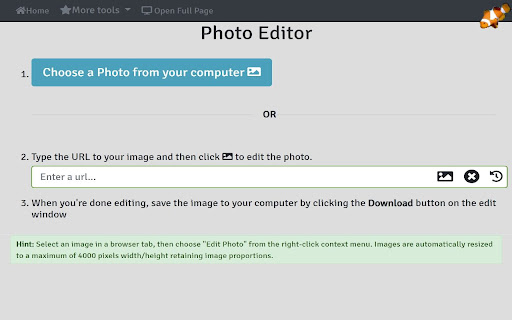
Photo Editor by LinangData is a browser-based utility that allows users to perform basic image manipulations. It supports editing images from local storage, URLs, or directly via a right-click context menu within the browser.

Developer:LinangData
Version:1.1.0
Size:3.03MiB
Last updated:

Overview

Installs

10K+

Rating

5.0

4 reviews

Languages

1 locales

Includes English (United States)

Market analysis

Review-backed positioning, friction, and market signals for this Chrome extension.

Backed by review samples

Macro category

Niche Lifestyle & Gaming Hacks

Pricing friction

Low review signal

Complaint intensity

Low review signal

Listing & review signals
Observed signals from store listing text and review samples.

Listing positioning

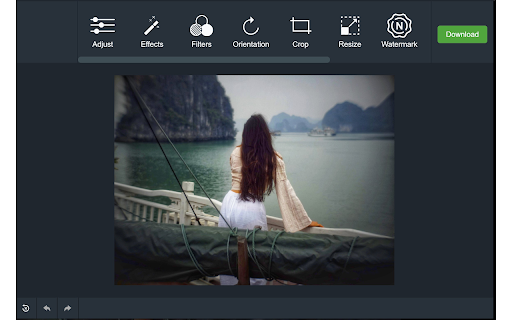
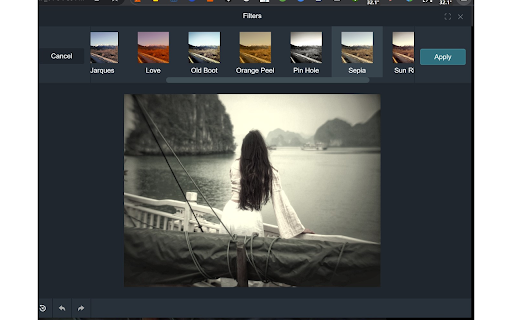
The store listing positions this product as a free, lightweight, and accessible in-browser photo editing solution. It emphasizes ease of use for common tasks like cropping, brightness adjustment, and applying filters directly from a browser context menu.

Inferred product pattern

Simple, single-purpose browser utility offering basic image manipulation tools.

Review-backed pain points

Review-backed data is not available as all current reviews are high-rating short-form comments.

Observed feature gaps

No specific feature gaps reported by users in the available review sample.

Tags
Photo EditorImage EditingBrowser UtilityQuick Edit
Target users

- Casual browser users

- Non-professional editors

Primary use cases

- Quick image cropping and scaling

- Adjusting image brightness and contrast

- Applying basic filters and presets

- Adding watermarks and signatures

Positive themes

- Ease of use

- Effective for quick tasks

Negative themes

No negative theme data.

Observed friction

- No pricing friction observed; the extension is stated as free.

Evidence boundary: Analysis based on 4 high-rating user reviews and the developer-provided store listing descriptions. Review sample size is small and consists primarily of short, non-detailed feedback, limiting insight into deep technical reliability.
Complaint summaries
Review-backed complaint signals grouped by operational area.

Support

No support complaints identified.

Reliability

No reliability complaints identified.

Privacy

No privacy complaints identified.

Access & pricing

- Free usage observed

- No account requirement observed

- Free plan or free usage claimed

Store listing facts

Listing assets

- Screenshots: 3

- Videos: 0

- Languages: 1

Trust signals

- Privacy policy

- Developer contact

- Official website

Store metadata

- Version: 1.1.0

- Size: 3.03MiB

- Last updated:

Store description excerpt
Short excerpt from the public Chrome Web Store listing; full copy is available on the official store page.
Use this free online tool to quickly and easily perform common photo editing tasks directly in your browser... Features: - edit images from your computer - edit images from a URL you enter - select an image in a browser tab, then choose "Edit Photo" from the right-click context menu - adjust brightness, contrast, saturation, change orientation, image scaling, apply presets and filters, crop and scale, add watermarks and signature. - provides links to other tools from LinangData from the More tools menu, including: XML Formatter; CSV - JSON Converter; Grammar, spelling and style checker; Calculator; Photo Exif Data Viewer; Weather Forecast; World Clock - It's free!

Listing SEO keywords

Search intent keywords
Keyword signals for evaluating how users may discover, compare, or search for this extension category.

Core discovery

online photo editorbrowser image editorcrop image extensionfree photo editor chrome

Comparison

Photo Editor vs Photoshopbest browser photo editor

Problem

edit image in browserhow to watermark images online

Alternative

Pixlr alternativeCanva alternative

Similar extensions

Jump to related discovery paths:

FAQ

What is Photo Editor mainly used for?
Photo Editor by LinangData is a browser-based utility that allows users to perform basic image manipulations. It supports editing images from local storage, URLs, or directly via a right-click context menu within the browser.
What market signals stand out?
Visible niche traction with limited review base. Last known update: 06/21/2022.
What should builders compare before entering this space?
Compare install concentration, rating quality, update recency, screenshots, developer portfolio, listing claims, and review-backed friction signals.
Is this page review-backed?
Backed by review samples. This page combines store metadata with selected review signals, while raw store metrics remain visible for comparison.

Screenshots

Photo Editor screenshot

Links

Recommended Chrome extensions

Related listings from the same category, trending peers, and the same publisher portfolio.

Browse art
Calculator icon

Calculator

LinangData

A simple calculator that remembers your last calculation. You can close it at any time, and reopen it without losing your work.

Installs

50K+

Rating

4.1

Grammar Checker icon

Grammar Checker

LinangData

Grammar, spelling and style checker. Get suggestions on writing improvements

Installs

40K+

Rating

4.3

One-click image downloader - Grabit icon

One-click image downloader - Grabit

Grabit Team

Download images in one click. A powerful downloader with original-size saving, bulk downloads, and auto-scroll capture.

Installs

30K+

Rating

3.6

Photo editor PhotoStudio for images icon

Photo editor PhotoStudio for images

RedcoolMedia

PhotoStudio to create and edit photos and images online

Installs

30K+

Rating

3.6

Bulk Image Downloader - HImage icon

Bulk Image Downloader - HImage

addonx

Easily batch download images from web pages

Installs

30K+

Rating

4.2

Exif Viewer icon

Exif Viewer

LinangData

View the EXIF data in your photos. Select photos on your device or on a web page. Simply right-click on an image in a web page.

Installs

30K+

Rating

2.8

Snag - Save as image icon

Snag - Save as image

Jesse Jones

Save and convert images to JPG, PNG, WebP, GIF, and more.

Installs

20K+

Rating

3.9

Higgsfield Instant icon

Higgsfield Instant

mobile.higgsfield

Instant AI creation from anywhere on the web - reference styles or swap faces with one click.

Installs

20K+

Rating

4.4

Behance saver icon

Behance saver

qwertykqwertov

Скачивание невероятных картинок в максимально доступном разрешении с https://www.behance.net/ !

Installs

20K+

Rating

4.1

Dreamy - Anime HD New Tab Sharing App icon

Dreamy - Anime HD New Tab Sharing App

dreamy-new-tab

Fill your new tab with stunning HD scenery from anime and games. Share your photos and videos with the community.

Installs

20K+

Rating

4.9