Bulk Image Downloader - HImage icon

Bulk Image Downloader Chrome Extension Analysis

Video & Image Downloaders

Store listing title: Bulk Image Downloader - HImage

Chrome extension ID: glcgjkleinhkbopkjdjkbhmmphaohgpd

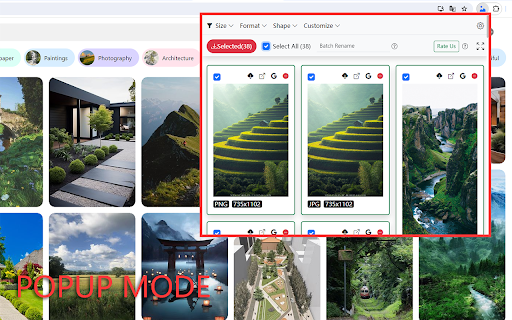
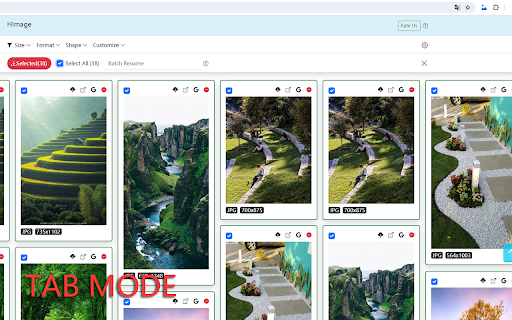
A Chrome extension that allows users to batch-download images from websites. It supports a wide array of image formats, provides a wide-interface tab mode for easier management, and packages downloads into ZIP files for organization.

Developer:addonx
Version:1.2
Size:314KiB
Last updated:

Overview

Installs

30K+

Rating

4.2

88 reviews

Languages

35 locales

Includes Deutsch, English, English (United Kingdom), English (United States)...

Market analysis

Review-backed positioning, friction, and market signals for this Chrome extension.

Backed by review samples

Macro category

Video & Image Downloaders

Pricing friction

Low review signal

Complaint intensity

Moderate review signal

Listing & review signals
Observed signals from store listing text and review samples.

Listing positioning

The product positions itself as a workflow automation tool for capturing and downloading images in bulk from web pages. It emphasizes technical control through filtering by size, shape, and domain, and provides utility features like format conversion and batch renaming.

Inferred product pattern

Utility-based asset extractor focusing on batch processing and basic image manipulation.

Review-backed pain points

Users report that the 'bulk' functionality is unreliable, with some cases of downloading only a fraction of selected images. Significant frustration exists regarding the lack of a 'stop' button and the fact that images are often saved in reverse or random order.

Observed feature gaps

Absence of non-ZIP export options, lack of shift-click for range selection, and missing state persistence when interacting with the extension's internal links or browser tabs.

Tags
Bulk Image DownloaderImage ScraperBatch DownloadImage Converter
Target users

- Content Creators

- Digital Marketers

- Researchers

- Web Designers

Primary use cases

- Bulk gathering of visual assets for projects

- Automating the collection of images from specific domains

- Converting web images to standard formats during download

Positive themes

- Competitive performance compared to other similar extensions

- Effective initial image capturing

Negative themes

- Incomplete bulk downloads

- Incorrect file ordering/sorting

- Loss of user selection when maximizing windows or switching tabs

- Lack of flexibility in output options (forced ZIP)

Observed friction

- Performance complaints detected

- No pricing information provided in the listing or reviews.

Evidence boundary: Analysis based on the provided store listing and a sample of 13 reviews in multiple languages. Pricing and account requirements are not explicitly detailed in the provided text; review sample size is a small fraction of the total user base.
Complaint summaries
Review-backed complaint signals grouped by operational area.

Support

No specific support or account-related complaints observed.

Reliability

Reliability issues noted regarding the accuracy of bulk downloads and the persistence of the user interface state.

Privacy

No privacy or security complaints observed.

Access & pricing

- No clear monetization signal

- No account requirement observed

- No clear pricing signal

Store listing facts

Listing assets

- Screenshots: 2

- Videos: 0

- Languages: 35

Trust signals

- Developer contact

- Official website

Store metadata

- Version: 1.2

- Size: 314KiB

- Last updated:

Store description excerpt
Short excerpt from the public Chrome Web Store listing; full copy is available on the official store page.
Through this browser extension, you can capture and download images in bulk from web pages, helping to automate your workflow. Features: 1. Supports filtering images based on their size, shape, and format. 2. Allows filtering images from specific domains to avoid unwanted interference. 3. Supports searching for similar images using "Google Lens." 4. Automatically converts downloaded images to the specified format if you specify an image output format (JPG, PNG, WEBP). 5. Provides a tab mode that allows you to switch to a wider interface if you find the extension's pop-up window too narrow. It displays and processes captured images in a broader interface. 6. Supports batch renaming. 7. Supports capturing most web image formats, such as JPG, WEBP, PNG, GIF, SVG, ICO, AVIF, BMP. 8. The images to be downloaded will be packaged into a zip file, keeping everything organized.

Listing SEO keywords

Search intent keywords
Keyword signals for evaluating how users may discover, compare, or search for this extension category.

Core discovery

bulk image downloaderbatch save imageschrome image scraperdownload all images from page

Comparison

best bulk image downloaderHImage vs other image downloaders

Problem

how to download all images from a websitebatch download images to zip

Alternative

bulk image downloader alternativebatch image saver chrome

Similar extensions

Jump to related discovery paths:

FAQ

What is Bulk Image Downloader mainly used for?
A Chrome extension that allows users to batch-download images from websites. It supports a wide array of image formats, provides a wide-interface tab mode for easier management, and packages downloads into ZIP files for organization.
What market signals stand out?
Visible niche traction with limited review base. Last known update: 05/06/2024.
What should builders compare before entering this space?
Compare install concentration, rating quality, update recency, screenshots, developer portfolio, listing claims, and review-backed friction signals.
Is this page review-backed?
Backed by review samples. This page combines store metadata with selected review signals, while raw store metrics remain visible for comparison.

Screenshots

Bulk Image Downloader - HImage screenshot

Links

Website: addonx.net

Recommended Chrome extensions

Related listings from the same category, trending peers, and the same publisher portfolio.

Browse art