

Snag Chrome Extension Analysis
Video & Image DownloadersStore listing title: Snag - Save as image
Chrome extension ID: nfihojoiaipdjchgdbkknlaodibopnpf
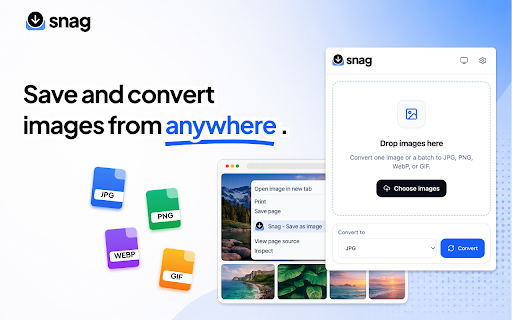
Snag is a Chrome extension that allows users to download and convert images on the web with a single right-click. It supports popular formats and includes a drag-and-drop popup interface for quick local file conversions without leaving the browser.
Overview
Installs
20K+
Rating
★ 3.9
30 reviews
Languages
55 locales
Includes Deutsch, English, English (Australia), English (United Kingdom)...
Market analysis
Review-backed positioning, friction, and market signals for this Chrome extension.
Macro category
Video & Image Downloaders
Pricing friction
Low review signal
Complaint intensity
Moderate review signal
Listing positioning
Snag positions itself as a lightweight utility for quickly saving and converting images directly from the browser context menu. It eliminates the need for external applications by allowing instant conversions to PNG, JPG, WebP, and GIF. It features both a right-click workflow and a drag-and-drop popup converter.
Inferred product pattern
A client-side browser utility that extends the context menu to intercept image URLs and process format conversions locally prior to triggering a Chrome download event.
Review-backed pain points
The most significant pain point is the extension's context menu disappearing after Chrome restarts or when session data is cleared (e.g., via CCleaner), forcing users to uninstall and reinstall it repeatedly. Additionally, users report issues with incorrect format conversions and compatibility failures on Twitter.
Observed feature gaps
Reviews highlight a lack of an automatic saving feature to a default folder, forcing users to manually select a directory each time. Users also noted the lack of batch/bulk image conversion during the initial download process, and incorrect output formatting for GIF, BMP, and TIFF.
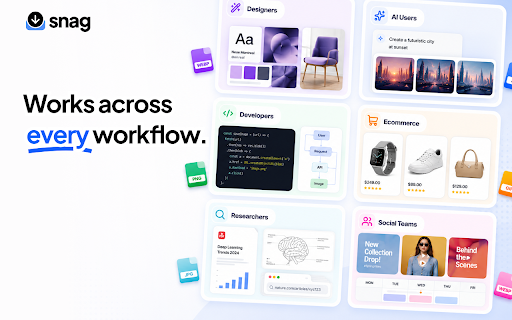
- Designers
- Developers
- Marketers
- Students
- E-commerce sellers
- Content creators
- Saving web images directly into specific formats like PNG or JPG
- Converting local images using a drag-and-drop popup converter
- Saves images using their original filename rather than generic titles
- Completely free and easy to use
- Convenient right-click context menu integration
- Context menu option disappears after restarting Chrome or clearing session data
- Fails to convert correctly to certain formats like GIF, BMP, and TIFF, defaulting instead to PNG
- Does not work on specific platforms like Twitter
- Performance complaints detected
- No pricing friction was observed. User reviews confirm that the extension is completely free and highly valued for not charging fees.
Support
No specific support channel complaints were found, though users express frustration about having to repeatedly reinstall the extension to solve bugs.
Reliability
Multiple users complain that the right-click menu functionality stops working after clearing browser sessions or restarting Chrome. Some users also report the extension fails to grab or convert images on Twitter.
Privacy
No privacy or security complaints were found in the analyzed reviews.
- Free usage observed
- No account requirement observed
- Free plan or free usage claimed
Store listing facts
- Screenshots: 2
- Videos: 0
- Languages: 55
- Developer contact
- Official website
- Version: 3.3.0
- Size: 244KiB
- Last updated:
Listing SEO keywords
Core discovery
Comparison
Problem
Alternative
Similar extensions
Jump to related discovery paths:
FAQ
Screenshots
Links
Website: snagimage.com









![Custom profile picture for Netflix™ [QVI] icon](https://extspot.com/api/v1/assets/googleusercontent/aHR0cHM6Ly9saDMuZ29vZ2xldXNlcmNvbnRlbnQuY29tL1Z3OWc3ZjFJeDgtQndyLWVOYUhQdXpsYjVRUzJxaVV5VDRGSzlxaGVnRUxlSk1hVWRMMndTcEZ2bHdycEIzUUpyb1RhYll6aWxFemtxNXZXeUV3OFlraVZadw)