Microsoft Defender Browser Protection icon

Microsoft Defender Browser Protection Chrome Extension Analysis

Privacy, Security & Ad Blockers

Chrome extension ID: bkbeeeffjjeopflfhgeknacdieedcoml

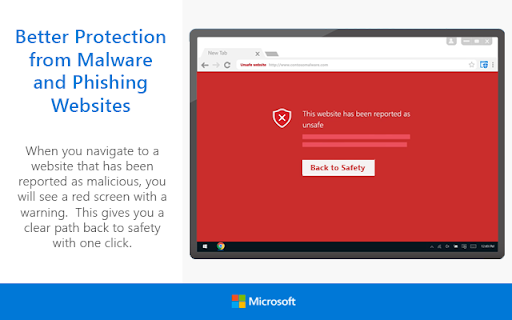
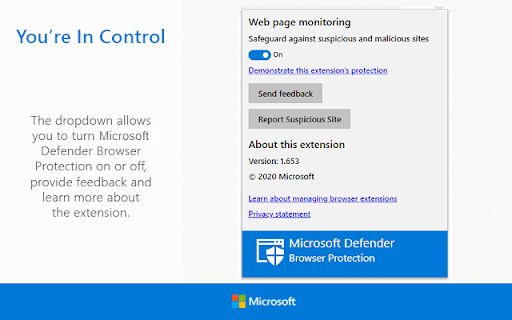
Microsoft Defender Browser Protection is a security utility that checks visited URLs against a Microsoft-maintained list of malicious sites. It provides warning screens when users navigate to potential threats and includes reporting features for suspicious activity.

Version:1.664
Size:240KiB
Last updated:

Overview

Installs

2.0M+

Rating

4.1

629 reviews

Languages

1 locales

Includes English (United States)

Market analysis

Review-backed positioning, friction, and market signals for this Chrome extension.

Backed by review samples

Macro category

Privacy, Security & Ad Blockers

Pricing friction

Low review signal

Complaint intensity

High review signal

Listing & review signals
Observed signals from store listing text and review samples.

Listing positioning

Microsoft positions this extension as a real-time security shield against phishing and malicious URLs. It serves as a browser-based extension of Microsoft Defender's threat intelligence, providing warnings for harmful sites.

Inferred product pattern

Corporate-branded security utility intended to mirror native security features in competing browsers.

Review-backed pain points

Users frequently express frustration over 'false positives' that block necessary work tools and difficulty removing the extension when it is deployed via corporate group policy.

Observed feature gaps

Lack of granular user control to bypass blocks easily, and perceived lack of transparency regarding the extension's active background protection state.

Tags
SecurityPhishing ProtectionMicrosoftBrowser SafetyMalware Blocker
Target users

- Chrome users

- Enterprise IT administrators

- General web users seeking anti-phishing protection

Primary use cases

- Blocking access to phishing websites

- Preventing accidental downloads of malicious software

- Enterprise-wide security policy enforcement

Positive themes

- Initial perception of value as a security layer

- Recognition of the Microsoft brand as a security provider

Negative themes

- Overly aggressive blocking of legitimate sites

- Inability for users to disable/uninstall when managed by corporate policy

- Perception of the tool as a marketing vehicle for Microsoft Edge

- Concerns regarding long-term developer support

Observed friction

- Performance complaints detected

- None; the product is free.

Evidence boundary: Evidence is drawn from 629 reviews, showing a mix of functionality issues, corporate policy management friction, and user sentiment regarding the product's role as an Edge-promotional tool. The sample size is modest relative to the user count; negative sentiment is likely over-indexed by users experiencing site-blocking errors or forced policy installs.
Complaint summaries
Review-backed complaint signals grouped by operational area.

Support

Users report that technical support for the extension is difficult to access and that the product is often used as a mechanism to steer users toward Microsoft Edge.

Reliability

High; users report instances where the extension flags entire site domains as unsafe, effectively breaking browser functionality, with no easy way to disable it.

Privacy

No specific privacy violation claims found, though some users express cynicism regarding data handling by Microsoft.

Access & pricing

- Free usage observed

- No account requirement observed

- Free plan or free usage claimed

Store listing facts

Listing assets

- Screenshots: 2

- Videos: 0

- Languages: 1

Trust signals

- Privacy policy

- Developer contact

- Official website

Store metadata

- Version: 1.664

- Size: 240KiB

- Last updated:

Store description excerpt
Short excerpt from the public Chrome Web Store listing; full copy is available on the official store page.
Currently supported region(s): United States The Microsoft Defender Browser Protection extension helps protect you against online threats, such as links in phishing emails and websites designed to trick you into downloading and installing malicious software that can harm your computer. If you click a malicious link in an email or navigate to a site designed to trick you into disclosing financial, personal or other sensitive information, or a website that hosts malware, Microsoft Defender Browser Protection will check it against a constantly updated list of malicious URLs known to Microsoft. If the malicious link matches one on the list, Microsoft Defender Browser Protection will show a red warning screen letting you know that the web page you are about to visit is known to be harmful, giving you a clear path back to safety with one click. Privacy statement: https://privacy.microsoft.com…

Listing SEO keywords

Search intent keywords
Keyword signals for evaluating how users may discover, compare, or search for this extension category.

Core discovery

browser securityphishing protectionmalware blocker chromemicrosoft security extension

Comparison

Microsoft Defender vs Google SafeBrowsingalternative to browser security extensions

Problem

website blocked by microsoftfalse positive security alertcannot remove chrome extension

Alternative

Cisco UmbrellaCloudflare GatewayuBlock Origin

Similar extensions

Jump to related discovery paths:

FAQ

What is Microsoft Defender Browser Protection mainly used for?
Microsoft Defender Browser Protection is a security utility that checks visited URLs against a Microsoft-maintained list of malicious sites. It provides warning screens when users navigate to potential threats and includes reporting features for suspicious activity.
What market signals stand out?
Large installed base with moderate review base. Last known update: 02/16/2025.
What should builders compare before entering this space?
Compare install concentration, rating quality, update recency, screenshots, developer portfolio, listing claims, and review-backed friction signals.
Is this page review-backed?
Backed by review samples. This page combines store metadata with selected review signals, while raw store metrics remain visible for comparison.

Screenshots

Microsoft Defender Browser Protection screenshot

Links

Recommended Chrome extensions

Related listings from the same category, trending peers, and the same publisher portfolio.

Browse workflow
Microsoft Bing Homepage & Search for Chrome icon

Microsoft Bing Homepage & Search for Chrome

Microsoft Corporation

Set Microsoft Bing as your default homepage and default search engine

Installs

4.0M+

Rating

3.8

Microsoft Bing Search with Rewards icon

Microsoft Bing Search with Rewards

Microsoft Corporation

Use the Microsoft Rewards extension to find new ways to earn every day, easily track your points and set your default search to Bing

Installs

3.0M+

Rating

4.4

Free Download Manager icon

Free Download Manager

Free Download Manager.ORG

Free Download Manager integration with browser

Installs

3.0M+

Rating

4.2

夸克网盘-网页嗅探 icon

夸克网盘-网页嗅探

广州市动悦信息技术有限公司

识别到网页资源时,可一键存夸克网盘

Installs

3.0M+

Rating

1.7

Mendeley Web Importer icon

Mendeley Web Importer

Mendeley

Fast, convenient import of references and PDFs to your Mendeley Reference Manager library.

Installs

3.0M+

Rating

2.3

Enable local file links icon

Enable local file links

Takashi Sugimoto (tksugimoto)

Make it possible to open by click a link to a local file that is disabled by Chrome.

Installs

3.0M+

Rating

3.9

Pop up blocker for Chrome™ - Poper Blocker icon

Pop up blocker for Chrome™ - Poper Blocker

dingosolutions

Block popups, ads, cookie requests, trackers, notifications, ads on social media & more. A clean browsing experience starts today.

Installs

2.0M+

Rating

4.8

Momentum icon

Momentum

Momentum

Transform your browser into a beautifully designed tab that helps you feel calm, keep focus, and stay energized.

Installs

2.0M+

Rating

4.5

Google Scholar PDF Reader icon

Google Scholar PDF Reader

scholar-chrome-extensions

Supercharge your paper reading: follow references, skim outline, jump to figures, cite and save.

Installs

2.0M+

Rating

4.1

Keeper® Password Manager & Digital Vault icon

Keeper® Password Manager & Digital Vault

Keeper Security

Generate strong passwords, autofill and protect your confidential info with zero-knowledge encryption.

Installs

2.0M+

Rating

4.8