Enable local file links icon

Enable local file links Chrome Extension Analysis

Automation & Workflow Efficiency

Chrome extension ID: nikfmfgobenbhmocjaaboihbeocackld

This tool enables users to open local file system links directly from Chrome by clicking on them. It functions by intercepting user clicks and requires the 'Allow access to file URLs' setting to be manually enabled in the Chrome extensions management page.

Version:0.10.0
Size:9.57KiB
Last updated:

Overview

Installs

3.0M+

Rating

3.9

74 reviews

Languages

3 locales

Includes English, français, 日本語

Market analysis

Review-backed positioning, friction, and market signals for this Chrome extension.

Backed by review samples

Macro category

Automation & Workflow Efficiency

Pricing friction

Low review signal

Complaint intensity

Moderate review signal

Listing & review signals
Observed signals from store listing text and review samples.

Listing positioning

The extension is positioned as a utility to override Chrome's default security restriction that prevents the clicking of links to local files. It emphasizes that it serves as a bridge for users who need functionality formerly common in Internet Explorer, requiring specific manual permission settings in Chrome.

Inferred product pattern

Single-utility open-source bridge extension for legacy browser behavior.

Review-backed pain points

Users frequently report that the extension does not function as expected, often citing confusion over Chrome's evolving security policies, specific file types like .xlsx, or issues with network-mapped drives.

Observed feature gaps

Lack of granular configuration for handling different file extensions and a perceived failure to open network share files directly without first downloading them.

Tags
Local FilesFile AccessBrowser UtilitiesProductivity
Target users

- IT professionals

- Corporate intranet users

- Power users managing local document repositories

Primary use cases

- Opening local network files

- Accessing intranet resources

- Clicking file paths on internal wiki or document pages

Positive themes

- Serves a niche but necessary function for local file access

- Open-source and transparent

Negative themes

- Incompatibility with specific Chrome versions

- Inconsistent behavior with network drives

- Downloads files to local storage instead of opening directly from the server

Observed friction

- Performance complaints detected

- None; the product is free.

Evidence boundary: Extracted from public Chrome Web Store description and user reviews highlighting functionality issues related to browser security updates. Review data is limited to user complaints about functionality and does not represent the experience of the entire user base.
Complaint summaries
Review-backed complaint signals grouped by operational area.

Support

Complaints are focused on technical functionality rather than customer support interactions.

Reliability

High; users consistently report that the extension 'doesn't work' or fails to handle specific link types/environments, often blaming Chrome's security restrictions.

Privacy

None observed.

Access & pricing

- Free usage observed

- No account requirement observed

- Free plan or free usage claimed

Store listing facts

Listing assets

- Screenshots: 1

- Videos: 0

- Languages: 3

Trust signals

- Developer contact

- Support link

Store metadata

- Version: 0.10.0

- Size: 9.57KiB

- Last updated:

Store description excerpt
Short excerpt from the public Chrome Web Store listing; full copy is available on the official store page.
In Google Chrome, links to local files are disabled, unlike IE. This extension allows you to open a link to a local file by clicking it. [Setting] Starting with Chrome 118 in October 2023, you will need to enable the "Allow access to file URLs" setting from the extension settings page. chrome://extensions/?id=nikfmfgobenbhmocjaaboihbeocackld [Security] A malicious page can not open a local file without permission, because this extension reacts only to the click operation by the user. [Others] Personal information is not collected / used. Source code is released to GitHub. https://github.com/tksugimoto/chrome-extension_open-local-file-link

Listing SEO keywords

Search intent keywords
Keyword signals for evaluating how users may discover, compare, or search for this extension category.

Core discovery

open local file links in chromechrome file url accessopen file explorer links from browserlocal file link extension

Comparison

chrome vs internet explorer local filesalternative to chrome file link restrictions

Problem

chrome not allowed to load local resourcecannot open file:/// links in chrome

Alternative

browser extension to open local files

Similar extensions

Jump to related discovery paths:

FAQ

What is Enable local file links mainly used for?
This tool enables users to open local file system links directly from Chrome by clicking on them. It functions by intercepting user clicks and requires the 'Allow access to file URLs' setting to be manually enabled in the Chrome extensions management page.
What market signals stand out?
Large installed base with limited review base. Last known update: 10/18/2025.
What should builders compare before entering this space?
Compare install concentration, rating quality, update recency, screenshots, developer portfolio, listing claims, and review-backed friction signals.
Is this page review-backed?
Backed by review samples. This page combines store metadata with selected review signals, while raw store metrics remain visible for comparison.

Screenshots

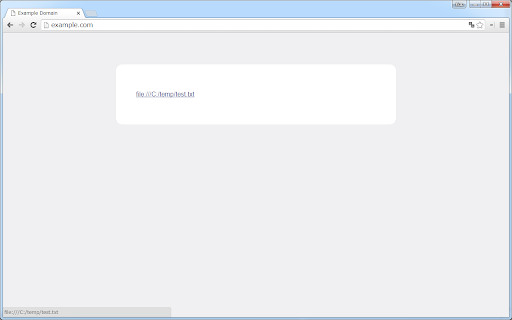
Enable local file links screenshot

Links

Recommended Chrome extensions

Related listings from the same category, trending peers, and the same publisher portfolio.

Browse workflow
Share page information icon

Share page information

Takashi Sugimoto (tksugimoto)

Convert page information to Wiki notation, etc.

Installs

133

Rating

5.0

Google Scholar PDF Reader icon

Google Scholar PDF Reader

scholar-chrome-extensions

Supercharge your paper reading: follow references, skim outline, jump to figures, cite and save.

Installs

2.0M+

Rating

4.1

Keeper® Password Manager & Digital Vault icon

Keeper® Password Manager & Digital Vault

Keeper Security

Generate strong passwords, autofill and protect your confidential info with zero-knowledge encryption.

Installs

2.0M+

Rating

4.8

AI Grammar Checker & Paraphraser – LanguageTool icon

AI Grammar Checker & Paraphraser – LanguageTool

lt-extension-publisher

Instantly Enhance Your Texts with LanguageTool’s Grammar Checker and Paraphrasing Tool

Installs

2.0M+

Rating

4.7

Snow Web Application Metering icon

Snow Web Application Metering

snow_chrome_extensions

This extension tracks web application use for the purpose of license compliance and cost optimization. www.snowsoftware.com/browser

Installs

2.0M+

Rating

1.3

Sound Booster - increase volume up icon

Sound Booster - increase volume up

Sound-ultimate.com

Volume Booster helps boost sound video or music on any tab! Increase volume and bass booster, equalizer. Volume control.

Installs

2.0M+

Rating

4.5

Evernote Web Clipper icon

Evernote Web Clipper

Evernote

Use the Evernote extension to save things you see on the web into your Evernote account.

Installs

2.0M+

Rating

4.7

Clever icon

Clever

Clever

Allows students and staff to access apps in Clever Portal.

Installs

2.0M+

Rating

2.5

Microsoft Defender Browser Protection icon

Microsoft Defender Browser Protection

Microsoft Corporation

Protect yourself against online threats, like phishing and malicious websites, with real-time protection from Microsoft.

Installs

2.0M+

Rating

4.1

Визуальные закладки icon

Визуальные закладки

Yandex

Визуальные закладки – это страница, на которой собраны ваши любимые сайты

Installs

2.0M+

Rating

3.4