Auto Scroll icon

Auto Scroll Chrome Extension Analysis

Automation & Workflow Efficiency

Chrome extension ID: bkggibdnpjimciggoihhgchhhkmgnbmn

Auto Scroll is a browser extension that enables smooth, automated page scrolling toggled via the Shift+S shortcut. It allows users to adjust scrolling speed in real-time using the keyboard's arrow keys.

Developer:Free Apps
Version:0.1.7
Size:59.68KiB
Last updated:

Overview

Installs

556

Rating

0 reviews

Languages

40 locales

Includes Deutsch, English, Filipino, Indonesia...

Market analysis

Review-backed positioning, friction, and market signals for this Chrome extension.

No review samples found

Macro category

Automation & Workflow Efficiency

Pricing friction

Low review signal

Complaint intensity

Low review signal

Listing & review signals
Observed signals from store listing text and review samples.

Listing positioning

The product is positioned as a productivity enhancer that removes the friction of manual scrolling. It emphasizes maintaining cognitive flow for professionals performing research, auditing, or proofreading long web pages.

Inferred product pattern

Single-utility accessibility tool designed to reduce manual input for long-form content consumption.

Review-backed pain points

Review-backed data is not available.

Observed feature gaps

No review data available to identify user-reported feature gaps.

Tags
Auto ScrollReading AssistantProductivity ToolHands-Free Scrolling
Target users

- Researchers

- QA Engineers

- Content Proofreaders

- Long-form readers

Primary use cases

- Hands-free reading of dense articles

- Auditing webpages for layout and copy

- Mining long discussion threads

- Scanning legal documents

Positive themes

No positive theme data.

Negative themes

No negative theme data.

Observed friction

- No pricing friction observed; the developer is listed as 'Free Apps'.

Evidence boundary: Data extracted exclusively from the public Chrome Web Store listing. No user reviews were available for analysis, limiting insights to developer claims.
Complaint summaries
Review-backed complaint signals grouped by operational area.

Support

Review-backed data is not available.

Reliability

Review-backed data is not available.

Privacy

Review-backed data is not available.

Access & pricing

- Free usage observed

- No account requirement observed

- Free plan or free usage claimed

Store listing facts

Listing assets

- Screenshots: 1

- Videos: 0

- Languages: 40

Trust signals

- Privacy policy

- Developer contact

- Official website

Store metadata

- Version: 0.1.7

- Size: 59.68KiB

- Last updated:

Store description excerpt
Short excerpt from the public Chrome Web Store listing; full copy is available on the official store page.
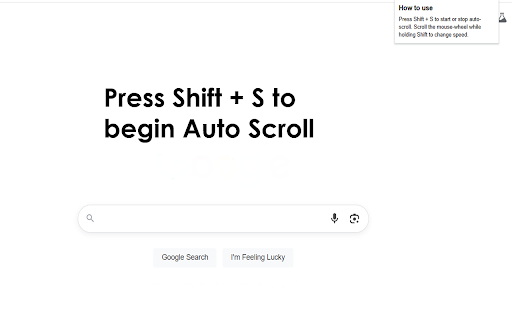
Begin Auto Scroll by pressing Shift + S Adjust the speed of scrolling by using the up and down arrow button. One of the most immediate advantages of an auto-scroll browser extension is the way it removes the need for constant manual input as you read or review long web pages. Instead of nudging the scroll wheel, tapping the spacebar, or dragging the scrollbar every few seconds, you set a pace—slow for careful reading, medium for skimming, or fast for quickly surveying a document—and the page glides downward on its own. This uninterrupted flow mirrors the experience of turning pages in a book: your focus stays on the content, not the mechanics of moving through it. When your hands and attention remain free, you absorb details more efficiently and retain more information, particularly during lengthy research sessions or when reading dense articles. Productivity Gains During Research and Q…

Listing SEO keywords

Search intent keywords
Keyword signals for evaluating how users may discover, compare, or search for this extension category.

Core discovery

auto scroll extensionsmooth page scrollhands-free readingautomatic webpage scroller

Comparison

auto scroll vs manual scrollingbest auto scroll chrome extension

Problem

manual scroll fatiguehow to auto scroll chromereading long pages

Alternative

auto scroll alternativespage scroller chrome

Similar extensions

Jump to related discovery paths:

FAQ

What is Auto Scroll mainly used for?
Auto Scroll is a browser extension that enables smooth, automated page scrolling toggled via the Shift+S shortcut. It allows users to adjust scrolling speed in real-time using the keyboard's arrow keys.
What market signals stand out?
Early or small audience with limited review base. Last known update: 05/17/2025.
What should builders compare before entering this space?
Compare install concentration, rating quality, update recency, screenshots, developer portfolio, listing claims, and review-backed friction signals.
Is this page review-backed?
No review samples found. This page combines store metadata with selected review signals, while raw store metrics remain visible for comparison.

Screenshots

Auto Scroll screenshot

Links

Recommended Chrome extensions

Related listings from the same category, trending peers, and the same publisher portfolio.

Browse tools